Building a budget PC for under $360

Summary: A budget PC for under $360 built around AMD excellent A8 Llano APU (Accelerated Processing Unit).
Many of the build-your-own systems that I cover here on Hardware 2.0 are high-end gaming systems or systems designed specifically for a certain tasks, such as running Photoshop. However, not all build-your-own systems have to cost a fistful of dollars. It's possible to put together a great value PC without having to break the bank.
Here I'm going to show you how to build a budget PC for under $360, built around AMD's excellent A8 APU (Accelerated Processing Unit).
Let's take a look at the components you need for this system.
Building a budget PC for under $360
| Image Gallery: Building a budget PC for under $360 | ![]() |
![]() |
||||
Processor
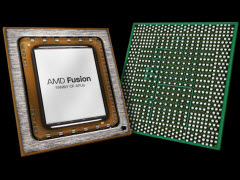
AMD A8 APU processors are great for budget builds because they combine the CPU and GPU into a single chip. There is no need for a separate graphics card, a component that significantly reduces the overall cost. You also get a decent heatsink and cooler included with the bundle, so there's no additional spending required on cooling either.
The processor I've chosen here is the A8-3670K "Black Edition". It features a 2.7GHz quad-core Socket FM1 CPU, and a built-in AMD Radeon HD 6530D GPU.
Processors from AMD's 'Black Edition' line all have an unlocked multiplier, offering the scope for some impressive overclocking -- if you're into that sort of thing. It's quite possible to push this 2.7GHz CPU all the way to 3.8GHz and still have it running rock-solid stable.
Price: $110.
Motherboard
Because we're using an AMD A8 APU, we need to choose a motherboard that features a Socket FM1.
With a budget build like this we don't really need to go overboard on the motherboard; we simply need something solid and reliable. Fortunately, for under $100 you can get a good board with high-end features such as HDMI, UEFI firmware, and even USB 3.0 ports.
The board I've gone for this build is there the Gigabyte GA-A75M-D2H. It contains everything you need at a decent price point.
Price: $80.
RAM
I know we're building a budget PC here, but I still don't believe that you should skimp on the RAM. Fitting any less than 4GB is false economy, especially since two 2GB RAM modules will only cost you around $25.For this build I've gone for two sticks 2GB of Crucial Ballistix Sport DDR3 1333 (PC3 10600). It is good, stable RAM, and it's a decent price.
I've had nothing but good experiences with Crucial RAM over the years, and I personally recommend it. For more information on how much RAM you need, head this way.
Price: $25.
Storage
Following the disastrous flooding in Thailand which caused production of hard drives to slow down dramatically, the price of storage has gone through the roof, increasing by as much as 300 percent. Given this, it's vital to shop around for the best deals.
One of the best deals I've found when it comes to storage is the Western Digital Caviar Blue WD5000AAKX 500GB. It's an excellent drive that's still available at a reasonable price.
When buying hard drives it's a good idea to choose a "bare drive" option rather than the 'retail kit'. These retail kits come with all sorts of extras such as packages, drive rails, screws, instructions and so on that you're unlikely to need. You can pay as much as $30 extra for the privilege of your drive coming with retail packaging as opposed to being shipped in a plain anti-static bag.
Price: $80.
Power Supply Unit
Here I've gone for the Corsair Builder Series CX430 V2. This offers 430W of power, and a wide range of connectors. On top of that, it's quiet and is 80 PLUS efficient so it won't cost too much to run.Price: $45.
Optical Drive
Don't overthink this one. A combo DVD burner like the ASUS DRW-24B1ST will suffice, and come at a relatively cheap price.Price: $20.
The bottom line
Let's do a quick rundown of the price list:- CPU: A8-3670K "Black Edition" - $110
- Motherboard: Gigabyte GA-A75M-D2H - $80
- RAM: 2 x 2GB Crucial Ballistix Sport DDR3 1333 - $25
- Hard drive: Western Digital Caviar Blue WD5000AAKX - $80
- Power supply unit: Corsair Builder Series CX430 V2 - $45
- Optical drive: ASUS DRW-24B1ST - $20
Total price: $360.
Image credit: AMD, Gigabyte, Western Digital.
Related:
- How to: Stress test your new PC to shake out any faults
- Build-Your-Own "Ultimate" Adobe Photoshop CS6 PC
- How much RAM do I need?
Kick off your day with ZDNet's daily email newsletter. It's the freshest tech news and opinion, served hot. Get it.

Talkback
Don't you need a case to put it all in?
Exactly what I was thinking
no
you CAN buy a case with a power supply in it that will blow up in a puff of smoke in six months, however.
PSU wattage is often overblown
@wackoae, why "500W or better"? A budget PC like that is unlikely to consume even 200W at peak, especially considering that there will be no graphics card. Even most more powerful configurations will not come even close to consume the 400W that are the lower limit of the good-quality PSUs in the market. A PSU in the 400W range (for which there are many good models out there) is enough for 95% of all users, the remaining 5% being heavy overclockers and gamers with SLI/CrossfireX of power-hungry video cards. Not the case here, as we're talking about budget PCs.
Use a too powerful PSU and the efficiency will be compromised, as most PSUs work better at around half their rated power. A PC with a too overdimensioned PSU will operate outside the latter's optimum efficiency range. That will cost you money in your electricity bill.
And the Corsair CX430 is a very decent PSU, with extremely stable output and good (although not stellar) efficiency. I concede that the entire CX line could have a better power distribution among the lines, with more power on the 12V line and less on the 5V and 3.3V lines, and that may make a slightly more expensive PSU from Seasonic, OCZ, Antec or XFX a better choice, but Corsair's quality and reliability are legendary and for a budget, low-power PC, the CX430, even at $45, is a great choice.
But I agree with you in one thing: CoolerMaster makes DREADFUL PSUs! So does Thermaltake, whose other kinds of products are equally excellent.
Really?
@Fantomex1
200W PSU ??? Are you freaking nuts??
Sure, you can live with a 400W PSU (but not less). But that will limit your ability to expand in the future. With the difference in cost between a good quality 400W PSU and a good quality 500W PSU being about $10 (if any), why limit yourself ??
http://MakeCash25.com
Still keeps it at $400 or less
I think it's the wording of the title that gets me...
Pagan jim
A $40 PSU is a piece of crap
If you are going to built a PC ... spend a little extra on a good quality PSU and save yourself a lot of $$$ later. It doesn't have to be a $200 PSU. An $80 PSU (500W or better) should be sufficient. Just avoid the PSUs with 1 year (or less) warranty.
BTW, From personal experience I can tell you that PSUs from CoolerMaster are some of the WORST in the market, even the expensive models. So avoid the brand like it was a plague.
A case?
I've got a shed full of them
But if necessary a good quality one will make it easy to build and service. I got a couple of Antec cases for $100 which I thought were great value despite the price.
Ken
430W is plenty
The components Adrian selected--minus whatever power the system board itself needs--will draw no more than 65W @80% load. You're welcome to do your own research on PSU requirements here: http://www.msi.com/service/power-supply-calculator/
And since AMD's APUs are sometimes not very good for playing games, there's plenty of wattage "overhead" available to stuff a dedicated video card into the system that *will* play games well.
Finishing up
why go to all that expense?
If you're like most people that already have a desktop, just transfer the existing peripherals. You could even go so far as swapping out the entire guts and putting the spec'd parts in that AKH mentions (or any other parts that suit you) into the old case - providing, of course, they are the correct form factor (e.g. compare ATX, U-ATX, m-ATX) that fit the old case.
I mean we have to assume those that are most likely to buy parts for a new desktop system *have* an existing desktop system. Being in the field of PC repairs, i know precious few folk (and i mean a lot of people) that ever upgrade to a desktop after owning a notebook PC. The point being: most these folks that upgrade / replace a desktop with another, re-use the peripheral devices from the old desktop.
Please tell me you thought of all that before posting.
Case needed or not???
Case or no Case, that is the question....
@craigs@... technically speaking
At the very least, you wouldn't want to gamble on the life of the board by doing whacky things like this, but if you do, i recommend putting it in (at least) an anti-static bag.
I know for sure (and ZDNet ran the article) some guys used a cardboard case to successfully run a complete system. I don't even wanna get into how whacky (let alone combustible) that is, but hey .. it worked!
?