First look at OpenOffice.org 3.0 beta

Summary: Since I'm testing the viability of running Ubuntu on a number of platforms, and paving the way to shift from Internet Explorer to Firefox 3.0, I might as well take a look at the viability of abandoning Microsoft Office and making the leap to OpenOffice.org.
Since I'm testing the viability of running Ubuntu on a number of platforms, and paving the way to shift from Internet Explorer to Firefox 3.0, I might as well take a look at the viability of abandoning Microsoft Office and making the leap to OpenOffice.org.
Check out the OpenOffice.org gallery.
Now, I'm a firm believer that the OpenOffice.org (OO.o) suite offers far more functionality than the average user needs or wants. However, an area of prime concern to me is backward compatibility with Microsoft Office. This is important to me for two reasons:
- I have a massive archive of old Word, Excel and PowerPoint files that I need to be able to have access to. Not only do I need to be able to open these documents, but the reproduction (both on-screen and print) needs to be faithful.
- I exchange Word, Excel and PowerPoint files on a regular basis with others. Most of the people and companies I work with use Microsoft Office (although some do use OO.o) so my solution needs to be compatible.
With that in mind I downloaded OpenOffice.org 3.0 Beta and loaded it into a VMware test machine for experimentation. [See gallery for a close-up view.]
Here are some thoughts from the download and install process:
- The complete download is only 144MB.
- Installation was quick and painless, taking only a few minutes (less than five).
- No restart required.
- OO.o doesn't seem to junk up the system much (compared to Microsoft Office 2007).
Once I had the application suite installed, I decided to have a look around.
- The first time loading any of the applications seems slow, much slower than the Microsoft Office 2007 equivalent. Subsequent launches are much faster (until you reboot).
- File loading times don't seem that different to those the Microsoft Office 2007 equivalent.
- Once loaded, applications feel nice and responsive, same as the Microsoft Office 2007 equivalent.
- Occasionally I noticed odd screen artifacts when using menus or resizing windows. Not sure what's behind this.
OK, but what about compatibility?
Word document compatibility
For this test I created three Word documents in .docx Word 2007 format:
- A simple one page document containing text and simple formatting
- A 217 page document containing text and simple formatting
- A two page document containing drop caps, SmartArt and Shapes
OpenOffice.org Writer beta handled the first two documents just fine with hardly any format differences (nothing that mattered at any rate).
The third document was a different matter. The formatting on the drop cap was wrong, the SmartArt didn't show up and the Word Shape was rendered incorrectly.
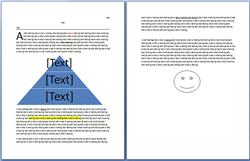
Document displayed in Word 2007
Document displayed in Writer 3.0 beta
I then tool the three documents as displayed in Writer and saved them in the Word 97/2000/XP .doc format and tried opening these in Word 2007. All three files worked fine in Word 2007, although the two page document containing drop caps, SmartArt and Shapes was no longer formatted correctly.
Conclusion: Since I don't do much with drop caps, SmartArt and Shapes, I think I could live with Writer instead of Word.
Page 2 -->
Excel document compatibilityNext I created a test Excel document in Excel 2007 .xslx format that contained several examples of formulae (sum, average, count number, min and max), and a couple of charts (I use Excel charts a lot).
Document displayed in Excel 2007
The file opened in OpenOffice.org Calc beta and all the formulae seemed to work fine, but the charts were as good. They were accurate in terms of the information, but they were a stylistic nightmare.
Document displayed in Calc 3.0 beta
Saving the file in Calc into Excel 97/2000/XP .xls format just mangled the charts further when the output was opened in Excel 2007.
Document saved into .xls format in Calc 3.0 beta and opened in Excel 2007
Conclusion: The way Calc handles charts for me is, at present, a deal-breaker. Maybe things will get better as the beta program progresses.
PowerPoint document compatibility
I created a couple of sample PowerPoint document in PowerPoint 2007 .pptx format based on built-in templates.
So, how did OpenOffice.org Impress beta handle these files? Well, to put it bluntly, the output was an unmitigated disaster.
Document #1 displayed in PowerPoint 2007
Document #2 displayed in PowerPoint 2007
Document #1 displayed in Calc 3.0 beta
Document #2 displayed in Calc 3.0 beta
Conclusion: Impress totally fails to impress me.
Closing thoughts
It's early days for OO.o 3.0 Beta and things could get a lot better between now and release, but what I'm seeing now doesn't give me much hope that I'll be able to replace Microsoft Office 2007 with OO.o 3.0.
Thoughts?
<< Home >>
Kick off your day with ZDNet's daily email newsletter. It's the freshest tech news and opinion, served hot. Get it.
Talkback
OLD NEWS: Don't expect OpenOffice to develop more perfect compatibility
NeoOffice for Mac is much closer (but still not perfect) to Word compatibility and NeoOffice is a fork off of OpenOffice 2.2.1. OpenOffice never seemed to get any better since then.
However, OpenOffice is good enough if you don't ever intend to exchange documents.
Completely different experience.
One niggle, occasionally, a font replacement scheme is needed (easy to do) when you get a document with "New Zaph Sans Times New Quantum Berry Italic" that some person installed on their local computer and then used. Course, same problem happens when using strange custom settings on one MS machine and another even using Office.
TripleII
P.S. Office 2003 just couldn't open many W95 files, hence the server I set up as stated in my post below.
Perhaps
This "push" by the OO.org people that many functions are unecessary anyway doesn't hold up with those I work around. I'm talking even clerical people. They need to be able to faithfully share complex documents of all kinds, without issue. It's not possible.
Complex documents
Seriously, anyone who thinks that Word is suitable for producing "complex" documents is someone who has never tried to produce a "complex" document with it and tried to get several thousand Word users to open up that document and see exactly the same thing. Word will never work for that. In fact, Microsoft doesn't even have a product that is good for producing complex documents that render reliably across different systems. It tried, but failed miserably, with Publisher.
"Should" never produce complex documents?
OpenOffice will not be adequate for people who use Office for more than fairly plain letters and memos until it can render at least as well as Word.
People: a word processor and the rest of an office suite are [b]TOOLS[/b]. Disliking one tool is not sufficient reason to use a different one that won't do the job. OOo has to satisfy the needs of a [i]very[/i] large fraction of users of MS Office before it will be a viable substitute for business users ("very large" being over something like 98%).
The question isn't whether you or I like MS: it's whether the tools will do the job. If I want complex documents, that is one of the criteria for choosing my tools. Otherwise I would be throwing out the concept of screws because they can't be installed with a hammer.
Precisely why XML is NOT "standard"
Microsoft deliberately designed in "traps" for other office programs and is deliberately withholding key parts of the specifications so that no one else can have complete compatibility with it. This is in blatant defiance of ISO's rules.
It is not Open Office's fault - their documents work wonderfully - it's only when they try to interface with Microsoft's deliberately squirrelly and not fully released so-called "standards" that trouble is created for us, the users and customers.
I think Microsoft should be legally forced to COMPLETELY release ALL specifications for the protocol since they were so insistent on having it declared a standard. They should have to abide by the same rules as everyone else.
Could Not Have Said It Better Myself
Interesting!
In case of the "old" MS formats the results are generally decent.
BTW, have you ever tried to open an Office 2007 document with an earlier version? NO? So, you should try, then, you would come to a discovery that it is impossible!
Right, but in practice...
Moreover, the reverse is also true: InDesign is not meant for word processing, and even if you do use it, you need to have first a raw master document made in Word (or OOo) to be reworked on later. In my experience, the degree of complexity that OOo chokes with includes "mid-complexity" things such as simple nested tables, separate section definitions, text boxes or fixed-position pictures - that is, things that are not exactly "basic," but are not otherworldly esoteric features either.
I am a professional technical translator and software localizer (English to Brazilian Portuguese), and my work mostly involves delivering the final product, rarely just raw text. Sometimes I get a PDF to start with, sometimes printed material, sometimes CHM or HLP files that need to be reworked into something sequentially printable (i.e., an old-fashioned manual, that some clients and regulatory entities require here in Brazil, where I live), sometimes even JPEG or TIFF scans. In other words, I rarely have direct access to the original master document in English, and mostly have to rebuild its structure as closely as possible. Word does this job well, while OOo has proven grossly inadequate for that, especially because my clients need to have the master files for further rework on their own, if necessary.
One thing I do use OOo for, however, is to directly open PDF files and save them as DOC or RTF for further rework. Word doesn't do that, OOo does. In some cases, when I get a PDF as input, this simplifies my work enormously.
Right, but in practice...
2. Oo is compact -- both the software and the documents, which means in the long run it will be a big time saver.
3. Some of the problems reported below can be avoided by avoiding round-tripping -- Import into Oo; and thereafter circulate not MS Office documents, but PDFs.
4. Oo has some features that beat the pants off MS Office, like:
(a) Functionality of expensive add-ins like EndNote for researchers
(b) A much better Math Engine than the Equation Editor that comes with MS Office
(c) No need to buy a PDF Creator!
(d) ruby text (pronunciation keys) in the default version
4. MS Office has created impenetrable undocumented objects and features like Pivot Tables in Excel that don't translate into Oo -- I challenge even Microsoft to create a Oo translator for Pivot tables. And such incapability actually helps them -- by creating barriers for changeover.
5. Unfair! Unfair! We expect the Earth and more from FREE Oo but no one thinks to ask Microsoft to provide purchasers of their ever-more-expensive software a simple "save as Oo" option that works just as well in Oo as Oo manages MS Office documents.
And we expect that we translate MS Office to Oo to MS Office!
Built in PDF
Of course, I've only had the new version for a week or two and I'm sure there are limits but at a $159 upgrade price, I'm glad i got it.
Exactly!
MS makes compatability difficult or impossible by design, then any that would come along to offer up choice in the marketplace are called fatally flawed because they can not undo what MS has done.
Pitiful, and the lemmings continue to reach ever deeper into their wallets, while running head long at the cliff and zealously defending their plight even as they fall to their demise.
Perhaps I should not have used "documents"
I was not limiting what I said to Word exclusively. <br><br>
As i said to Tripell, i seriously don't think MSO 2007 and oo.org are comparable. Perhaps MS Works and open office would be closer to a comparison in many ways. <br><br>
MSO has become a system with many apps and the next release will have real web capabilities that are a hassle now. It is highly programmable with minimal code and can be used as part of a larger set of tools. <br><br>
I don't think this "complexity" leaves out the average worker however. <br><br>
Sharepoint's marketshare has quietly passed 100 million licenses. It's becoming commonplace for MOSS to be implemented in some fashion. To give all workers access to backend data via Office, in the format they need, when they need it, is a Huge business advantage. <br><br>
Publisher
Inlcudes Macros in Word and Excel.
Your point may be valid, we aren't using xls sheets as CAD programs, nor are we an accounting firm, etc, but it works really really well for what we need.
Something that I have asked before, what specifically, is the list of features Word has that OO doesn't?
TripleII
I think oo.org compares better to MS Works.
We are using Sharepoint and Infopath forms with Office. The ability to create custom application with either VBA or VSTO is a huge plus. The VSTO capabilities for Office/exchange and sharepoint in Visual Studio 9 are phenomenel in my experience. <br>
MSO had changed. It's not just an Office suite anymore. <br><br>
Thus i think the MS Works - oo.org comparisons are the only that make sense at this point in time.
Sharepoint, etc.
Bringing in a free add on to a windows server function that integrates with Office is not really relevant. When sharepoint server is included with Office 2007 for the desktop, it is relevant.
There are many solutions for hosted and managed document management that have existed for many years. My company uses them, independent of the client machine. We share, collaberate, integrate, merge, etc from probably over 150 countries worldwide on our document host platform.
The only interesting or new thing I think is the integration of the IM client with calendaring from the sharepoint server. For one customer I work with, this is the only function they use, and it is only local to one location because IT won't open the firwewall ports.
Anyway, sharepoint has nothing to do with Office, it has to do with Windows server, except, that it integrates with server.
So, what you say is fine, you have an entire Windows ecosystem, doing lots of development, however, that is not really specific to Word, and as said, comparing OO to your complete IT infrastructure is not really valid.
Assume no internet connection, no Windows server backend, no sharepoint, what does Word 2007 do that OO can't, or why is 2007 so superior?
TripleII
It is included.
MSO has a Sharepoint designer as an application now, so it's very relevant i think. <br><br>
It's similar in some ways to the Groove client for Office. <br><br>
You see, MSO has much more breadth and depth than oo.org. <br><br>
As for word head to head with oo.org WP, there is no comparison in my mind. Word 2007, as are all MSO 2007 applications, is a revolutionary change and not merely an evolutionary one. I've used MSO 2007 for over a year now and can say with every app, the amount of work, keystrokes and clicks included, has been reduced by 50% or more in most cases, to achieve the same or better result than in Office 2003, or oo.org. <br><br>
Try out Office 2007, you'll love it.
Just to add...
Open Office trashed my docs