ie8 fix
madison

Hardware 2.0

Adrian Kingsley-Hughes

Gifts for Geeks - In search for the best USB flash drive

By | December 8, 2006, 3:56am PST

Summary: For years I’ve been in search of the “ultimate” USB flash drive. Up until recently the capacities were too small or the prices too high, but now I’ve found three USB flash drives that come close to claiming the “ultimate” tag.

For years I've been in search of the "ultimate" USB flash drive.  Up until recently the capacities were too small or the prices too high, but now I've found three USB flash drives that come close to claiming the "ultimate" tag.

Here are the three drives in question:

Each of these three drives shares a number of similarities:

  • They're all 1GB or bigger
  • They're all fast (fast enough to be used as a Windows Vista ReadyBoost drive)
  • They all come with a lanyard carry strap that attaches to the drive and not the cap (so you don't end up losing the drive if it becomes separated from the cap - a small point, but one I wish all USB flash drive makers would take on board)

But the similarities pretty much end there - each drive has features that make is pretty desirable - shame that I can't find one drive that has all the features!

Poll

When it comes to USB flash drives, what's most important to you?

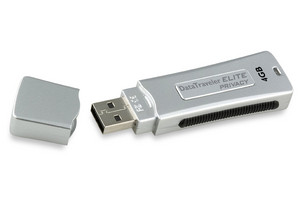
Kingston DataTraveler Elite Privacy

Kingston Data Traveler Elite Privacy 

There are two features that I absolutely love about my Kingston DataTraveler Elite Privacy:

  • Blazing speed
    Read speeds of 24MB/sec and write speeds of 14MB/sec.
  • 128-bit Advanced Encryption Standard (AES)
    All the data I drop into the protected zone on this drive is automatically protected without having to mess about with separate programs or having to remember to re-encrypt a file after decrypting it.  While most USB flash drives come with encryption software, none match the simplicity and ease of use of the Kingston DataTraveler Elite Privacy.

The Kingston DataTraveler Elite Privacy is the largest of the three drives - 3.1" x 0.9" x 0.4" (77.4mm x 22.1mm x 10.1mm) - so it's not going to fit into tightly spaced USB ports

SanDisk Cruzer Titanium

Sandisk Cruzer Titanium 

There's one feature of the SanDisk Cruzer Titanium that totally stands out the - the "Liquidmetal" titanium alloy body that is capable of resisting crush forces over 2,000 lbs.  I've really hammered my drive (stood on it, placed it under a chair leg and then sat on the chair, that kind of stuff) and it still looks like new (even the laser-etched finish is still like new). 

This model doesn't have a cap over the USB connector, instead is retracts into the safety of the titanium alloy shell, which is a nice idea but it does leave the connector open to muck getting into it, although I have to add that this so far hasn't been a problem.

Performance-wise this drive is also pretty good, achieving read speeds of around 15MB/sec and write speeds of about 9MB/sec.

The SanDisk Cruzer Titanium comes with a number of U3 compatible programs installed.

Memorex Mini TravelDrive

Memorex Mini TravelDrive 

The one feature that I absolutely love about this drive is how small it is, or more precisely, how thin it is. 

This model measures in at 2.25" 0.85" x 0.27" (57.2mm x 21.6mm x 6.8mm) which, by USB flash drive standards is pretty small.  The SanDisk Cruzer Micro USB flash drive is about the same size but the Memorex drive has one advantage - the contoured shape makes it easier to remove from those tight USB ports (I have a SanDisk Cruzer Micro too and the problem I find with that is that I end up having to yank it out of the USB port using the lanyard.)

The encryption software requires installation on the PC which is perhaps one downside, but overall this is a low price, high quality drive that is sturdy as well as stylish.

Kick off your day with ZDNet's daily e-mail newsletter. It's the freshest tech news and opinion, served hot. Get it.

Topics

Adrian Kingsley-Hughes is an internationally published technology author who has devoted over a decade to helping users get the most from technology.

Disclosure

Adrian Kingsley-Hughes

All opinions expressed on Hardware 2.0 are those of Adrian Kingsley-Hughes. Every effort is made to ensure that the information posted is accurate. If you have any comments, queries or corrections, please contact Adrian via the email link here. Any possible conflicts of interest will be posted below. [Updated: February 23, 2010] - Adrian Kingsley-Hughes has no business relationships, affiliations, investments, or other actual/potential conflicts of interest relating to the content posted so far on this blog.

Biography

Adrian Kingsley-Hughes

Adrian Kingsley-Hughes is an internationally published technology author who has devoted over a decade to helping users get the most from technology -- whether that be by learning to program, building a PC from a pile of parts, or helping them get the most from their new MP3 player or digital camera.

Adrian has authored/co-authored technical books on a variety of topics, ranging from programming to building and maintaining PCs. His most recent books include "Build the Ultimate Custom PC", "Beginning Programming" and "The PC Doctor's Fix It Yourself Guide". He has also written training manuals that have been used by a number of Fortune 500 companies.

Adrian also runs a popular blog under the name The PC Doctor, where he covers a range of computer-related topics -- from security to repairing and upgrading.

13
Comments

Join the conversation!

Just In

RE: Gifts for Geeks - In search for the best USB flash drive
jpaul_johnson@... 18th Feb 2009
The best flash drives use SLC NAND dual channel memory. Much faster, much longer life. Look at Super Talent, Jet Transcend, Luxio, or the older unavailable 8Gb Voyager GT. I bought the Luxio 32Gb at NewEgg for $64.
0 Votes
+ -
can I have this one instead?
Arm A. Geddon 8th Dec 2006
http://www.mandriva.com/en/individuals/products/flash

that's my wish for the Christmas season.

gnu/linux...giving choice to the neX(11)t generation.
0 Votes
+ -
Contributr
That is pretty cool!
Adrian Kingsley-Hughes 8th Dec 2006
I want one now! happy
0 Votes
+ -
My personal favorite is the iDisk Tiny.

You can purchase the 2 GB model here:
http://www.microsupply.com/product_info.php?products_id=19943&cPath=312_316_317

You can find out more information about the drive in general
here:
http://www.verbatim.com.au/products.cfm?productID=TD2128SL

I love it because it is so small. It attaches to my keyring.
It is smaller and weighs less than most of my keys. That way
I'm never without it. How many time have you been somewhere
and someone's said, "Oh, I have that on my flash drive," only
to discover that they left it at home that day? Many other
drives will also attach to a keyring, but most of them are too
bulky for me to allow them in my pocket. They also don't have
an easy way to remove themselves. I don't want to have my
keychain hooked to the back of a flash drive that is plugged
into the back of a computer. The iDisk Tiny has a clasp like
you would find on a necklace that allows it to detach and
reattach to your keychain.

It's not the fastest drive in the world, and I wouldn't get it
if the only purpose was to run ReadyBoost, because I would
leave that permanently attached to my machine, but it is at
least twice as fast as it needs to be for ReadyBoost, so you
can use it for that purpose if you like.
0 Votes
+ -
Contributr
Good cap design
Adrian Kingsley-Hughes 8th Dec 2006
Another nice lookin' drive. I especially like the cap.
0 Votes
+ -
Size and is it Bootable?
jpr75_z 9th Dec 2006
I see there are now 8GB flash drives, the bigger the better. But what about bootable flash drives? When are we going to see a USB flash drive that can boot up Windows XP?
0 Votes
+ -
Kingston Drives are bootable..
lenohere 9th Dec 2006
The Kingstons drives are bootable because they see them as usb harddrives. I recommend them because they work great.
0 Votes
+ -
It depends on your BIOS
phburks 9th Dec 2006
Your BIOS is what determines if the computer can boot from a USB device. Newer computers are able to boot from USB, but you have to be sure that that option is selected in your BIOS settings. And of course, you have to have something bootable on the USB drive.
0 Votes
+ -
Contributr
Yeah, it's dependent on the BIOS ...
Adrian Kingsley-Hughes 10th Dec 2006
... but most PCs less than a year old should be able to pull off this neat trick.
0 Votes
+ -
Booting WinXP
Cornhead 28th Dec 2006
Booting under WinXP is totally different from FAT-based M$ OS's like Win98 or DOS. And M$ has endeavored to lock down this functionality in WinXP without the install CD (recall the "DO NOT COPY" affixed to all DOS bootable floppies). To be sure, Vista will probably be even more of a headache than XP, and is another reason to consider a free, Linux-based OS. However, you might want to try BartPE:

http://www.nu2.nu/pebuilder/

which is good for making bootable ISO's with custom plug-ins that can be burned to CD, not that I have ever figured out what to do once I have booted up into a pre-install environment (I prefer the good ol' days of DOS, and burning bootable floppy images to CD with PC-DOS or some other non-M$ OS is simple enough especially if you have at least one of your hdd partitions formatted as FAT32 which WinXP and Vista will recognize). If you are savvy with making bootable CDs (not for the faint of heart) then making a USB flashdrive bootable is just just another hack. My own BIOS is more than a year old (and a Dell to boot, pardon the pun) and it supports booting from USB.
0 Votes
+ -
Ativa U3 drive
dckstl@... 11th Dec 2006
has a neat cap that you can't lose! Thin and pretty fast.
0 Votes
+ -
Contributr
They also make an 8GB version
Adrian Kingsley-Hughes 11th Dec 2006
happy
0 Votes
+ -
Rainbow Technology
deep@... 17th Apr 2007
Hey Adrian,

What is your take on the rainbow technology. Though still not really proven but looks promising or not!!

http://content.msn.co.in/Technology/TechnologyTT_140407_1615.htm

Regards,
Deep
0 Votes
+ -
The best flash drives use SLC NAND dual channel memory. Much faster, much longer life. Look at Super Talent, Jet Transcend, Luxio, or the older unavailable 8Gb Voyager GT. I bought the Luxio 32Gb at NewEgg for $64.

Join the conversation!

Formatting +
BB Codes - Note: HTML is not supported in forums
  • [b] Bold [/b]
  • [i] Italic [/i]
  • [u] Underline [/u]
  • [s] Strikethrough [/s]
  • [q] "Quote" [/q]
  • [ol][*] 1. Ordered List [/ol]
  • [ul][*] · Unordered List [/ul]
  • [pre] Preformat [/pre]
  • [quote] "Blockquote" [/quote]
ie8 fix
Click Here
ie8 fix

The best of ZDNet, delivered

ZDNet Newsletters

Get the best of ZDNet delivered straight to your inbox

Facebook Activity

White Papers, Webcasts, & Resources
ie8 fix
ie8 fix