Microsoft already has the ideal tablet OS, and it's not called Windows 7

Summary: As the year draws to a close it's time to start speculating as to what 2011 will bring. One item that's bound to dominate discussions are tablet PCs and whether Microsoft can make Windows work on this emerging platform.
As the year draws to a close it's time to start speculating as to what 2011 will bring. One item that's bound to dominate discussions are tablet PCs and whether Microsoft can make Windows work on this emerging platform.
2010 has proved to use several things about the tablet market that we didn't know in 2009. First, Apple have proved to everyone that there's a market for tablet systems. A huge market, and one that's not confined to the enterprise market. It seems that ordinary people want tablets, and are willing to pay $500 for them.
We also found out that people are happy to accept a tablets running non-desktop operating systems. Apple put a different flavor of the iOS platform to the one on the iPhone, and we've also seen tablets running the Android OS.
But we're still left with a big question - can Microsoft make the Windows OS work on tablets?
OK, before we go any further, allow me to point out that Windows-based tablets do indeed exist. Take the HP Slate 500 for example. This device features an Intel Atom Z540 processor and comes with 2GB of RAM and 64GB of flash-based storage, all of which is topped off with an 8.9-inch multi-touch display. It runs Windows 7. How well does it run Windows 7? Well, it runs as well as you'd expect a system based on an Atom processor to run Windows. If pressed for a single word to describe the experience, I'd choose "mediocre."
Note: No, you can't play Crysis on the Slate 500 ... or Angry Birds!
But the problem isn't just down to speed and power, it's the screen. Or more precisely, the size of your finger compared to the size of screen elements such as icons, buttons, drop-down boxes and so on. The Windows user interface has been designed to be operated by a cursor, not a fingertip. HP seem to acknowledge this weakness with the Windows platform because the Slate 500 comes with a digital pen. But that pen adds a whole new level of hassle, not to mention vital (and expensive to replace) parts to lose.
Put that another way, Windows 7 on a tablet is kludgy, and requires the addition of a digital pen, which makes the whole thing kludgier.
So can Microsoft make Windows work on the small screen? I don't know. When I look at Windows 7 I see an OS designed primarily with the desktop in mind, and notebooks secondary. Over the years we've seen inches added to the dimensions of the displays we sit in front of, and even quite reasonably priced notebooks come with some pretty big displays. Windows makes pretty good use of this extra screen real estate. What I don't see in Windows 7 is much (any?) consideration given to making Windows better suited to small screens and small screen use. Even touch support in Windows is pretty basic, and the core OS offers no support for tablet features such as screen orientation, and movement detection via the use of accelerometers and gyroscopes. Core support for this sort of stuff isn't absolutely necessary, but without it users have to rely on third-party drivers, which can get messy.
I can see Windows getting some sort of new skin or theme to make it better suited to tablets, but that doesn't solve the problems caused by the user interface of installed applications or interfaces generated by middleware such as Adobe Flash.
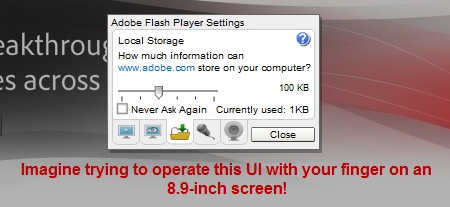
Sidenote: Even netbooks present a problem when it comes to screen size when using some applications. Trying to get an application like Outlook to fit on a small screen and still be usable is a major pain.
When you consider the issues faced by the idea of scaling down a desktop OS to fit onto a tablet, and then thrown in all the usability curveballs, quirks and nightmares potentially associated with every single application that is designed for the desktop, you quickly realize that using an OS designed for a small screen, like a smartphone, makes a lot more sense. Sure, you're kicking off a new ecosystem, and it means that you're not getting the desktop experience on a tablet, but when the desktop experience on a tablet sucks as much as it does, that might not be such a bad thing.
Windows 7 doesn't work on tablets, not because it's an inferior operating system, but because it's designed for an entirely different ecosystem.
Here's a prediction of mine for 2011. Microsoft is sitting on an OS that would be ideal for tablets. It's not called Windows 7, it's called Windows Phone 7. But because Microsoft is so late getting its mojo together in the mobile arena, and it's still very early days for Windows Phone 7, the Redmond giant can't start sticking this new OS on tablets because people don't really trust Windows Phone 7 yet, consumers and developers alike. Sticking Windows Phone 7 on tablets at this point in time would be suicide for both Microsoft and the OEMs, and would rush the entire Windows-powered tablet market into a coffin. I have to assume that Microsoft is smart since a whole bunch of smart people worth there, and if they're smart, they already recognize the fact that Windows doesn't work on tablets. Windows Phone 7 is the ideal platform to develop into a tablet OS. It's designed for small touchscreens, it offers support for tablet features such as screen orientation and motion, and most importantly, the apps are designed for small touchscreens.
My guess is, if things go well with Windows Phone 7 based smartphones, we'll see Windows Phone 7 tablets before the end of 2011.
Kick off your day with ZDNet's daily email newsletter. It's the freshest tech news and opinion, served hot. Get it.
Talkback
RE: Microsoft already has the ideal tablet OS, and it's not called Windows!
You do know what the "soft" mouse is? BTW, do you realize you can also change the DPI of the screen to make things bigger?
I'm curious, have you actually used a touch based Windows 7 device? Your writing comes across as if you haven't.
RE: Microsoft already has the ideal tablet OS, and it's not called Windows!
Of course he hasn't.
Yet another Microsoft failure
These latest efforts are just more of the same failed product from Microsoft.
Why is Microsoft obsessed with using a stylus pen on mobile devices? It's failed Windows Mobile phones had one. Now its tablets have styluses. Nobody wants to use a stylus pen. Why can't Microsoft learn this?
Even if Microsoft shoehorns multi-touch onto its desktop Windows as an afterthought, those desktop apps will never be suitable for tablets.
People want to touch tablets with their hands, and scroll with their fingers. Not a stylus pen!!!
You can
But how do I take notes then? Or use handwriting on a tablet?
RE: Microsoft already has the ideal tablet OS, and it's not called Windows!
I guess that makes you 'people.' Quit substituting "everybody" for yourself. Even if the majority "wants" touch, that doesn't make them everybody.
RE: Microsoft already has the ideal tablet OS, and it's not called Windows!
In fairness, I don't think his point was that Windows 7 doesn't work well with touch, I think his point was more that it doesn't work well with a small tablet sized screen
He does have a point about the size of the screen it does seem that it would be difficult for something which is designed for a 13 inch or bigger screen to be compressed into a screen half as big.
Note the source of the complaints
Nearly 100% of all complaints about Windows 7 on a tablet come from people who have never used Windows 7 on a tablet or, just as importantly, [b]don't need a powerful OS on a tablet[/b].
If an iPod Shuffle owner started talking about how bloated and complicated the iPod Touch is as an MP3 player, the iPod Touch owner would start freaking out about how much more stuff the iPod Touch can do. The iPod Shuffle owner replies with "but I don't need to do any of that stuff". So does the iPod Touch suck because the iPod Shuffle is a simpler, less bloated MP3 player? Of course not. It is all about finding the right tool for the right job and it would be ignorant to rely on a review of the iPod Touch from the perspective of a user who needs nothing more than a simple and small MP3 player. So why do we publicize reviews of Windows 7 tablets from the tablet equivalent of the iPod Shuffle user? It makes no sense.
So where are all the desktop users looking for a tablet form factor
RE: Microsoft already has the ideal tablet OS, and it's not called Windows!
It's difference between finger painters and artists.
Believe it or not. your finger is not a really accurate device. If you just consume things, then being able to put your fat finger on a big button is a no brainer, but if you actually create or develop things, then accuracy and precision is paramount, a stylus also lets you write, which you can't do on other pads.
Seriously Adrian, have you ever tried editing a document on an iPad? If you're a masochist, then I suppose it's a lot of fun.
I expect in a few years you'll be saying touch is nothing compared to gestures and having had a Kinect for the last week (and enjoying it a lot) I can see that touch is really a dead end, only useful for small devices, but I think I'll still be looking for a stylus as air mouse seems to be even less precise than touch ;-)
Re: editing documents on an iPad
I really have to call you on that opinion. As far performing an "edit" on an iPad, I suppose you imply that a finger can't place the cursor next to the letter or insertion point accurately enough. I suppose your reasons for this opinion is that the text is too small and the finger is "too fat".
Take it from a "day one" iPad owner. Editing or cursor placement is easy and accurate do to a simple built-in iOS function called "pinch and zoom".
Here are the steps. Taking a half second to accomplish, first "Pinch and zoom" to enlarge the area where you wish to place the cursor. Then ... just put your finger at that point. Easy .. fast .. and .. accurate. And definitely not a masochistic endeavor. Copy and Paste is easy as well.
An iPad user would know these things. I forgive you for not being familiar with this technique.
Its way harder to edit a ZDNet blog than it is to edit an iPad document. But in all fairness, using a mouse or trackpad to position the screen cursor is easier.
@tonymcs: I totally agree
It is truly, truly a painful endeavor.
@tonymcs: I totally disagree
Editing a document on an iPad is a snap. What kind of dope would consider it a painful endeavor?
RE: Microsoft already has the ideal tablet OS, and it's not called Windows!
I'd have to agree with roteague
Oh and before Donnieboy comes (I know what he is going to say), the EEE PC only weighs 4.6 pounds, and has yet to "get hot" on me while holding it, and is running Windows 7 Pro on a 1.66 GHz chip with 2 GBs of RAM.
RE: Microsoft already has the ideal tablet OS, and it's not called Windows!
[i]One item that?s bound to dominate discussions are tablet PCs and whether Microsoft can make Windows work on this emerging platform.[/i]
Emerging platform? Here's a clue for you, its been around for years, almost a decade or longer. I know your thinking that because Microsoft was doing this it can't possibly be true but go back and look up your history.
Does it
upset your delusional world?
Well, maybe you need to get used to it, because it will get worse for you.
I dare you to post one critical comment about MS and its products and one complementary comment about Google and its products, like some of the more objective individuals around here do from time to time, no matter what their preferences might be.
Shock us all.
RE: Microsoft already has the ideal tablet OS, and it's not called Windows!
Hmmmm.
Surprise us all by addressing the argument rather than the man. Windows has been used on tablets for a long time, so he's actually correct.
Try to keep your comments rational and we may all benefit.
Just Because There Is Room for Touch Doesn't Mean There Isn't For Pens