My Mac mini - Initial thoughts

Summary: We've had the Mac mini at the PC Doc HQ for nearly a week now and while the system isn't fully integrated into the ecosystem, it's not been left to gather dust either. So, with a week under my belt, I thought I'd pass on my initial thoughts about Apple's smallest member of the Mac family.
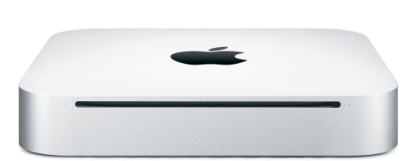
We've had the Mac mini at the PC Doc HQ for nearly a week now and while the system isn't fully integrated into the ecosystem, it's not been left to gather dust either. So, with a week under my belt, I thought I'd pass on my initial thoughts about Apple's smallest member of the Mac family.
The first thing that struck me about the Mac mini is how small it is. I'd seen Mac minis on display in the Mac store but even that didn't prepare me for the small box I got handed at the cashier's desk. I expect hard drives to come in boxes that size, or maybe PSUs, not a whole computer. I'm pretty sure that my last cellphone came in a box bigger than the box that the Mac mini came in. But it's a solid, well-packed box. Just like the MacBook Pro that I reviewed earlier this year, there's nothing rattling about in the box at all.
I'll spare you the unboxing pornography but after I got home and unboxed the Mac mini, I got a few more surprises. Not only does the Mac mini feel tiny once you get it out of the box, but the power adaptor is gigantic by comparison. The thing is huge.
I got the system hooked up to an LCD panel and a Microsoft keyboard and mouse (oh, the irony!) and I hit the power button and waited ...
... and waited ... and waited some more. I hit the power button again. Nothing. I hit the power button repeatedly, they way that you do when trying to hurry up the elevator. Click ... click ... click.
Nothing happened. Uh-oh. I really hoped that I didn't have a DOA Mac on my hands. I rechecked the connections and discovered what my mistake was - when you connect the power cord you have to adaptor you have to press it home quite far. Seems I hadn't done this properly the first time around. With the power cord fitted properly this time I did another quick countdown and hit the power button again and the system sprung into life.
Since the system came pre-loaded with Tiger and I wanted to take Leopard for a spin, didn't spend much time investigating Tiger before nuking the install with the upgrade disc. If you're interested in reading about the upgrade process, you can do so here. The main thing to note is that the upgrade process seemed to go flawlessly (albeit a bit slow) and I ended up with a fully functioning Mac mini at the end of it.
The Mac mini is not only small but it's really quiet. I didn't really notice this until I hooked up an external hard drive to use with Time Machine. It's so quite that you have a really hard time telling that it's on and you have to trust that it's coming out of sleep mode because there are no sound cues (there's a light on the front of the Mac mini to tell you that it's coming back to life). This is the kind of system that you can happily have running in your living room without getting on your nerves.
We do have one problem with my Mac mini - the remote control doesn't work. I've checked it with video camera and there are no signs of life from it. I'll check the battery later just in case but my feeling is that the unit is dead.
Everything else seems to work just fine - network, WiFi, optical drive (personally I'm not too thrilled about slot loaders, but that's not really a big issue) - and the unit seems robust and very well put together.
If you're buying a Mac mini I'd recommend that you pick up a Mac keyboard too. I cheaped out and I'm regretting it already. I'm not doing a five hour round trip to pick one up, so I'll probably have to get one mail order.
All in all, we're very pleased with the new Mac.
Kick off your day with ZDNet's daily email newsletter. It's the freshest tech news and opinion, served hot. Get it.
Talkback
Remote and Noise Level
They are very quiet, however its because Apple has the fan set to run really slow. I run SMC Fan Control on my mini so that I can control the fan speed manually. If I a doing some heavy work, I will run it up to 5k rpm which cools it WAY better. The stock sped for idle is 1500rpm, and it will slowly climb up to 2000 and eventually 2500 when it gets really warm. And while the T7200 in mine has a pretty high thermal limit, I don't like it running at 60-70C all the time under heavy work. It will idle at around 49-50C with the fan set to 2000rpm, which is still audibly very low.
RE: My Mac mini - Initial thoughts
Machine hookup, but this site:
http://www.123macmini.com/
has lots of wacky mini owners doing stuff to their minis.
You seem like the type thats not going to just let it sit
there :p - there are a lot of interesting hacks people have
done to help you get started taking it apart.
Keyboard and Mouse
you don't have to buy Apple's. Check out
the Matais Tactile Pro. (Although I haven't
tried the new Apple Keyboard, the
previous two models sucked, so I have
little faith in it.)
Another piece of advice: keep the MS
Mouse. You have no idea how much
"mouse feel" has to do with getting
adjusted to a new platform. Map Expos??
to the wheel button, and you'll never look
back.
Agreed
I also dislike the Apple mouse, I use logitech mice.
Don't bother with the Apple keyboard
If you look at newegg.com, you can get a Macally for about $15 or a Kensington for about $35.
So what are you actually doing with the Mini?
From what I can tell...
He is probably using it like most Macs get used...
Macs. The metrosexual computer...
Pardon Me..
wow...
Have you watched CNN
Fox News for that matter. They religiously report on nothing with a conservative Christian angle.
Uwe Bol is probably the most productive person that has ever used a Mac, and we all know what kind of movies he makes.
pat urself on da back...
Re:
Oh Please!
"do nothing". But, come on, what do $3000+ macs have in common with a mini? That same work could be done on a $1200 PC except they're not cool (that is true, btw).
Well, what do you do..
The Hardware 2.0 guy doesn't have the power cord plugged in???
Enjoy your new toy!
This really depends on the moment
Stupid mistakes happen.
I am fighting not to spend money right now. I really want to, I would enjoy it, but I have a few other things that I need to buy.
As it's small
What he didn't say..
Incidentally, I have seen equally small PCs used in internet cafes so there's nothing magical about the Apple technology. They've simply had the sense to market the size factor.
Magic
marketed? If not, why? If it's a good reason to do it for purposes of heat dissipation
and footprint, does Apple's "insincerity" negate those advantages.
If there is no magic to the engineering, there is no magic in the marketing either.