madison

Hardware 2.0

Adrian Kingsley-Hughes

Windows 7 beta 1 performance - How does the OS compare to Vista and XP?

By | January 1, 2009, 2:59pm PST

Summary: How does Windows 7 beta 1 compare to Vista and XP in terms of performance? That’s a question that’s been hitting my inbox regularly over the past few weeks. Let’s see if we can’t answer it!

Special Report: Windows 7

How does Windows 7 beta 1 compare to Vista and XP in terms of performance? That’s a question that’s been hitting my inbox regularly over the past few weeks. Let’s see if we can’t answer it!

Important note: Before I go any further I feel I need to make a point, and make it clear. The build I’m testing of Windows 7 (build 6.1.7000.0.081212-1400) is a beta build, and as a rule beta builds are usually more geared towards stability than performance. That said, the performance of this build should give us a clue as to how the OS is coming along.

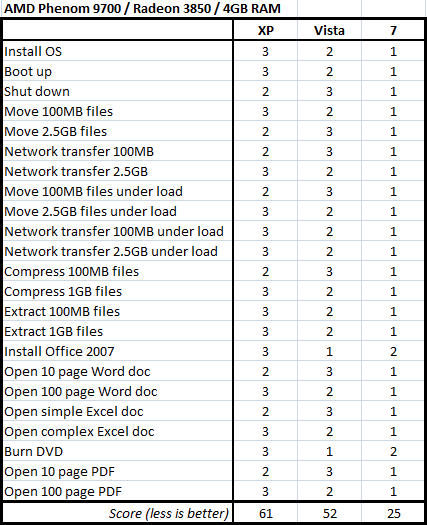
Rather than publish a series of benchmark results for the three operating systems (something which Microsoft frowns upon for beta builds, not to mention the fact that the final numbers only really matter for the release candidate and RTM builds), I’ve decided to put Windows 7, Vista and XP head-to-head in a series of real-world tests to find out which OS comes out top.

The tests

There are 23 tests in all, most of which are self explanatory:

  1. Install OS - Time it takes to install the OS
  2. Boot up - Average boot time to usable desktop
  3. Shut down - Average shut down time
  4. Move 100MB files - Move 100MB of JPEG files from one hard drive to another
  5. Move 2.5GB files - Move 2.5GB of mixed size files (ranging from 1MB to 100MB) from one hard drive to another
  6. Network transfer 100MB files - Move 100MB of JPEG files from test machine to NAS device
  7. Network transfer 2.5GB files - Move 2.5GB of mixed size files (ranging from 1MB to 100MB) from test machine to NAS device
  8. Move 100MB files under load - Move 100MB of JPEG files from one hard drive to another while ripping DVD to .ISO file
  9. Move 2.5GB files under load - Move 2.5GB of mixed size files (ranging from 1MB to 100MB) from one hard drive to another while ripping DVD to .ISO file
  10. Network transfer 100MB files under load - Move 100MB of JPEG files from test machine to NAS device while ripping DVD to .ISO file
  11. Network transfer 2.5GB files under load - Move 2.5GB of mixed size files (ranging from 1MB to 100MB) from test machine to NAS device while ripping DVD to .ISO file
  12. Compress 100MB files - Using built-in ZIP compression
  13. Compress 1GB files - Using built-in ZIP compression
  14. Extract 100MB files - Using built-in ZIP compression
  15. Extract 1GB files - Using built-in ZIP compression
  16. Install Office 2007 - Ultimate version, from DVD
  17. Open 10 page Word doc - Text only
  18. Open 100 page Word doc - Text and images only
  19. Open simple Excel doc - Basic formatting
  20. Open complex Excel doc - Including formula and charts
  21. Burn DVD - Win 7 beta 1 .ISO to disc using CDBurnerXP
  22. Open 10 page PDF - Text only, using latest Adobe Reader 8
  23. Open 100 page PDF - Text and images, using latest Adobe Reader 8

These series of tests will pitch Windows 7 build 7000 32-bit against Windows Vista SP1 32-bit and Windows XP SP3 32-bit. The scoring for each of the tests is simple. The winning OS scores 1, the runner up 2 and the loser scores a 3. The scores are added up and the OS with the lowest score at the end wins.

Next –>

Adrian Kingsley-Hughes is an internationally published technology author who has devoted over a decade to helping users get the most from technology.

Disclosure

Adrian Kingsley-Hughes

All opinions expressed on Hardware 2.0 are those of Adrian Kingsley-Hughes. Every effort is made to ensure that the information posted is accurate. If you have any comments, queries or corrections, please contact Adrian via the email link here. Any possible conflicts of interest will be posted below. [Updated: February 23, 2010] - Adrian Kingsley-Hughes has no business relationships, affiliations, investments, or other actual/potential conflicts of interest relating to the content posted so far on this blog.

Biography

Adrian Kingsley-Hughes

Adrian Kingsley-Hughes is an internationally published technology author who has devoted over a decade to helping users get the most from technology -- whether that be by learning to program, building a PC from a pile of parts, or helping them get the most from their new MP3 player or digital camera.

Adrian has authored/co-authored technical books on a variety of topics, ranging from programming to building and maintaining PCs. His most recent books include "Build the Ultimate Custom PC", "Beginning Programming" and "The PC Doctor's Fix It Yourself Guide". He has also written training manuals that have been used by a number of Fortune 500 companies.

Adrian also runs a popular blog under the name The PC Doctor, where he covers a range of computer-related topics -- from security to repairing and upgrading.

Talkback Most Recent of 456 Talkback(s)

  • Im guessing
    that you did not post exact times so as to get around the no-benchmarks part of the EULA? Unfortunately how much better one is compared to the other matters. Is it insignificantly faster? a small amount? or huge amount?

    Giving first second and third tells us that they improved the OS a bit, but not how much. Perhaps you can get around it by stating: Windows 7 is the benchmark to which you compare the other OSes. so 7 times do not get posted, and the ratio for the other two compared to 7 gets posted. For example: it takes XP 1.4 times the time 7 takes to boot?

    Not sure, maybe even this is pushing it.
    ZDNet Gravatar
    isulzer
    1st Jan 2009
  • Re: Im guessing
    It's an interesting way of getting round the EULA. What I take from it is not that 7 is better in just compressing, or file operations, or installation etc. but that there have been across the board improvements, and this is a very good thing.

    Couple this with the fact that no beta software has ever been as fast as the finished product and I think we'll be looking at a very fast, very stable OS indeed. Can't wait for the public beta!

    What I do find extremely interesting is that on the newer equipment Vista comes second, and on the older it is pretty much the same as XP overall (again, using the scoring system to get an overall impression of the system, not necessarily individual scores of individual tests). This tends to reflect the post-SP1 shift in opinions I have observed that has occurred which is that Vista is not actually a bad/slow/buggy/insecure/incapable OS, it's just had extremely poor word of mouth (also heavily influenced by a very vocal minority I note - over the past couple of years I have seen the same things referenced between groups of sites - A says problem X exists, B reports A has said this, C blogs that B has said it, D picks up C's blog and puts out a note on its RSS feed, this gets picked up by A who says "look, someone else with the same problem!". Gotta love the one-click-to-publish ethos of the internet!

    Sorry, got a bit off topic there.

    @AKH: would you consider a more technical set of tests using the same scoring system (i.e. not actual benchmarks, but just an overall impression)? Disk activity when idle for instance, smallest memory footprint (I'm going to guess Vista will come bottom on that one, XP first, 7 second, but you never know, XPs memory management isn't as sophisticated is it?).

    Keep up the good work, it was an interesting read!

    And Happy New Year!
    ZDNet Gravatar
    Ben_E
    1st Jan 2009
  • The beta is public
    Can't wait for the public beta

    Perhaps you meant RTM?
    Anyway, you can download the current beta and try it yourself.
    ZDNet Gravatar
    tikigawd
    9th Feb 2009
  • Most interesting read in a long time
    These were some very important measurements - very interesting reading. I really look forward to reading a final version when you can actually post times.

    I think the only other thing I'd like to see is if you could add a 64 bit to 32 bit performance comparison - should probably be very close but it would be interesting to know.
    ZDNet Gravatar
    boed
    1st Jan 2009
  • Great post to give us an idea
    Even if the margins are slim, this at least gives us an idea of what to expect. In other words, performance hasn't suffered at all. It looks to be as good or better in nearly every category. This is good news.
    ZDNet Gravatar
    BillDem
    7th Jan 2009
  • RE: Windows 7 beta 1 performance - How does the OS compare to Vista and XP?
    @isulzer you can download the current beta and try it yourself its sounds very good, Great post. book reports | Admission essays | theses
    ZDNet Gravatar
    linasmith
    21st Aug
  • RE: Windows 7 beta 1 performance - How does the OS compare to Vista and XP?
    @isulzer lot higher likelihood that with their search results tied to phone access that they are coming closer
    to the line. Many media outlets have been pared down as well as the phone companies. The day is coming,
    and google may have to spin off something to
    stay within bounds of the law. Lets hope it's the search engine, or everything else.
    oto kiralama ankara
    ankara oto kiralama
    rent a car ankara
    luks arac kiralama ankara
    Bmw Kiralama Ankara
    ankara bmw kiralama
    ZDNet Gravatar
    concone
    26th Sep
  • RE: Windows 7 beta 1 performance - How does the OS compare to Vista and XP?
    On the burn DVD score for both machines you have 2 OS's with the same score
    ZDNet Gravatar
    planruse
    1st Jan 2009
  • RE: Windows 7 beta 1 performance - How does the OS compare to Vista and XP?
    These comparisons are not particularly meaningful. Did the number 1 scoring OS beat the number 2 by 1%? 10%? Enough to make a difference in real world usage? How many times was each test run? How much variation was there in the results? Were the rankings the same across both machines?
    ZDNet Gravatar
    ThisIsNotMyUserName
    1st Jan 2009
  • Congratulations Adrian, epic post.
    This is exactly the kind of comprehensive test I have been looking for. You'd think there would be more like this, as often as it is repeated that XP is faster than Vista, I don't suppose these bloggers have just been repeating what they heard, you think?

    This will be one of the hottest and most linked stories out there. I'll be linking it myself. So, Kennedy has his one benchmark he is beating to death and you have 23 on two very different systems and three OSes. Wonder why Kennedy hasn't attempted to bolster his belief that Vista is a bloated monstrosity from hell with more than the one test? Perhaps he has and the others weren't 'suitable' for public release?
    ZDNet Gravatar
    eggmanbubbagee@...
    1st Jan 2009
  • Not so fast! Seems we have another MS cronie!
    Adrian would have you believe his testing was complete, however there are two very important area's he didn't test at all. 1 Graphics apps like DirectX and Non-DirectX graphics like Auto-CAD, and 2.Gaming, another area the Microsoft cronies like Adrian would have you totally forget about. While using Vista you can expect a 10-25% performance hit in these area's and I see there was no practical testing done here, so why would you expect Windows7 to be any better, especially when it's already know MS will be distribution DirectX 11 which is again incompatible with may, if not all, of the current Video cards.
    ZDNet Gravatar
    vmeck@...
    20th Jan 2009
  • RE: Windows 7 beta 1 performance - How does the OS compare to Vista and XP?
    Useless test. Your test shows Vista is faster than XP. Great, except thats not why everyone hates it is it? After 8 years there are 1,000's of programs that work with XP but not the over bloated Vista. Now we all understand these companies want to invest billions in another Microsoft adventure with no profit in it for them. It's alredy dead before it's released and we know that. But it's fast...
    ZDNet Gravatar
    aeryos
    1st Jan 2009
  • dead wrong
    except for some proprietary apps that are up to the companies themselves to update, if they so choose, and some very old hardware, Vista is nearly 100% compatible with XP and closing what gap is left everyday - in fact, the usual complaint against Vista now is that it is slow and 'bloated', as you yourself said - well it seems it isn't slow at all and as for bloat - so what if it takes up more HD space or a marginal amount of extra RAM? XP was written for machines with 128 to 256 meg of RAM and 5 gig hard drives more than seven years ago!

    Face it, Vista isn't the POS you thought and hoped it was and you just can't accept it.
    ZDNet Gravatar
    eggmanbubbagee@...
    1st Jan 2009
  • wrong again?
    I personally have nothing against Vista itself. It's harder to fix but then I get paid more then. But I have reverted many vista computers to XP for my customers because they cannot use it. As for bloated and slow that easy to fix, but my point is there are alot many more proprieary apps out there than you seem to realise that companies are using in their line of work. As for me I reverted my wifes Vista Laptop back to XP because it couldn't find the pictures on my camera. XP saw them no problem.
    ZDNet Gravatar
    aeryos
    1st Jan 2009
  • re: wrong again?
    What you're talking about are bad programs, and
    liabilities. Those programs should have been updated.
    The cost of using them can actually be greater than a
    total rewrite, which usually enhances the quality of
    the older programs too.

    Also, Microsoft's VirtualPC is free and it runs
    Windows XP, Windows 2000, and even NT4 pretty well. If
    you're not going to update old programs, eventually
    this is the way you'll have to go. Running
    Windows XP in 2012 will be like running Windows 98
    today, and that doesn't sound like too much fun for
    the IT guys, or the guy who has to pay them.
    ZDNet Gravatar
    thomastmc
    2nd Jan 2009

Talkback - Tell Us What You Think

Formatting +
BB Codes - Note: HTML is not supported in forums
  • [b] Bold [/b]
  • [i] Italic [/i]
  • [u] Underline [/u]
  • [s] Strikethrough [/s]
  • [q] "Quote" [/q]
  • [ol][*] 1. Ordered List [/ol]
  • [ul][*] · Unordered List [/ul]
  • [pre] Preformat [/pre]
  • [quote] "Blockquote" [/quote]
Click Here

The best of ZDNet, delivered

ZDNet Newsletters

Get the best of ZDNet delivered straight to your inbox

Facebook Activity

White Papers, Webcasts, & Resources