Windows 8 includes enhanced multi-monitor support

Microsoft is finally acknowledging that some of us sit in front of than one monitor and plans to put new tools into Windows 8 to help us get more out of our extra screen real estate.
In a lengthy Building Windows 8 blog post, Mark Yalovsky, lead program manager on Microsoft's User Experience team, explains the changes.
There's quite a lot of information to digest, but here are some of the highlights.
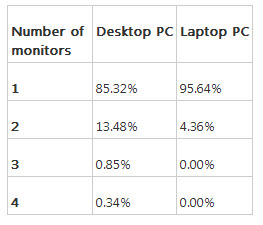
First, there are more people using multiple monitors than you might expect. Data collected by Microsoft's Windows Feedback Program shows that some 14 percent of desktop PCs and 5 percent of notebooks run with multiple monitors.
Since this is an opt-in data set, Yalovsky cautions us that it is "enthusiast-leaning so represents the high end of usage". Nonetheless, this is quite a high figure and shows that multi-monitor setups are no longer niche.
Yalovsky spends a lot of time discussing how Windows 8 will allow multi-monitor systems will allow better background personalizations, including how the updated slide show application selects the best images for multi-monitor setups that that consists of different sized and/or oriented monitors.
If you're into displaying your photographic prowess on the desktop, then the new personalizations will be of interest to you. For me though, the important changes are in the way Windows 8 handles the taskbar across multiple screens. On Windows 8 there will be an option to display the taskbar on all of the displays. Not only that, but there will be three options as to how buttons on the taskbar are handled.
The three options are as follows:
Show taskbar buttons on all taskbars (default):

Show taskbar buttons on the taskbar where the window is open:

Show taskbar buttons on main taskbar and taskbar where window is open:

These settings allow you to personalize how the taskbar works to fit in with your workflow and needs. To have this sort of control over the taskbar under previous versions of Windows you would need to install third-party software.
Windows 8 makes extensive use of user interface elements such as the Start Menu, the Charms bar or a list of recently used apps that are triggered by moving the mouse to the corner of the screen. On a system with a single monitor it's no problem to take the mouse to an edge or a corner, but on a multi-monitor system this isn't easy because of the tendency to overshoot.
To help combat this, Microsoft has added what it calls "real corners" to the shared corners between screens that traps your cursor, helping you to find the edge or corner easier.

The protruding real corners are only six pixels in height, which that means you shouldn't run into them during normal mouse operations. However, to further limit any annoyance that such corners might cause, Microsoft has coded them to be intelligent in how they trap the mouse. For example, in the diagram below, the right corner on the top monitor will only trap the cursor if it is already on that screen and won't trap the cursor when moving it up from the second screen.

As someone who can't remember my main desktop PC not having multiple monitors attached to it, these changes come as welcome news. Having proper out-of-the-box multi-monitor support without the need to install third-party software will be a real benefit to me.
Image source: Microsoft.
Related:
- Microsoft to charge customers $99 to remove OEM 'crapware'
- Don't let Windows 8 upgrade offers lure you into buying a new PC
- No Windows 8 DVD playback will mean increased costs, and consumer confusion
- Windows 8: Media Center functionality likely to cost more
- Microsoft: Here are the four editions of Windows 8
- Bring Metro apps to Windows 7 to encourage developer growth
- Why Windows 8 won't reimagine hardware that much
- Windows 8: Can we live without the desktop?
- Here's what's wrong with Windows 8