Windows 8 is ready for 'Retina' display screens

Summary: Windows 8 is well prepared for post-PC devices equipped with post-HD displays.
It's not just Apple with its new iPad that's ready for high pixel density displays. Microsoft has outlined how Windows 8 will handle post-PC devices equipped with post-HD displays.
Read also: Here's what's wrong with Windows 8
In an in-depth post over on Building Windows 8 (do you expect anything but in-depth posts from the Building Windows 8 team?) David Washington, a senior program manager for Microsoft's User Experience team, outlines some of the tricks that the new operating system will employ to look good across various screen sizes.
The problem with increasing pixel density is that the physical on-screen size of elements gets smaller. Here's an image of a 11.6-inch screen running at 1366x768 (or 135 dots per inch) and another screen of the same resolution running at 1920x1080 (or 190 dots per inch):
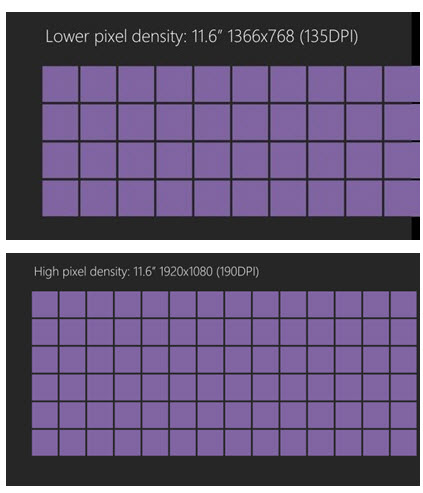
On big screens this isn't as much of a problem, but on small-screened systems, especially those that people are expected to drive with their fingertips, this becomes a real problem as objects become too small to tap easily.
Microsoft's solution to this problem is to apply predictable scale percentages across three different screen types:
- 100% when no scaling is applied
- 140% for HD tablets
- 180% for quad-XGA tablets
Having fixed scaling percentages prevent objects looking blurry when scaled up or down unpredictably, and it also maintains the size of the user interface elements on high pixel density devices while at the same time making the fonts and content look crisper.
Where did the 100%/140%/180% scaling numbers come from? If you take 1366x768 as the baseline, then 1920x1080 HD tablets are 140% of this baseline resolution, while 2560x1440 quad-XGA tablets are 180% of this baseline. This means that content is the same physical size and the same layout on all three screen sizes.
Why choose these screen resolutions? Because Microsoft sees them as representing a sweet-spot between pixel density and a touch-target size for on-screen elements of around 9 mm. These scaling values keep the ideal touch target size near to consistent across the different pixel densities.
To make this scaling work, Windows 8 natively supports vector graphics images, and SVG (Scalable Vector Graphics) or XAML art will scale without getting blurry. In addition, developers will get the option to save three versions of images that correspond to each of the three scale percentages.
It seems that Windows 8 is well prepared for post-PC devices equipped with post-HD displays.
Related:
- Windows 8: Can we live without the desktop?
- Boot to the 'Classic' desktop in Windows 8 Consumer Preview
- Are consumers expected to take Windows 8 ARM tablets mainstream?
- Windows 8 Consumer Preview: Are your applications and devices compatible?
- Will Windows 8 require a product key at the point of installation?
- Restore the Start Menu and disable Metro UI in Windows 8
- Windows 8 turns shutting down your PC into a convoluted process
Kick off your day with ZDNet's daily email newsletter. It's the freshest tech news and opinion, served hot. Get it.


Talkback
This is all well & good...
Been using the Dev Preview on a slightly older PC...and not sure Microsoft has come up with an answer for that yet...but they had better do so quickly.
Agreed
Lion's new "Dashboard" is just the old Dashboard with an opaque background which is a step backwards, not forwards. The new "Mission Control" is a button on the Dock that does just exactly what pressing [F4] on my MBP will do. I will admit that either of these is still easier than the W8 approach. And NO - I don't need the "Launchpad" but I do see how it influenced the Start Metro pane development even tho MS still managed to make theirs ugly. And Lion kills Rosetta and a several of my standard, legacy apps, but MS killed a lot more of the Windows legacy apps with Vista.
All in all, I think the rush to "Touch" by both companies will be the real reason for the "Post-PC" era. If you make using a PC frustrating and limited, then of course they will be left behind except by those that have to use them. Too bad I am one of them.
Windows 8 is ready for 'Retina' display screens
Microsoft's product design philosophy can be summed up in one word:
Sounds great!
I don't know
post-i don't think so.
/post
Windows may be ready are the OEMs?
I agree
However, as legal as this is, it is still sad that we, as consumers, have our choice limited to Apple because of this tactic. For just a second, let's pretend that someone out there really does prefer Android or what they see in Windows 8. If they are unable to get an HD display in their Android or Windows 8 tablet and are forced to purchase a device with what they feel is an undesirable OS, that consumer loses.
Why should someone who prefers Android or Windows 8 be punished and forced to purchase an iPad just because Apple has purchased every single HD display in the world? Again, I'm not saying Apple is to blame, I only feel sorry for the consumer who loses out because they are not able to buy the best device for them even though that device is technically capable of being produced.
We need to stop thinking about pixels entirely . . .
In any case, yeah - I want a big push for resolution independent graphics, especially with Windows. It's rather annoying that if you want certain things bigger, you do it by adjusting the resolution of the screen - which, in turn, makes thinks more blocky (or blurry, depending on how the scaling is being done) and less sharp.
Stop with the whole Retina Display thing already
Okay, Windows 8 is ready for retina displays, so, how can we get Windows 8
There's gotta be a better solution
That said I think what we need is a set of APIs that can be called at app initialization to query display characteristics (x by y; ppi; etc), and some calls that could use this information to optimally adjust app display behavior. That might be complex and involve a multiyear transformation of app development practices.
Another approach would be a mechanism that could display a dialog that lets the user set the scaling factor on an app by app basis. Once set it could be "remembered" and the dialog would not need to be used unless the physical display changed.
Given all the display idiosyncrasies of individual apps, a per app scaling factor rather than a Windows global scaling factor is to be preferred. Letting the user enter any scaling factor they like also would immunize us from ever higher display resolutions as new displays appear on the market.