Windows 8 Metro UI and how previous attempts to revamp the desktop failed

Summary: Will Microsoft succeed with the Metro UI?
Every new version of Windows brings with it 'the next big thing' and puts a nail in the coffin of 'the last big thing that didn't take off.' While Microsoft's new Metro UI is the 'next big thing' in Windows 8, it's the latest of a number of failed attempts by Microsoft to turn the Windows desktop into more than just a place to store files.
Microsoft has, in fact, been trying to remodel the Windows Desktop since the release of Internet Explorer 4.0 for Windows 95 and Windows NT 4.0 back in 1997. Back then the attempt was called Active Desktop. This technology gave users an option to down the a Windows Desktop Update that allowed then to bind HTML content to the desktop in the form of a wallpaper replacement and desktop items that were synchronised automatically when connected to the web.
Active Desktop never really gained much traction and was dumped by the time Windows Vista rolled in.
With Active Desktop tossed to the kerb in Vista, Microsoft took another stab at doing something with all that desktop real estate, this time releasing a technology called Windows Sidebar.
Microsoft initial idea for the Windows Sidebar was that it would replace the quick Launch toolbar, but this idea was binned mid-2004 and instead the technology was re-purposed to display 'gadgets' on the desktop featuring active content. Vista came with a total of eleven gadgets (Calendar, Clock, Contacts, CPU Meter, Currency Conversion, Feed Headlines, Notes, Picture Puzzle, Slide Show, Stocks, and Weather) and developers could create their own and upload them to the Windows Live Gallery.
In Windows 7 Microsoft dropped the Windows Sidebar name and instead adopted a new name - Windows Desktop Gadgets. Microsoft also added a new gadget - the Media Center gadget - and removed a whole bunch of other - the Contacts, Notes and Stocks gadgets.
Note: Those of you with long memories will remember that Windows Vista bought with it another technology that pretty much died on the vine. Called Windows SideShow, this was designed to drive an auxiliary display on PCs (such as an LCD panel on the lid of a notebook) showing custom information such as emails, contacts and so on.
Gadgets are still present in Windows 8, they're available in the Gadget Gallery, but it's fair to say that just like the Active Desktop, Gadgets failed to ignite much interest amongst users.
Note: Some might argue that Microsoft's DreamScene utility that shipped as a Windows Ultimate Extra for Vista that allowed videos to be used as desktop backgrounds was another attempt at 'activating' the desktop. Given that the main thing this utility did was consume crazy amounts of system resources, I'm going to ignore it.
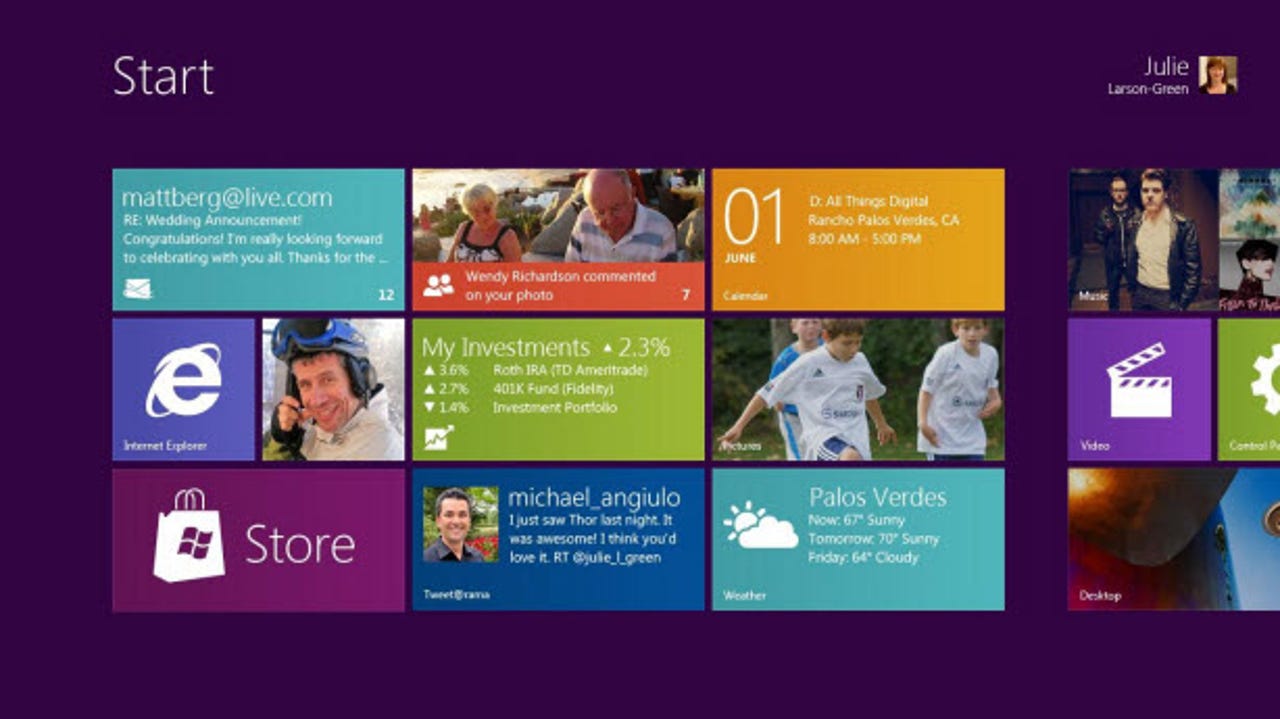
So now we come to the Metro UI. Metro is certainly far more ambitious than anything we've seen before, and it does fit in with Microsoft's tablet aspirations, but I, along with many others, remain to be convinced of its importance on the desktop. Metro, like the technologies that have come before it, have to tread a very fine line between innovation and gimmickry. Past incarnations of technologies that were going to revamp Windows have shown that users are allergic to clutter and attempts to shoehorn technologies between users and the desktop. While Microsoft has this time chosen to keep the classic Windows desktop alive and untouched, Metro could still be seen as an unnecessary layer between the user and their beloved desktop.
Will Metro succeed, or will it fail like so many technologies that came before it? Time will tell.
Kick off your day with ZDNet's daily email newsletter. It's the freshest tech news and opinion, served hot. Get it.


Talkback
Quite the naive commentary Adrian
While I would hesitate to give MS credit for inventing the "active desktop" the truth is that the concept of an active desktop is alive and well in every major OS out there. OS X has it, Android has it, at least 1 of the Linux UIs has it, and iOS 5 is getting limited support for it on the lock screen.
The K's have it
Metro UI is just another kludge workaround over the
Launchpad is just another kludge workaround over the
RE: Windows 8 Metro UI and how previous attempts to revamp the desktop failed
Innovation is iterative, not revolutionary
You're missing a few...
Bob --> Windows ME --> Vista --> Windows 8?
Missing a few - quite right.
What kind of hardware were you testing Windows 8 on?
It seems far, far too early to be talking about "market data" yet, when developers have only just received an early preview release.
It would be interesting to know what kind of hardware you were using, just to put your remarks in context.
RE: Windows 8 Metro UI and how previous attempts to revamp the desktop failed
"Market data" may support Metro's usefulness for tablets. Does not support its usefulness for serious PC users--quite the contrary. Confusing "cute" for "useful" is risky.
RE: Windows 8 Metro UI and how previous attempts to revamp the desktop failed
Some developers aren't so thrilled
http://www.i-programmer.info/professional-programmer/i-programmer/2591-dumping-net-microsofts-madness.html
RE: Windows 8 Metro UI and how previous attempts to revamp the desktop failed
Having a dynamic "desktop" would be great for tablet usage and a text-based Metro interface (a la WP7) would look very attractive compared with the static "desktops" of iOS and Android. Even on the desktop, it'll be nice to have a brief glance at much needed information (Mail notifications, RSS feeds, calendar remainders, etc) than a static grid of icons.
RE: Windows 8 Metro UI and how previous attempts to revamp the desktop failed
It is impossible to express how badly metro sucks as a desktop interface in its current iteration.
RE: Windows 8 Metro UI and how previous attempts to revamp the desktop failed
Metro gives the average user everything he wants, whether it is email, browsing, youtube, facebook or other simple tasks. If you are the kind of user who does anything complex, you are probably savvy enough to know how to switch to the old desktop. Enterprises will lock their systems down to the old explorer anyways. I don't see how it is a nightmare anyways.
Win8 is a calculated risk by MS. Of course, I don't know whether it will work or not, but they are surely thinking the right way
RE: Windows 8 Metro UI and how previous attempts to revamp the desktop failed
Let me say this again, Metro is Bob awful. It is as bad as Unity and Gnome 3 shell.
People keep saying that you can have the desktop and metro. That's not what I see in using the developer preview. Maybe things change by shipping. But their language, calling the desktop a legacy interface, means that they intend to dump the desktop at some point, or make it into a ghetto (in the sense the word was used in Warsaw when the Nazi's invaded), and kill it off one app at a time.
RE: Windows 8 Metro UI and how previous attempts to revamp the desktop failed
I installed the preview with virtual box and found I strongly dislike Metro. I like it on my phone but hate it on my PC. I recently got my first Mac and am glad the launchpad can be removed from the task bar. Regardless of the OS, I don't want a mobile interface on my desktop. It just doesn't feel right.
RE: Windows 8 Metro UI and how previous attempts to revamp the desktop failed
Exactly. Microsoft wants you to believe that Windows 8 is a no compromise approach. That it offers the best of both worlds, metro-style shell plus full desktop OS. Everyone will be happy. But from early peek at the OS, it looks like it will be a compromise for both the power user and those looking for light iPad-like computing on tablets. You can't full satisfy the two worlds without making compromises somewhere.