ie8 fix
madison

Hardware 2.0

Adrian Kingsley-Hughes

Windows 8 SmartScreen file checker - Smart feature or more 'dumb dialog box' security?

By | April 8, 2011, 8:20am PDT

Summary: If early leaked screenshots are to be believed (and the feature survives without being canned for some reason or another) Microsoft is to bake into Windows 8 a file verification tool based on the SmartScreen Filter currently employed in Internet Explorer and Windows Live Messenger 2011. Is this a smart move or yet another of Microsoft’s attempts at protecting the end user by throwing dialog boxes at them?
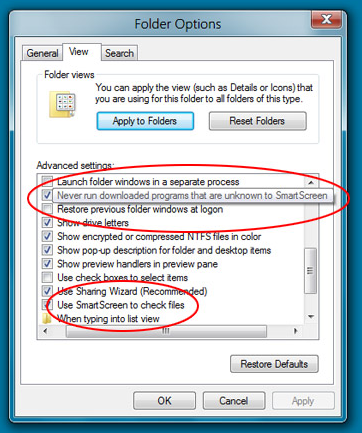
If early leaked screenshots are to be believed (and the feature survives without being canned for some reason or another) Microsoft is to bake into Windows 8 a file verification tool based on the SmartScreen Filter currently employed in Internet Explorer and Windows Live Messenger 2011. Is this a smart move or yet another of Microsoft’s attempts at protecting the end user by throwing dialog boxes at them?

Now, as a rule I’m pretty pro anything that makes the end user safer, but in this case I’m just not sure. Here’s why. It’s pretty clear that Microsoft knows that it cannot bake a fully-functional antivirus program into Windows without attracting the evil gaze of regulatory bodies all around the world. So instead of either fighting the fight (ultimately I have a hard time seeing governments ruling against something that will make everyone safer …) Microsoft is instead turning to a growing number of diverse tools and features to protect Windows users. It only works for as long as the checkbox is checked, and unless it offers tools to customize the experience, people will switch it off (didn’t Microsoft learn anything from UAC prompts?).

But there’s another, more important, reason why I don’t like the SmartScreen idea, and Long Zheng himself points it out:

Although it’s been proven highly effective to prevent socially engineered malware, it’s also subject to false positives which frustrates developers to “clear their name”.

False-positives are a huge pain in the rear but with live with them and accept them (and some people are majorly caught out by them). But the tool tells you it’s detected malware, tells you what it is (or what it thinks it is) and offers corrective action. In other words, it gives you an informed choice. SmartScreen, certainly in its current incarnation, tells you it thinks that it thinks that something is unsafe and gives you nothing more to go on to decide. And even the self-proclaimed 99% block rate still leaves a lot of latitude for false-positives and letting bad stuff through the net …

… which leads me to the next problem …

Are users meant to trust SmartScreen to protect them 99% of the time, or a separate antivirus tool that has a higher success rate and is more transparent about its findings?

I’m not saying that SmartScreen built into Windows is a bad idea, but after experiencing it in both IE and Live Messenger 2011, it’s also hard to say that it’s a good idea. If forced to describe the technology, ‘annoying’ is probably the word I would choose.

What do you think? OK for the masses or another UAC?

Kick off your day with ZDNet's daily e-mail newsletter. It's the freshest tech news and opinion, served hot. Get it.

Topics

Adrian Kingsley-Hughes is an internationally published technology author who has devoted over a decade to helping users get the most from technology.

Disclosure

Adrian Kingsley-Hughes

All opinions expressed on Hardware 2.0 are those of Adrian Kingsley-Hughes. Every effort is made to ensure that the information posted is accurate. If you have any comments, queries or corrections, please contact Adrian via the email link here. Any possible conflicts of interest will be posted below. [Updated: February 23, 2010] - Adrian Kingsley-Hughes has no business relationships, affiliations, investments, or other actual/potential conflicts of interest relating to the content posted so far on this blog.

Biography

Adrian Kingsley-Hughes

Adrian Kingsley-Hughes is an internationally published technology author who has devoted over a decade to helping users get the most from technology -- whether that be by learning to program, building a PC from a pile of parts, or helping them get the most from their new MP3 player or digital camera.

Adrian has authored/co-authored technical books on a variety of topics, ranging from programming to building and maintaining PCs. His most recent books include "Build the Ultimate Custom PC", "Beginning Programming" and "The PC Doctor's Fix It Yourself Guide". He has also written training manuals that have been used by a number of Fortune 500 companies.

Adrian also runs a popular blog under the name The PC Doctor, where he covers a range of computer-related topics -- from security to repairing and upgrading.

28
Comments

Join the conversation!

Just In

two-tier system?
Third of Five 12th Apr 2011
@bdlang@ I think it might be set up as having the "never run" box only be selectable if you have "use SmartScreen" checked, like how some IM programs have a box for remembering the username and password, and only having the automatic log-in button selectable if the remember button is checked.

That would make sense, at least.
0 Votes
+ -
The only feature I cares is
FADS_z 8th Apr 2011
blocking applications self-inserting into "startup program" even in admin-account. I want to run them, but don't want them to run itself.

I have to costantly remove these applications from "startup" either from windows-defender in xp, or in sys-config in windows 7.
0 Votes
+ -
Crying, waiting, hoping ~ Buddy Holly sad

Wishing and hoping and thinking and praying ~ Burt Bacharach sad

Only don't hold yer breath, that flag lies tattered.

You got rats on the west side, bed bugs uptown
What a mess. This town's in tatters ~ Jagger & Richards sad
Its a good idea and if you don't like it just uncheck the box. Its a win-win for everyone.
@Loverock Davidson

There more that comes out and I hear about Windows 8, the more I think that iOS might be in trouble in the future.

I hope Apple gets their act together and starts developing a useful o/s
0 Votes
+ -
iOS and Windows 8...
Pete "athynz" Athens 8th Apr 2011
@IAmLegion20ll So what does Apple's iOS (a MOBILE smartphone/ tablet OS) have to do with Windows 8 (a Desktop/ laptop OS)? Perhaps if you had worded it as Windows 8 and Mac OSX (or whatever incarnation they might have coming out next) then you might make more sense.
Windows 8 Phones and slates are likely to be made.
Well, then it seems this feature will quell the ZDNet Government blog the otherday about going online after a fresh install.

Back on topic: All I have to say is this:
You're damned if you do, and damned if you don't...


EDIT: I have to say, I like the look of the font in the titlebar. Very nice.
0 Votes
+ -
@Cylon Centurion 0005
"In a brilliant, and much needed feature, Google once again trumps everyone else by adding a 'Smart Screen Filter' as it?s been proven highly effective to prevent socially engineered malware, it?s also subject to false positives which are worth the risk of this excellent feature".

Just predicting the future happy
@Will Farrell There is just no pleasing some people. When Googe implements it, it is revolutionary but a nag screen when done by Microsoft!
@Will Farrell

LOL! Although I would replace Google with Apple.
0 Votes
+ -
Agreed
Ammalgam 8th Apr 2011
@Cylon Centurion 0005

Agreed.

In this case Microsoft is damned either way..

http://www.windows8update.com/2011/04/08/windows-8-to-use-smartscreen-security/
0 Votes
+ -
Why TWO options instead of one?
Bruce Lang 8th Apr 2011
The option to "Never run downloaded..." should be eliminated. Seems redundant to have both options.
@bdlang@...

Not really. One option looks to scan the files, the other one you're talking about seems to kill off the ability for it to run all together. Very nice. I know a few folks who need this feature NOW! Lol.
0 Votes
+ -
What does it scan then?
Bruce Lang 8th Apr 2011
@Cylon Centurion 0005 - Let's say the "Never run..." is off (NOT checked) but "Use SmartScreen..." is on (checked) - does SmartScreen ignore (possible) malicious executables then?
@bdlang@...
probably that would warn you before you make a decision to override it while executing that.
@bdlang

That particular setting is likely aimed at network PCs. I would guess that "Never run..." isn't turn on by default while the SmartScreen filter would be. However it would be nice on a network to flat out prevent potentially unsafe programs from running no matter the source.
0 Votes
+ -
two-tier system?
Third of Five 12th Apr 2011
@bdlang@ I think it might be set up as having the "never run" box only be selectable if you have "use SmartScreen" checked, like how some IM programs have a box for remembering the username and password, and only having the automatic log-in button selectable if the remember button is checked.

That would make sense, at least.
0 Votes
+ -
nice features
alshawwa@... 8th Apr 2011
nice features , which should make everything under control , now about throwing more dialog boxes to the end users , why mac users and linux users dont complain? go for it microsoft.
0 Votes
+ -
portable apps
Cocco Bill 8th Apr 2011
best software are the apps you don`t need to install...and that`s the way to go...why to install anything, exept what`s neccessery, let it all be portable, so run it when you need it...
0 Votes
+ -
portable apps
Cocco Bill 8th Apr 2011
if all the apps are portable and I don`t need to install them, then I`ll run them when I need them. No installation, just what is really needed...
is in the users own data folders. Usually it's either the Application Data (AppData junction in Vista, 7) folder or the Local Settings\Application Data folder. Sometimes an exploit can make use of user credentials to inject itself into the Public/All Users folder, which can affect all user accounts, but only at logon. Windows XP, however, can allow any application full admin rights easily. Vista and 7 at least isolate it from the system, for the most part. If there's an uncompromized account, you can easily clean the computer from it (if you know where to look, and what, if any, modified registry keys need to be fixed).

What I say is: No program should be allowed to write executable code into a data folder. Most of the security issues regular users deal with is Fake AV software programs, and most of those reside as an EXE inside their AppData folder. If Windows blocked executable code from being in a data folder, it would be a lot more secure. Block it from being written there, and block it from being able to be executed from there.

What do you think?
0 Votes
+ -
You call this journalism?
omdguy 8th Apr 2011
An allegedly leaked screenshot from an unknown source of an Alpha software solutiuon becomes a story?

Apparently all it takes is the ability to use a keyboard to work at ZDNET as this is simply a garbage "story" from a well known Apple apologist.

Anyone seen Windows 8, anyone know what features are coming, anyone know the source of these leaks? Didn't think so, move along...
0 Votes
+ -
Something here doesn't make any sense...
adornoe@... Updated - 9th Apr 2011
Heres why. Its pretty clear that Microsoft knows that it cannot bake a fully-functional antivirus program into Windows without attracting the evil gaze of regulatory bodies all around the world.

If Microsoft were to create an OS which was completely virus proof and hacker proof, then the whole world, including those in government in charge of anti-competitive concerns, would be applauding the new Windows OS as a great leap forward in computing and in protection against malware. Now, just because the protection might be designed as an "afterthought" which can be turned on and off, why is the protection being looked at as a regulatory concern? If that same protection had been seamlessly included as part of the OS, would regulatory bodies want Microsoft to build a less safe OS just to provide work for the anti-virus and anti-trojan companies out there?

Microsoft has been, in the past and in the present, been accused of building an OS and a browser without proper security features, and now that they've taken the matter seriously and are doing something about it, why should anybody in government or in the private sector be complaining about Microsoft trying to solve the problem? Isn't that what everybody wanted? If OSes, from the beginning, had been designed to be bullet-proof, nobody would have ever complained. Now that Microsoft is trying to make their software safer, people are complaining just the same. It's a catch-22 situation and utterly stupid.
0 Votes
+ -
Windows is a broken system
kraterz 10th Apr 2011
The very fact that you need antivirus, firewalls, and a bajillion "security" updates every week that fix that hole where a "remote user can completely take over the computer" means one thing - the basic system architecture is flawed and broken.

Corporate admins can easily roll out security and software policies, we do that all the time. I'm not talking about that. Most home users run windows, and they have no clue how insecure their system is. Why? Most of they switch off UAC because of the constant annoying popups, most of them run as admin because "something doesn't work without admin permissions", they're so sick of the incessant popups from the browser or apps they automatically click "allow" for everything otherwise "something doesn't work". The last thing people need are more confusing security popups.

Windows has always been a half-baked design, yes they tried getting it right with Dave Cutler and NT, they did improve with W2K and XP but it is still a mess and the cause of most of today's virus and security problems.

Unix/Linux got it right, the design and architecture is solid, but it was just never polished and well integrated enough to be usable by aunt Marge or grandpa Jones, it's still a hacker's OS.

Apple did a good job in breaking from the old MacOS 9.x system, and they probably have one of the best user experiences around today. The design philosophy is radically different from Windows - they just get out of the way and let you do real stuff.
0 Votes
+ -
Maybe so but...
Cayble 11th Apr 2011
@kraterz
If you have actually looked at the only two real alternatives they too are broken. And I can assure you, no matter how much you may dislike the thought they are far more broken in several critical ways then Windows has ever been for the purposes of the average man on the street.
It is all in how it is implemented, if it is intrusive the end user will most likely turn it off. If it works seamlessly then it could actually be a good thing.
0 Votes
+ -
SmartScreen
sashley_z 11th Apr 2011
Hay whatever I can always turn it off; the ones that need it won't know how. It might save me a phone call from one of my friends or relatives with whom I perform tech support. I'm sure many reader of this column know that I am talking about.

Join the conversation!

Formatting +
BB Codes - Note: HTML is not supported in forums
  • [b] Bold [/b]
  • [i] Italic [/i]
  • [u] Underline [/u]
  • [s] Strikethrough [/s]
  • [q] "Quote" [/q]
  • [ol][*] 1. Ordered List [/ol]
  • [ul][*] · Unordered List [/ul]
  • [pre] Preformat [/pre]
  • [quote] "Blockquote" [/quote]
ie8 fix
Click Here
ie8 fix

The best of ZDNet, delivered

ZDNet Newsletters

Get the best of ZDNet delivered straight to your inbox

Facebook Activity

White Papers, Webcasts, & Resources
ie8 fix
ie8 fix