Review: Motorola Roadster Bluetooth speakerphone

We have strict hands-free laws in Washington State and I won't use my phone in my car without a headset or speakerphone. I am not a huge fan of headsets and have transitioned to using Bluetooth speakerphones since I do not make a ton of calls and also use my speakerphone daily as a speaker for listening to podcasts played on my devices. Motorola sent their latest BT speakerphone, the Motorola Roadster, for me to try out for a couple of weeks and I think it is a solid product that deserves consideration. You can check out some photos of the speakerphone in my image gallery.
| Image Gallery: Check out photos of the Motorola Roadster Bluetooth speakerphone. | 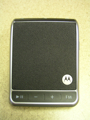 | |||||
Hardware
The Motorola Roadster comes with a car adapter and thankfully uses standard microUSB for charging. It is a rather compact speakerphone measuring in at 3.54 x 2.76 x 0.55 inches and 3.07 ounces.The front is dominated by the speaker that is covered in gray material, giving it a classy look. The speaker is quite loud and works well for me even at 60 mph in my car.
The top and bottom actually have quite a few buttons and controls, which is in contrast to my rather simply Jabra SP700 speakerphone. The top has buttons for mute, call, and voice dial while the bottom has buttons for play/pause, volume/FM tune down, volume/FM tune up, and FM/speaker toggle. The right side has a power switch, microUSB port, status light and charge indicator light. The buttons are all quite large and easy to press, but the power button is a bit tough to find when it is attached to your visor.
There is a strong wire clip that lets you attach the Roadster to your visor and this seems to be rock solid with the Roadster never slipping or sliding around.
Setup and usage
When you first turn on the Roadster you will hear a voice speak "ready to pair" and then you simply make sure your device is in pairing mode to make the connection. Depending on your phone, you may have to enter 0000, but newer devices should auto connect. The Roadster will turn off when your phone is moved away from the car (or turned off) for more than 1 minute. The slick thing is that it turns back on and reconnects when you get back within range. One thing to keep in mind though is that your phone may stay connected to the Roadster if you are near your car. I found this out when I was in my garage trying to answer my phone and could not hear the caller because they were on inside the car ;)I tested the Roadster with my Dell Venue Pro and HTC HD7 Windows Phone 7 devices and orange Nokia N8 Symbian^3 device. Voice dialing, Bluetooth podcast streaming, and call controls all worked well on both devices when connected to the Roadster. While my N8 has an FM transmitter to help me listen to podcasts over the radio, the area where I live is heavily saturated with FM stations so it is tough to find an open channel. I have since moved to using a BT speakerphone for podcast listening and the Roadster worked perfectly with both of these devices for Bluetooth audio streaming.
You can also connect a phone to the Roadster and then connect to your car's FM radio via the integrated tuner to have audio and calls played over your car's stereo system. Keep in mind though that your audio may be heard by other cars nearby on that same frequency.
Volume control on my N8 is handled by the speakerphone, while on my WP7 device the volume for audio is controlled from the device so your experience will vary with your particular handset.
The buttons allow you to answer calls, ignore calls (you can also speak "ignore"), use voice commands to make calls, mute/unmute calls, answer second incoming call, and end calls.
On my Nokia N8 pressing the Music button on the Roadster launches the Symbian music player and starts playing music. Pressing the Voice Dial button launches the Symbian voice dialing software. On my Dell Venue Pro and HTC HD7 pressing the Music button starts the Zune music player and starts playing from the general music playlist. Pressing the Voice Dial button launches the slick WP7 voice dialing feature powered by TellMe that is usually accessed by pressing and holding the Start button.
One very slick feature I like that makes the Roadster truly hands-free is when an incoming call comes in you can simply speak the word "answer" to answer the call without having to touch anything.
The Roadster also has support for MotoSpeak so if your device supports it you can have text messages read aloud and also dictate text responses. This did not work with either device I tested, but the two I used are not that popular. MotoSpeak is designed for Android 2.2 devices and there is a free application to enable this functionality.
You can also pair with two devices at once in case you are using one for music and the other for calls. The last device paired during a session is the primary one for calls so keep that in mind.
Pricing and performance
You can find the Motorola Roadster online for about $70 or in stores at the full MSRP of $99.99. It performed very well and is a BT speakerphone you may want to consider for yourself.The Roadster has a dual microphone noise cancellation technology and callers said I sounded great whenever I used it in my car. The specifications state you will get up to 20 hours of talk time and my experiences indicated this is about right. I charged it up every two weeks and never really had to worry about battery life.