ie8 fix
madison

$60 router + DD-WRT = high-end wireless router and switch

By | October 16, 2007, 4:14pm PDT

Summary: Getting a high-powered wireless router with some high-end features is a lot cheaper than most people think.  In fact it doesn’t cost any more than a regular router needed to connect to the Internet which allows the sharing of IP addresses between multiple clients.  With the addition of DD-WRT, you can turn a cheap commodity [...]

Getting a high-powered wireless router with some high-end features is a lot cheaper than most people think.  In fact it doesn’t cost any more than a regular router needed to connect to the Internet which allows the sharing of IP addresses between multiple clients.  With the addition of DD-WRT, you can turn a cheap commodity router in to a high-end wireless router and switch.  With the addition of a high-powered antenna located high up in the air which amplifies the send and receive capability of the wireless access point, anyone can set up their own wireless hotspot service with a massive coverage area.

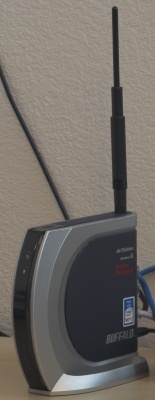
Pictured to the left is the Buffalo WHR-HP-G54 router that sells for as little as $60 at all the local electronics stores like Circuit City, Best Buy, and Fry’s or it can be ordered online.  The WHR-G54 sells for as little as $50 and is virtually identical except for the fact that the WHR-HP-G54 has a receive side amplifier which helps the router hear faint laptops coming in on long-range connections.  Both routers come with an RP-SMA antenna connector for external antennas which makes this router extremely flexible for wireless ISP and long-range bridging applications.  The WHR-HP-G54 also comes with a wall mounting bracket so that you can mount the device up high.

This particular router can run DD-WRT using this specific upgrade procedure.  DD-WRT can turn this cheap device in to an enterprise class product with enterprise features normally found in devices costing hundreds of dollars more.  Things you often don’t get on your consumer routers are features like VLAN (Virtual LAN) support on the switch, Enterprise Wireless LAN security support, QoS (prioritization), site-to-site VPN tunneling and VPN servers, Hotspot, and advanced routing features like OSPF and BGP.  You can see a full gallery here with all the important features of DD-WRT.

[Update 10/17/2007 - Readers have commented that the OpenVPN function is very nice too.  I'll also be looking at adding FreeRADIUS to this device and will follow up on it.]

Kick off your day with ZDNet's daily e-mail newsletter. It's the freshest tech news and opinion, served hot. Get it.

Topics

Disclosure

George Ou

http://blogs.zdnet.com/Ou/?page_id=557

Biography

George Ou

George Ou, a former ZDNet blogger, is an IT consultant specializing in Servers, Microsoft, Cisco, Switches, Routers, Firewalls, IDS, VPN, Wireless LAN, Security, and IT infrastructure and architecture.

35
Comments

Join the conversation!

Just In

RE: $60 router DD-WRT = high-end wireless router and switch
eepr0m 2nd Oct 2009
I read that they took all the Buffalo routers off the market: http://www.eloquentspace.net/blog/dd-wrt-v24-revealed/

Either way, DD-WRT does make any compatible router a lot better, but you're still limited to what your hardware can do. If you install DD-WRT x86 on a PC with a wireless card and a nic, now you're talking high-end!

Most routers have between 2-16MB flash 4-32MB ram and a wireless transmit power of about 70mw with not so good antennas. Imagine even a shuttle PC with a low end Core2, 2gb DDR2, a gigabit nic, and a 600mw atheros card with a big antenna! That's my next project...
0 Votes
+ -
dd-wrt demo
D T Schmitz 16th Oct 2007
I've been running dd-wrt on a Linksys WRT54GL for about a year now--it really is true folks--high-end features.

You can check out a demo of the web gui features here.

Nice article George.
That's why I said it isn't worth using client-side mesh when stuff like this is so cheap. You need the Ethernet Switch and router anyways and the Wireless AP essentially comes for free.

Can you make an 433 MHz XO do all of this? Sure, with some hacking. But why would you waste a perfectly good $200 XO laptop when it's much easier to get a $60 device like this and a $40 antenna?
Furthermore, the XO-1 doesn't have a built-in Ethernet port so you'll have to get an extra USB to Ethernet adapter for it. Avoiding infrastructure simply isn't wise.
0 Votes
+ -
Interesting point
D T Schmitz 16th Oct 2007
Your point is well taken, but here's an explanation from Jim Getty, one of the OLPC engineering team members, on why mesh networking was chosen.

Thanks George.
0 Votes
+ -
But his logic is fundamentally flawed
georgeou 17th Oct 2007
"Many or most children in the world do not have electric power, nor do they have computer networking. Without power being available, even if access points cost nothing, you have no network. So we are deploying mesh networking, to allow a child?s laptop to forward packets for their friend or neighbor?s laptop; each laptop becomes, in effect, a battery powered access point for the others."

The point here is that if you must have some kind of router with Internet uplink. The router (which comes with an Access Point for essentially $10) and the modem that connects to the Internet MUST have some kind of power source be it Sun, Wind, Coal power plant, Nuclear plant, leg power, arm power, whatever. Therefore providing the extra watt of power for the radio is essentially moot and the cost of the radio is moot. Your only cost for creating a massive hotspot is the $40 antenna which you can?t possibly connect to the OLPC without some serious hacking plus a USB-to-Ethernet adapter. What makes sense is connecting that $40 antenna to one of these dirt cheap routers (which you have to have anyways) running DD-WRT.

So Jim Getty is trying to solve a problem using the OLPC that doesn?t need to be solved since there are cheaper and better solutions such as the solution shown in this blog. Here you?re using a Broadcom 251mW radio with a receive-side amplifier which I?ve just tested to have 4 times the range of any other access point I?ve used. That?s using the stock antenna in a really poorly placed location. Next step I?m going to get one of those antennas and put it on my roof and then test it again.
0 Votes
+ -
Be careful up there on that roof!
D T Schmitz 17th Oct 2007
nt
0 Votes
+ -
George, your ignoring the power consumption requirement constraint that the project has set for itself.
0 Votes
+ -
Marvell
D T Schmitz 17th Oct 2007
The Marvell 88W8388 chip is a very low power consumer, in addition to the Geode's low-power spec and will continue running to maintain a mesh connection even when the Geode goes into suspend mode!
0 Votes
+ -
His constraint is based on a flawed assumption; that mesh is necessary and that infrastructure is too expensive to put up. If he didn't have to use mesh, it would make his design a lot siimpler. As low-power as that Marvel chipset/radio is which operates even when the Geode processor is suspended, it's still non-zero. There simply isn't a need mesh because infrastructure is cheap to put up and it does a much better job.
Since the XO doesn't have an Ethernet adapter, it will have to have a wireless base station to connect to and act as a repeater. The mere act of "repeating" just once cuts your bandwidth in half because you've doubled the congestion. Every hop you add then adds even more congestion.

But the fact that you need an AP to begin with means you've mooted the entire need for client side mesh.
0 Votes
+ -
I've been running the Ubiquitous WRT54GL from Linksys with DD-WRT for almost a year now and love it. Completely stable. Works great with many open torrent connections etc. I remember you were looking for a way to do a very cheep and low power solution for a dedicate IP Cop solution. Well if you get a router with a USB port for mass storage, you can do just that for about 100 bucks. ASUS makes a couple of DD-WRT compatible routers that have multiple USB ports and faster 266mhz processors in them. There's a firmware package out there called Packet Protector that is basically the same IP Cop suite only reconfigured to run on the router. You need the USB port to add some additional storage for virus defs. You can do some fancy soldering and get a hardware hack for some of the other routers to accept a SD card, but why when you can get a faster router with usb built in?
0 Votes
+ -
Samba Filesystem on dd-wrt
D T Schmitz 17th Oct 2007
Having a router with usb ports is certainly nice but one other 'work-around' is available in dd-wrt: set up a samba share mount point into which you can install additional apps that run on the router. Being WRT54GL runs on Linux, setting a mount is straight-forward and can be done right in the dd-wrt gui settings.

Read more here
0 Votes
+ -
SAMBA may not work for virus defs.
beatphreek 17th Oct 2007
Yeah I'm aware of the SAMBA solution. I'm not sure that it would be fast enough in that application. Then again, I'm not sure it wouldn't be. I think to have the virus def's on the "local" file system would probably create less of a bottleneck in the security appliance application. Otherwise SAMBA would be a good fit for file share or FTP.
I already found a cheap solution for IPCop/Copfilter using an Open Frame PSU and an Intel D201GLY mobo/CPU. I'm going to blog it when I get done.
0 Votes
+ -
How cheap?
beatphreek 17th Oct 2007
Cheaper than $100? I'll be interested to see it for sure.
0 Votes
+ -
No, under $200 with a 1.33 GHz "Yonah" Celeron 115, 512 MB RAM, 40 GB 2.5" HDD for caching, open frame 60W PSU. Whole thing takes about 25W power and it's very powerful. I want that much performance because of the content filtering and the transparent antivirus scanning.
0 Votes
+ -
No really. Many people would do fine with this, but there are multiple wireless access points running on all the G-channels where I live. All I need is a couple 11n neighbors, and I might as well be using 11b. I'm really disappointed with retailers who have sold consumers down the G-only path, and then overcharge for the dual band equipment.

So, anyway, if I want to run enterprise quality, I'll want 11a too.
0 Votes
+ -
Agree - need the 5.8Ghz band
waltmaine 17th Oct 2007
2.4Ghz is a mess. The reality is that in dense environments (made WORSE with high-powered AP's) the spectrum is so congested / noisy that real-world throughput sucks. This is why all our corporate laptops have A support.
0 Votes
+ -
Good point, I'll look for a dual-band solution and ideally a/b/g/n.
0 Votes
+ -
It won't say what version is supported and it looks like the antennas are not removable. It also looks like the processor is severely limited.
Scratch this idea, you need a very special procedure to flash so don't try this.
0 Votes
+ -
http://www.buffalo-technology.com/products/wireless/wireless-ag-mimo-performance/wireless-ag-mimo-performance-broadband-router-and-access-point-with-high-gain-antenna/

Newegg has it for $87
http://www.newegg.com/Product/Product.asp?Item=N82E16833162015

This model has 2 radios and it's got 32MB RAM and 4MB flash with standard RP-SMA antenna connector. I'm not sure if the antenna is only used for 2.4 or both 2.4 and 5.3 GHz.

There is a special RC4 firmware specifically for this model at http://www.dd-wrt.com/dd-wrtv2/downloads/release%20candidates/DD-WRT%20v24%20RC4/BUFFALO%20WHR-HP-AG108/whrag108-firmware.bin
0 Votes
+ -
Yes!
Patrick Jones 17th Oct 2007
I've been running it on my Linksys for years now. I love it. I originally switched so I could adjust the radio power. I am now using it with OpenVPN. It works great.
0 Votes
+ -
Talk more about OpenVPN if you would
D T Schmitz 17th Oct 2007
nt
0 Votes
+ -
Try this
Patrick Jones 17th Oct 2007
http://www.dd-wrt.com/wiki/index.php/OpenVPN

There are many options - as always happy I use it in server mode with a static key. It was really easy to setup.
0 Votes
+ -
ssh
D T Schmitz 17th Oct 2007
It probably works great.

As for myself, a simpler route was chosen--add port forward settings for ssh and I 'on-demand' tunnel NX over ssh or rdp over ssh depending on the target client--obviously not as elegant as your OpenVPN solution.

The article is quite long and might seem 'intimidating' to the average user. Was it difficult to set up?

Thanks for the link to the how-to.
happy
0 Votes
+ -
It was pretty simple
Patrick Jones 18th Oct 2007
I think it took about 10 minutes for me to do it. Most of that was getting my machine setup so I could copy files to the router. the basic jist is that you copy the file to the router, add it to the startup, configure and add your static key.

They do have some packages with OpenVPN already in them. If you haven't flashed your router, or don't mind re-flashing it, you could use one of those.
0 Votes
+ -
Novice: Installed DD-WRT. What's next?
alokgovil 17th Oct 2007
Hi all,

I installed DD-WRT successfully on Buffalo router, and using for wireless access from laptop.

Being a novice, I see lots of things in the router configuration page, but do not know what I can do with it!

I installed VOIP version. Could never figure how to configure it, or do VOIP stuff with it (make VOIP calls?! what hardware do I need for that?). (If I still need to get service from Vonage, I do not see what use is the router then!)

Thanks
0 Votes
+ -
Hit the wiki
beatphreek 17th Oct 2007
Check out the wiki on their website for beginners and advanced settings.
One of the things I did was set it so I could use Dynamic DNS with it so I could remote control my computer from work or wherever.

As far as the VOIP goes, I think the primary advantage to having that is that while you do still have to have service from a provider like Vonage, you are not locked into any one provider and can cancel and start a new service and re-configure your router for it.

A lot of the things that your new router can do may be of no use to you at this point. But it's probably a lot more stable now and probably more secure. I say probably because I'm not familiar with the Buffalo factory firmware. I know DD-WRT made my linksys much more stable.
0 Votes
+ -
DDNS tutorial here
georgeou 17th Oct 2007
http://articles.techrepublic.com.com/5100-10877-6174999.html
"Make your home PCs accessible anywhere with Dynamic DNS for free"
Gee George, I was not surprised at at all that the word Linux was conveniently left out of Your entire article. but besides that I agree with you George, (which is rare) wink DD-wrt is awesome. I have been using DD-wrt for over 3 years, in a wrt54gs considering the hundreds of features it offers , the one I find using all the time Is the wifi "who is connected feature" visible on the Start page. A simple feature which is not found on many budget wifi routers, I have uploaded the firmware for friends and family alike. So cheer's George for a Good Article.
0 Votes
+ -
Some people are talking of DD-WRT becoming too bloated - and to be honest, I'm going to consider installing Tomato on one of my DD-WRT routers (yeah, I have two of em! happy. Tomato's been getting some good reviews from what I've seen, it's quite a mature, stable firmware, with some features not available in DD-WRT by default, and as the userbase is smaller the community is tighter and quicker to respond to problems than the (HUGE) DD-WRT community is at present.


I might run one Tomato, one DD-WRT... Hedge your bets!
Just some updates:
1. Buffalo Routers are removed from the shelves of BestBuy around 26th November 2007 and sold for cheap ( I was a late bird - didnot get any).
2. Probably the did it so, because Buffalo lost an appeal agasinst a Patent Troll - as a result NO Buffalo Devices can be sold in USA till it is reversed.
3. Buffalo has good devices, but they still keep their hardware locked down for a regular user (installation of DD-WRT on the router needs some sort of geekiness).
4. Buffalo has signed up with DD-WRT to create a special router and a special DD-WRT Firmware for it, but not sure if we will be able to see it in US market in 2008.
I read that they took all the Buffalo routers off the market: http://www.eloquentspace.net/blog/dd-wrt-v24-revealed/

Either way, DD-WRT does make any compatible router a lot better, but you're still limited to what your hardware can do. If you install DD-WRT x86 on a PC with a wireless card and a nic, now you're talking high-end!

Most routers have between 2-16MB flash 4-32MB ram and a wireless transmit power of about 70mw with not so good antennas. Imagine even a shuttle PC with a low end Core2, 2gb DDR2, a gigabit nic, and a 600mw atheros card with a big antenna! That's my next project...

Join the conversation!

Formatting +
BB Codes - Note: HTML is not supported in forums
  • [b] Bold [/b]
  • [i] Italic [/i]
  • [u] Underline [/u]
  • [s] Strikethrough [/s]
  • [q] "Quote" [/q]
  • [ol][*] 1. Ordered List [/ol]
  • [ul][*] · Unordered List [/ul]
  • [pre] Preformat [/pre]
  • [quote] "Blockquote" [/quote]
ie8 fix
Click Here
ie8 fix

The best of ZDNet, delivered

ZDNet Newsletters

Get the best of ZDNet delivered straight to your inbox

Facebook Activity

White Papers, Webcasts, & Resources
ie8 fix
ie8 fix