Build a Mac Pro equivalent workstation for 1/3 the cost

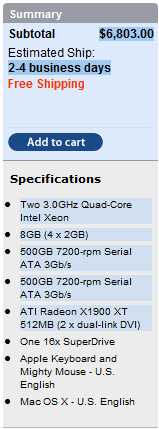
Summary: Conventional wisdom tells us that a digital content creation and CAD professional had to fork out $6000 to $10,000 dollars for a high-end 8-core dual-processor workstation, but this is Real World IT where I say screw conventional wisdom. I've put on my mad scientist hat again and brewed something up for $2311 with equal or better performance than a $6803 Mac Pro (as configured in Apple screen cap to the left).
Conventional wisdom tells us that a digital content creation and CAD professional had to fork out $6000 to $10,000 dollars for a high-end 8-core dual-processor workstation, but this is Real World IT where I say screw conventional wisdom. I've put on my mad scientist hat again and brewed something up for $2311 with equal or better performance than a $6803 Mac Pro (as configured in Apple screen cap to the left). Now granted you can't run Mac OS X so that might be a show stopper for a Mac user, but there are plenty of Windows users who want something that will run just as fast. If that's you, then keep reading!
The Mac Pro is essentially based on an Intel 5000 series dual-processor chipset. At present time, it still only comes with 65nm "Clovertown" processors maxing out at 3.0 GHz and not the recently launched 45nm "Harpertown" processors and newer motherboard that use the Intel 5100 series "San Clemente" chipset. As I showed in my quad-core CPU comparisons, the newer 45nm processors costing $300 can rival $1200 65nm processors. Furthermore, the 5100 series chipset supports cheaper and more energy efficient registered DDR2 memory instead of the power-hungry FBDIMMs (fully buffered DDR2 memory) used in the Intel 5000 series motherboards.
My home-brew 8-core solution costs about a third of the price with performance equal or better than the fastest Mac Pro you can buy on the market. But when it comes to SSE4 optimized video encoding which nearly every video encoding software package is going to support, you can expect a massive increase in performance over the 65nm "Clovertown" quad-core processors. Other improvements in my solution is a 5-drive hot-swap SATA back plane which allows you to easily swap out up to five hard drives. The video card I used is an NVIDIA Quadro NVS290 designed specifically for the workstation market and it is also used in Sun's single processor workstation.
Apple on the other hand uses the out-dated ATI Radeon X1900 XT which is actually a desktop gaming graphics card and not a workstation card. Below is the exact configuration and pricing for this system. I also threw in a cordless Logitech EX110 keyboard and optical mouse. Since Apple includes free shipping, my quoted prices (as usual) includes the cost of shipping. I also rounded to the nearest dollar and I do not include the effect of rebates in the quoted prices though I mention one rebate in the part description. I got these prices by roaming the search engines to find reasonable prices mostly from places that I have personally shopped before.
Updated 5:45PM - All Windows drivers for the Intel 5100 series "San Clemente" chipset have now been confirmed and can be downloaded here so both systems are confirmed to operate any x86 or x64 version of Windows XP, 2003, Vista. I have also verified XP and Vista x86/x64 driver support for all the other components.
Note that the use of FBDIMMs on the 5400 series platform adds about 7 watts of power consumption per DIMM, but the 5400 series "Seaburg" chipset has the added benefit of a 50% larger snoop filter and official DDR2-800 support so it's a higher end chipset. While the 5400 series chipset supports up to 16 FBDIMMs, the 5400 motherboard listed below has 4 DIMM slots whereas the 5100 series motherboard listed below has 8 DIMM slots. You can get higher memory capacity 5400 series motherboards but they cost a little more so it a toss up which chipset you should use. You can get a Supermicro X7DWN+B for example which has dual gigabit LAN and 16 FBDIMM slots for an extra $150 over the price of the Tyan S5392ANR.
High-end 8-core 2P Workstation (5400 series "Seaburg" version):
| Part | Price |
| Tyan TEMPEST I5400XL (S5392ANR) Intel 5400 series "Seaburg" | 408 |
| 8 GB fully buffered DDR2-667 ECC memory (2GB x 4) | 340 |
| Two Intel E5410 quad-core "Harpertown" 45nm 2.33 GHz CPUs | 616 |
| Seasonic 650W 88% efficiency "80 Plus" power supply | 160 |
| Cooler Master |
172 |
| NVIDIA Quadro NVS290 PCI-Express 256MB | 120 |
| Sound Blaster Audigy 7.1 | 36 |
| AMS 5-drive SATA hot-swap backplane (model DS-3151SSBK) | 102 |
| Two 500GB 7200RPM SATA hard drives | 200 |
| 18x DVD burner with SATA interface | 36 |
| Logitech EX110 wireless optical mouse and keyboard | 35 |
| Vista Business x64 edition OEM (dual-processor support) | 145 |
| Total (including shipping but not tax) | $2368 |
| Part | Price |
| 5100 series "San Clemente" dual-processor motherboard | 381 |
| 8 GB Registered DDR2-667 ECC memory (4 x 2GB) (4 slots open) | 310 |
| Two Intel E5410 quad-core "Harpertown" 45nm 2.33 GHz CPUs | 616 |
| Seasonic 650W 88% efficiency "80 Plus" power supply | 160 |
| Cooler Master Stacker ATX chassis (additional $60 rebate) | 170 |
| NVIDIA Quadro NVS290 PCI-Express 256MB | 120 |
| Sound Blaster Audigy 7.1 | 36 |
| AMS 5-drive SATA hot-swap backplane (model DS-3151SSBK) | 102 |
| Two 500GB 7200RPM SATA hard drives | 200 |
| 18x DVD burner with SATA interface | 36 |
| Logitech EX110 wireless optical mouse and keyboard | 35 |
| Vista Business x64 edition OEM (dual-processor support) ??? | 145 |
| Total (including shipping but not tax) | $2311 |
As for which LCD display to buy, make sure you buy something that isn't a typical TN type panel with lousy viewing angles and lousy 18-bit color. Dell's $700 24" 2407WFP-HC is highly rated and it uses a high color PVA type panel with true wide viewing angles that don't drastically drop in contrast ratio when viewed off center. The inexpensive $300 24" Soyo (available at Office Max) is actually an MVA type panel with true 24-bit color and wide viewing angles. If you don't need a super high color gamut, picking up two of the 24" Soyos for dual-screens might be a great solution. For comparison purposes, the Apple iMac 20" uses the lousy TN type display while the 24" iMac uses the superior PVA, MVA, or IPS TFT technology.
Update 5:45AM - What about Dell workstations?
Larry Dignan asked me what about Dell solutions for the workstation market. That's a great question and I just looked it up on Dell's website. I configured a Dell Precision T7400 with identical CPU and GPU configuration but with the older Intel 5000 series chipset [Update 6:40AM - reader s_souche pointed out that the T7400 is actually based on the newer 5400 series "Seaburg" chipset which also uses FBDIMMs and has the highest memory capacity]. One problem was that it only allowed me to configure half the memory using 4 1GB FBDIMMs. This makes me wonder if there are only four DIMM slots in the entire system which would be rather unusual for a 5400 series motherboard.
It was also crazy that they charge an extra $350 to upgrade to a 500 GB SATA hard drive when those drives are barely worth $100 to begin with. The total price for the RAM deficient system was $3817. You will have to go out and buy your own 2GB FBDIMMs if you want to get up to 8GB RAM. That's not as bad as the Mac Pro configuration above but it's still far worse than my home brew.
Kick off your day with ZDNet's daily email newsletter. It's the freshest tech news and opinion, served hot. Get it.
Talkback
Yeah ... but
Seriously though, good system and I've thought about building my own dual processor system for a while now. I haven't had a dual proc system since a Pentium Pro system I had years ago (still here somewhere).
Nice system ... when you going to build it?
If I can get the parts for review, I'll build it
build it and install OS X
What are the Mac fans going to say about that?
What do Mac fans care?
strange things to early Apple II's all the way up to George's iMac clone well sort of.
Sure people can do the OSX thing as well at least till the next security upgrade or
patch. It doesn't mean much too me except that "IF" I had an urge to do this (I did
it in the past and well I'm over it now) but still if one has the urge it's nice to know
one can. I doubt however that it means much besides that..... that it's nice to know
it can be done. I do like the case.
Pagan jim
Your say you doubt it means much...
People gripe about Microsoft being a monopoly, but at least with Windows you can buy the hardware from anyone you want. Only the Apple faithful can delude themselves into believing that paying more double the price of a Dell or triple the price of a DIY is OK.
Show me the money
shopping. Find the Dell that matches the Mac with the same features at half the price
and then wel'll talk. I've done the shopping and it's not the case. Be sure to show your
work.
I often find it useful...
Had you done so in this case, you would have seen that George had already done exactly that. In fact that was the whole purpose.
And where's your work?
RAM, RAM, bad, bad
high charges for RAM--and have always purchased the base system and
added my own. For George to discuss "budget" systems but take Apple's
full RAM upgrade price is disingenuous--or misleading. They now offer
only a single, base model Mac Pro with 1 GB RAM, and charge (gasp!)
$2,099 to take it up to the 8 GB George used. His own DIY example shows
8 GB for $310/$340. That alone takes almost $1,800 out of his
comparison, keeps Apple's 1 GB in place for a total of 9 GB--and makes it
much more realistic.
George, why didn't you take it up to the full 16 GB RAM and really make
your misleading point?
How is getting a quote straight from Apple's website...
Don't you think you should be pointing the finger at Apple? Normal Apple dodos would get the "upgraded" system as they intend to use it, not buy a low-RAM one and then upgrade it themselves.
Not sure if that will fully support the GPU or San Clemente chipset
Many people have and are talking about it.
But how many work for a Major Media Outlet?
However, what George can do is acquire the hardware for review and have an unnamed source install OS X. Then George could verify that OS X does run on this system.
If I remember correctly, Reporters don't have to disclose their sources.
Let me check with legal on using that unnamed source
Let me check with legal on using that unnamed source ;).
Deluded
I am glad you aren't running my company
The only thing insane
for cost comparison
It would just be "fun" to see the clone at $2000 beat the hell out of the $6000 Mac running the same software.
I'll build it!
hey - that question matters
hey - I work for a CAD company - these questions matter!
Seriously, though, probably decent, but not with all the bells and whistles in a consumer card since the card is optimized for throughput and OpenGL (DirectX takes a back seat) and generally have shaders that are one generation back.
I'm not sure if that will continue in the future because speculation has it that the next generation of shader will be tessellation shaders (geometry shaders can do this, but with limited vertexes and a significant impact to performance), and tessellating geometries is at the core of 3D CAD. A tessellation shader capable of doing CSG with other geometric primitives would be optimal - for instance, passing in a sphere and a subtract cylinder and some granularity and instantly get a sphere with, say 27000 vertices and a hole bored into it.
Too slow CPU, no dual gige, only 4 RAM slots...
Mac Pro: Quad-Core Xeon 3.0GHz
Your PC: Quad-Core Xeon 2.3GHz
Mac Pro: 8 RAM Slots, for up to 16GB RAM
Your PC: 4 RAM Slots, for up to 8GB RAM
Mac Pro: FireWire 400 (1394a) & 800 (1394b)
Your PC: Not
Mac Pro: Dual Gigabit Ethernet
Your PC: Single Gigabit Ethernet
Though the following don't affect performance, they're nice:
Mac Pro: Solid (thick and rugged) Aluminum Case
Your PC: Aluminum (thin) + Plastic
Mac Pro: Cables Inside: Zero
Your PC: Cables Inside: Rat's nest
Mac Pro: Looks Awesome (subjective)
Your PC: Looks like.. a PC (subjective)
You also doesn't need a special version of the OS to take advantage of all those features on the Mac Pro (unless you're going to run Windows.) Nor do you need to worry about if any drivers are 64-bit or 32-bit, or if the software will run on a 64-bit system. Mac OS X utilizes either 32-bit or 64-bit software seamlessly.