HDMI survival guide for home theater

There's a lot of money to be made in the HDMI cabling and switch aftermarket and unfortunately that means a lot of consumers are getting tricked in to paying outrageous prices. I've spent quite a bit of time helping my friends set up their home theaters recently and I thought I'd share that knowledge with my readers. If you're tired of paying high hundreds of dollars for HDMI switches and HDMI cables, read on.
What is HDMI? HDMI is a high speed digital interface for the transmission of high quality digital audio and digital video. So if you plug your DVD player, your PlayStation 3, your satellite or cable TV box, or even your computer up to a modern HDTV with a single HDMI cable, then the sound and picture will all work. The HDMI plug only has a single small connector so it's nice and simple. Before HDMI, you had to hook up three separate connectors for just the video and two additional RCA plugs for stereo sound. Instead of the two RCA plugs, you could also use an S/PDIF optical cable for the sound but it still adds a lot of cable complexity and clutter compared to a single HDMI cable.
Why are there different HDMI types? There are 4 basic versions of HDMI. You have 1.0, 1.1, 1.2, and 1.3 and you can get a quick summary of the capability of each version here. The easy answer is the higher the number, the better. If you're shopping now, try to stick with the HDMI 1.3 devices if you can.
Do I need monster HDMI cables? No, HDMI monster cables are simply a monster rip-off. If a cable is HDMI certified, it will by definition offer you a perfect digital signal. Despite the fact that the electrical signals traversing an HDMI cable degrade as a cable gets longer, it will still offer perfect digital transmission so long as the signal loss or distortion is within a certain tolerance. Analog cables might benefit from extra thickness and insulation because there's not much you can do to fix analog signal loss or distortion other than to amplify and maybe filter the signal a little to mitigate the bad side effects. But when it comes to digital technology, the signal is either all there or it isn't. There is zero measurable difference in the digital signal quality between the $6 HDMI cable and the $60 monster HDMI cable.
Where do I buy cheap HDMI cables? There are lots of online vendors that can be found via a quick Google search of "HDMI 1.3 cable". These cables suppliers have always been reliable in my experience and they're many times cheaper than the local retailer. Here's a few examples I compiled.
- 3 foot HDMI 1.3a cable $5
- 15 foot HDMI 1.3a CL2 rated cable $24
- 25 foot HDMI 1.3a CL2 rated cable $42
- 30 foot HDMI 1.3a cable $64 (bought for friend's project)
- 60 meter (197 feet) HDMI 1.3a CAT5e extender kit $199
<Next page - Can I split or switch multiple input/output HDMI sources?>
Can I split or switch multiple input/output HDMI sources? Yes, and it's actually gotten amazingly cheap in the last year. An HDMI switch allows you to plug in multiple devices in to a single HDMI port on your HDTV, LCD display, or HD projector. An HDMI splitter takes one HDMI source and replicates it across multiple HDMI ports so you can drive multiple displays with the same high quality digital video. There are combination devices that can switch and split at the same time. Normally, a 4 port HDMI switch will be called a 4x1 and a 2 port HDMI splitter will be called a 1x2. If a device takes 4 inputs and has 2 outputs, it's called a 4x2.
If you buy an HDMI switch or splitter in a retail shop, expect to pay hundreds of dollars. If you buy some no-name brand on eBay from a reputable source, it costs around $30. When I helped my friend set up his 200" HDTV projection home theater, he was shocked that the retail shop in Germany wanted 300 Euros for an HDMI switch. He was concerned about buying a no name brand but I told him there wasn't a difference in quality so he took a chance and paid 32 Euros for a 4-port HDMI 1.2 switch. Not only did the unit work, he loved the build quality and looks of the unit.
Here in the US, you can buy the same thing for less on eBay. Even Fry's Electronics which usually has some steep discounts on sale items wanted $130 for the same thing while it was on sale so I couldn't believe the price he was paying on eBay. If I had to guess, I'd say these guys are buying crates of these HDMI switches direct from a supplier in China to sell on eBay. Eventually these types of prices will filter down to the discount retailers but it see Here's a few examples of some great deals at low "buy it now" prices. Most of these eBay sellers are simply quicker to adopt the latest gear.
- 3x1 HDMI 1.3 switch $30
- 4x1 HDMI 1.3 switch with two 6' cables $46
- 4x2 HDMI 1.3 switch/splitter $130 (no pictures but nothing comes close to this price)
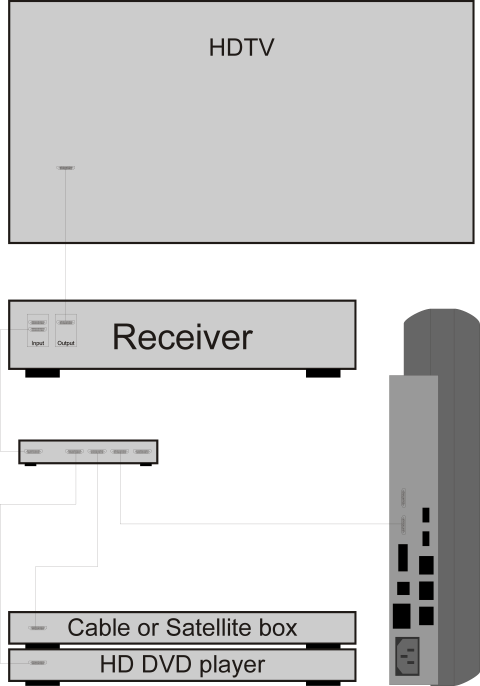
What about using high-end receivers as an HDMI switch? You can do that but most receivers only have 2 HDMI inputs and 1 HDMI output. You also need to be aware that these receivers may not support the latest HDMI 1.3 specification. What may be the most practical solution is to use a 4-port HDMI switch and route the output in to the receiver to get 5.1 or 7.1 audio output. That saves you from wiring hell with the simplicity of consolidated audio and video in HDMI. See the image below for how this is hooked up.
Can I hook up my computer via DVI to HDMI cable? Yes, and you get the best results doing it this way. HDMI is backwards compatible with the DVI interface although you lose the digital audio aspect of HDMI if you connect a DVI device. That means you're back to the RCA jacks or using an S/PDIF connector if your computer has an S/PDIF out. Note that the S/PDIF won't work as well as the HDMI connector in some rare instances because the bandwidth isn't high enough. For example, multiple uncompressed audio streams from a Blu-Ray source may not fully function unless you're running audio over an HDMI cable.
Some newer video cards, both discrete and integrated, have HDMI outputs on them which include audio so this is something to be aware of. But most video cards today are still DVI based so you usually have no choice but to use a DVI to HDMI cable. The only thing you really have to worry about is whether your video card supports the native resolution of the display you're outputting to. For example, a lot of 32 to 40 inch LCD HDTVs have 1366x768 resolution and not all video cards support this odd-ball resolution. Not all video cards can drive the massive 1920x1080 resolution of true 1080p HDTVs and even if they support it, it may not support game play at that resolution unless it's a really fast video card.
Here are some examples of cheap HDMI to DVI cables:
What is HDCP? HDCP is a copy protection scheme that needs to be supported in the hardware and software on both the source and output device if you want to play content from HD DVD or Blu-Ray movies over a digital interface such as HDMI or DVI. Not all devices with DVI/HDMI outputs or inputs support HDCP nor do they need it. If either the source device or the output device doesn't support HDCP, the content won't play and it must be routed over an inferior analog interface. For some HD DVD or Blu-Ray content, output over an analog interface might knock the quality down to quarter resolution.
<Return to top>