Killing the crapware problem on PCs

As many readers know, I'm not a fan of the Apple ads, but this one was spot on and not to mention funny. Poor old PC looked like a balloon and his dangling arms almost made him look like Jabba the Hutt.
One of the things that bother me the most about the PC industry is the inclusion of all that crapware (or crapplets) PC makers put into their computers. The same thing extends to the software industry as a whole. Every time you download some software, you're prompted (often the default setting) to install some kind of add-on for your Web Browser. By the time it's all said and done, we're looking at a computer that spends three to five minutes booting up and a Web Browser that's so jacked up that half the screen real estate is taken up by utilities that people never use. Of course, this isn't entirely unique to the PC industry, and I've seen Macs loaded with lots of junk during the startup process as well, but at least you don't get all that crap in a brand new Mac.
The first thing I do whenever I get a PC from any computer maker is format the entire hard drive and start with a clean slate. This isn't feasible for most people, so I'll usually resort to my second option, which is to clean out the startup with the MSCONFIG utility you can run from the start - run prompt (run prompt not needed with Vista).
The first thing I do is nuke all services that didn't come pre-installed with Windows. I simply check Hide All Microsoft Services and clear out everything else. There's no reason software needs extra services to work, with the exception of antivirus software and some VPN or network connectivity software (not entirely happy about that). A lot of IT departments like to load a bunch of junk utilities, and I've never been a big fan of that (at least when I was setting the desktop imaging standards). Some readers know I'm not a fan of desktop antivirus either, but I realize that your normal user will need it. The least obnoxious desktop antivirus solution is a free one from AVG. TrendMicro's corporate products seem to be tolerable and they're easy to manage, though I do wish they would audit their code better so that the next malformed compressed file doesn't completely root your PC.
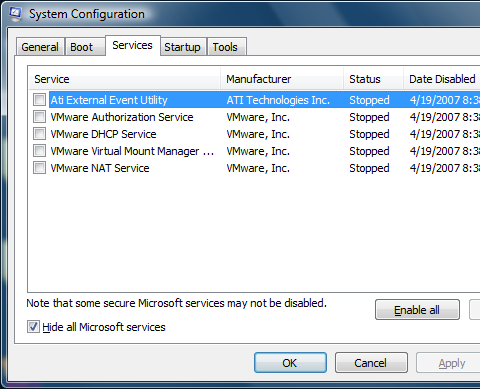
As you can see from my configuration, VMware tends to load a bunch of junk that you don't need for the routine operation of VMware workstation. Anyone who loads Oracle will be in shock when they see how many services and startups it loads. Logitech in the past has loaded a bunch of junk into the services and startup area for its video conferencing products, but I've been using the native Vista drivers instead. A lot of printers and other consumer products like routers will load junk into the services and startup area if you follow their instructions and load their CDs. Internet service providers ask their users to load "Internet Acceleration" software, which inevitably causes serious issues with the computer. Everyone in the entire PC industry from PC makers to accessory makers are in a race to see who can load the most crapware in people's computers.
The next thing I do is kill all the startup junk under the startup tab in MSCONFIG.
The picture above is actually just the tip of the iceberg, and there's tons of other stuff that I disabled as well. I'm pretty careful about the software I load on my computer and even I have so much stuff to disable. I've seen the typical user desktops that have so much junk loaded that their task tray lines the entire bottom of the screen and their startup list is a mile long. What I generally do is click the Disable All button in the lower-right corner of the screen and then selectively enable the things I know I want. The only thing you'll need to enable is your desktop antivirus solution. I'm a regular user of Live Messenger and Skype, so I keep those things in the startup list. Groove is something that comes with Office 2007, and I haven't figured out how to disable that yet without having it automatically come back, though it doesn't seem to be causing any problems.
[Update 4/23/2007 - Reader "Master Tech" posted this awesome tip. Microsoft Sysinternals has this tool called Autoruns, which is even better than MSCONFIG. It shows you all the hidden stuff that crapware/adware/malware might inject that may be hidden. Autoruns can hide all the digitally signed entries so that it will show you ALL of the non-Microsoft entries that gum up your PC.]
Between clearing out the non-Microsoft services and almost the entire startup folder, Windows XP should boot in 25 seconds (not including the system post time). A crapware-free install of Windows Vista should take about 35 seconds (excluding the system post times) to boot up, while shutdown times should never exceed a few seconds on XP or Vista.
If you've had your computer for a while and you've installed more junk over the years that clogged up the registry and hard drive, a more extreme measure is to use CCleaner, but that requires some care. I'll follow up with another article on how to use CCleaner to clean out even more crapware embedded in the file system and registry.