ie8 fix
madison

Realtek network driver silently corrupts data

By | July 28, 2007, 9:46pm PDT

Summary: [Update 8/8/2007 - Realtek silent data corruption caused by firmware] One of the three most dreaded phrases in the computer world is “SILENT DATA CORRUPTION“.  Your data gets corrupted just enough that it isn’t readily detectable by most applications and operating systems and you think your data’s good until you actually need to use it.  This weekend as [...]

[Update 8/8/2007 - Realtek silent data corruption caused by firmware]

One of the three most dreaded phrases in the computer world is “SILENT DATA CORRUPTION“.  Your data gets corrupted just enough that it isn’t readily detectable by most applications and operating systems and you think your data’s good until you actually need to use it.  This weekend as I was doing some routine maintenance tasks on my home computer and moving some data over my Gigabit LAN (now cheap and common), I got bit badly by silent data corruption.

My Realtek network adapter which is one of the most ubiquitous on-board Gigabit Adapters in the world was the culprit and it had been causing me some massive grief for months and I just didn’t know it.  Almost every modern Desktop Motherboard I know uses this particular on-board Gigabit adapter and I have to wonder how many millions of people are being affected by this issue and I have to wonder if this problem exists in any of the Server-based adapters from Realtek.  More specifically, Realtek driver version 6.191 was the culprit.
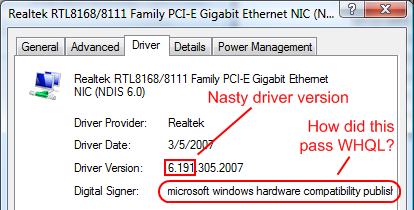
The problem had gotten so bad that if I dared use anything like µTorrent in the background, the data corruption rate was so bad that I couldn’t send any email attachments.  Even my Windows Update downloads got severely corrupted causing a permanent inability to update Windows Vista and I had to spend half a day with a good Tech Support guy from Microsoft and some Microsoft developers to get the update problem fixed.  Initially I was wondering if this was caused by uTorrent but it turns out that uTorrent was merely the trigger and it was the more extreme case because it transmitted and received so much more data.

So when I was transferring some videos from one computer to another today, I noticed that the playback was filled with playback artifacts.  I remembered that the file copy operations would force me to retry once or twice per file.  The resulting videos had severe artifacts during the playback and I knew something wasn’t right.  I downloaded a copy of Advanced CheckSum Verifier which generates a text file list with MD5 checksums that will tell me if the files have been altered.  It turned out that all but the smallest files in the directory I copied had been altered which means the data was being silently corrupted.

I shut off uTorrent and tried the file transfer again and Windows Vista didn’t prompt me to re-copy anything which was a positive sign.  I ran the checksum again and found that although the hundred megabyte file had copied correctly, two of three gigabyte sized files were corrupted.  This tells me that there is approximately one silent transmission error for every billion bytes sent so now I’m left scratching my head.  The error rate had definitely declined but the problem hadn’t entirely gone away.  Then I realized that Skype and MSN (while hardly active) were still running on the PC in question so I shut off Skype and MSN and tried to send the files again.  As I suspected, the transmission errors stopped and every file passed the MD5 checksum test.

At this point it was obvious that something was wrong with the network subsystem on the machine that could only reliably transmit data when just one application was using the network at a time.  I suspected that maybe it was the network driver so I upgraded to the latest 6.195 driver (downloaded from here).  I then ran the torture test with uTorrent going full blast while copying a few gigabytes of data to the other computer and everything copied without a single checksum error even under the worst conditions.  So it’s obvious that Realtek driver version 6.191 had been the culprit all along and it had caused me a lot of grief.  The problem is that now I’m worried about what else I corrupted during the last four months.

The immediate lesson to my readers is that if you better check your drivers because there’s a good chance you have Realtek network adapters.  If you do, it would be a good idea to upgrade to the latest version.  The long term implications are a bit more complex because I have to wonder how driver version 6.191 got through hardware qualification at Realtek and I also have to wonder how it got through Microsoft’s WHQL (Windows Hardware Qualification Labs).

Why aren’t Realtek and Microsoft doing this type of multi-gigabyte multi-application data transmission testing?  There is an expectation that WHQL means quality given the fact that the Q in WHQL stands for “quality”.  Why can’t Windows Vista (or any other Operating System) have more robust file copying capability to overcome these types of transmission errors and why can’t Windows Vista do checksum testing to warn the user if there is data corruption?  I realize that this is more CPU intensive but we’re in the era of multi-core CPUs and I don’t think it’s unreasonable for users to expect some level of reliability.

Kick off your day with ZDNet's daily e-mail newsletter. It's the freshest tech news and opinion, served hot. Get it.

Topics

Disclosure

George Ou

http://blogs.zdnet.com/Ou/?page_id=557

Biography

George Ou

George Ou, a former ZDNet blogger, is an IT consultant specializing in Servers, Microsoft, Cisco, Switches, Routers, Firewalls, IDS, VPN, Wireless LAN, Security, and IT infrastructure and architecture.

Related Discussions on TechRepublic

Did you know you can take part in these discussions with your ZDNet membership?
57
Comments

Join the conversation!

Just In

Just encountered this problem with vista/ubuntu
dh@... 20th Aug 2007
I've just got a new laptop with this problem under both vist and linux. I downloaded the new driver but the problem remains.

How would you tell if the firmware has been upgraded?
0 Votes
+ -
thanks
yagijd 29th Jul 2007
That clears up a couple of blue screen mysteries that went away after changing a NIC.
0 Votes
+ -
Did you have the same problem?
georgeou 29th Jul 2007
Did you have the same problem with the Realtek NIC drivers?
0 Votes
+ -
Not just the driver
Yagotta B. Kidding 29th Jul 2007
George, TCP/IP is supposed to be robust in cases like this -- bitflips lower in the stack should be caught at the datagram level.

If a driver error can corrupt data, it's because the operating system isn't verifying it higher up.
0 Votes
+ -
I wonder how other OSes handle this
georgeou 29th Jul 2007
I wonder how other OSes like Linux and OS X (BSD) handle this.
0 Votes
+ -
Not just the driver
DennisErnst 30th Jul 2007
I'm pretty sure TCP only protects its own headers. The data is not checksumed because that would be too computationally intensive.

ernie
0 Votes
+ -
From my ancient...
Cardinal_Bill 30th Jul 2007
kernel as found in the /usr/src/linux/ipv4/ip_output.c file

/* Generate a checksum for an outgoing IP datagram. */
__inline__ void ip_send_check(struct iphdr *iph)
{
iph->check = 0;
iph->check = ip_fast_csum((unsigned char *)iph, iph->ihl);
}
0 Votes
+ -
Yep.
Cardinal_Bill 31st Jul 2007
From my quick read of the TCP/IP Network Administration book by O'Reilly it looks like the Application Layer is responsible for the verification of data integrity. So, if I read it correctly and this is the case, exactly what application was he using to transfer the data and why didn't it catch the error(s) everytime?

Of course you could also look into the compatibility of the NIC's and whatever lies between the two computers (routers/switches/etc.)
0 Votes
+ -
Actually, it's the data too
fde101 3rd Aug 2007
The IP "wrapper" only checksums the header, but the TCP packet which is contained inside of the IP packet does checksum the data, as does UDP.

TCP is meant as reliable, in so far as it represents a stream of checksummed data; the protocols should maintain the data packets in the correct order, and automatically retransmit any dropped or corrupted packets.

UDP is considered unreliable, in that packets may be delivered out of order or dropped altogether; a checksum is used to look for corrupt data, in which case the packet will generally be dropped and just disappear rather than being retransmitted.

Here is a better resource:

http://www.protocols.com/pbook/tcpip2.htm
0 Votes
+ -
Can you check this?
pjotr123 29th Jul 2007
I'm starting to worry. My motherboard also has a Gigabit adapter. My machine runs on Ubuntu 7.04. This is what Linux says about the adapter:

*-network
description: Ethernet interface
product: L1 Gigabit Ethernet Adapter
vendor: Attansic Technology Corp.

Is this the same adapter as yours? I see no mention of Realtek, only of Gigabit.

Greetz, Pjotr.
0 Votes
+ -
This is the driver:
pjotr123 29th Jul 2007
driver=atl1 driverversion=2.0.6
0 Votes
+ -
This was a driver issue
georgeou 29th Jul 2007
1. I'm not sure you have Realtek hardware.
2. This is a Windows Driver issue.

If you're concerned about it, do the type of multi-application test where you transmit a few gigabytes and see if there are any errors.
0 Votes
+ -
Nice article George!
bportlock 29th Jul 2007
I've just spent a while checking the office kit via remote login. Fortunately the controllers in all the server are Tornados (Dell & HP kit) or Intel on the desktops! Phew!!

"I suspected that maybe it was the network driver so I upgraded to the latest 6.195 driver"

Of course, the problems is that at one point in time, this *was* the latest driver. If we go around testing every single component because we can't trust them then we might as well build the software ourselves a la open-source! This makes your next point about WHQL certification very pertinent - how *did* this get certified?

Finally (and I know George can't answer this) an additional consideration is other OSes. Is this a generic fault across the driver for all OSes or is the damage limited specifically to Windows? If anyone out can test this on Linux or Mac, posting the results here or contacting George with them could be very useful. Was this driver even availabel for other OSes?

Perhaps George could add a footnote to the blog entry asking for submissions on this point?
0 Votes
+ -
Updates for other OS
bportlock 29th Jul 2007
From looking at the dates on the RealTek website it says

Linux - No driver provided by realtek, driver is built in to the kernel

Mac OSX - Current driver is 23 Mar 2006 which is a year older than George's faulty driver.

Various Unixes - drivers even older than OSX
Thanks.
0 Votes
+ -
See my post above...
bportlock 29th Jul 2007
... it seems that (according to Realtek) Linux has a native driver for this and the OSX driver is getting on for 18 months old.
0 Votes
+ -
Linux has nearly all hardware drivers built into the kernel. But they are still just that: drivers. Sometimes supplied by the hardware manufacturers, sometimes coded by Linux developers. So, these drivers can have issues as well, just as Windows drivers can.
0 Votes
+ -
I understand what you're saying...
bportlock 29th Jul 2007
... but from the text on the RealTek site it would *seem* that they don't write that driver. Maybe that's a bit much to be reading into their words, but it seems to me that if the issue George outlined was occurring in the kernel drivers then it would have been flagged by now. By the nature of Linux, many systems get used as servers and moving huge volumes of data is a server's "bread and butter".

In any case the Linux driver is liable to be substantially different from the Windows version that George found the fault with, if only because the Windows one is 4 months old.
0 Votes
+ -
Thanks, somewhat reassured
pjotr123 29th Jul 2007
Indeed, it's unlikely that it's basically the same driver, given the release date of George's driver. That's somewhat reassuring. Thanks for replying.

Greetz, Pjotr.
I was just surprised something this serious wasn't caught in QA. Maybe they only tested it with one stream at a time and this problem occurs when there are two applications trying to use the network stack at the same time.
0 Votes
+ -
No problem on Linux!
Linux Geek 30th Jul 2007
I've checked it. Unlike windoze the transfer on Linux runs as a charm!
What are you waiting for?
Switch to Linux!
0 Votes
+ -
Silly Boy!
yyuko@... 30th Jul 2007
Remember, I'm a Linux (SUSE) user too.

The problem George outlined is a problem specifically with Realtek's writing of the driver for Windows. It is not the fault of Windows.

By the same token, whomever wrote the driver for the Linux kernel could have written it with the same error as well.

On the plus side, the open source world probably would have caught it quickly and issued a fix quickly. On the negative side, unless you're geeky enough, users aren't going to know where to find the fix unless they subscribe to a linux version where updates are issued. Otherwise, for the less geeky user, it is much easier to check the hardware manufacturer's site for dirver specifically for that piece of hardware.

The situation George has outlined isn't all that easy for a standard user to resolve in Linux. Yes the problem George had didn't exist on our Linux boxes (and we can breathe a sigh of relief), but that's not to say it couldn't have happened.

The overall scheme of Linux is a reason to "Switch to Linux!" yes, but the driver issue here is not.
0 Votes
+ -
WHQL
GW Mahoney 29th Jul 2007
I think WHQL just means that it shouldn't crash the OS, which is really all that MS is worried about. NIC drivers are common, but when you consider all the different types of drivers that get WHQL certification, of course they are not equipped to test the proper function of everything that can run on Windows. So they just check stability.

I'm no friend of Microshaft, and I think WHQL is extortion, because of the user warning in place since XP SP1, but I wouldn't fault them for passing that driver.
I'm the opposite. I think the warnings are good, but I think they should test for this kind of stuff. Silent data corruption is NOT cool and it's WORSE than driver crashes. With driver crashes, you know. With data corruption, you may not know.
0 Votes
+ -
Great Article George (NT)
SO.CAL Guy 29th Jul 2007
(NT)
0 Votes
+ -
Pedantry rules!
bportlock 29th Jul 2007
George said: "One of the three most dreaded phrases in the computer world is ?SILENT DATA CORRUPTION?. "

What are the other two "most dreaded phrases"?

Just curious..... wink
0 Votes
+ -
'We've been hacked"
georgeou 29th Jul 2007
'We've been hacked".
0 Votes
+ -
And? (NT)
Anton Philidor 29th Jul 2007
.
0 Votes
+ -
'The server's down, and so is the backup'. I'm sure there are many more. Intermittent bugs like this silent data corruption are some of the worst because it's hard to pin them down.
0 Votes
+ -
Re: And?
yyuko@... 30th Jul 2007
"Who unplugged the server to plug in the coffee machine?!?"
0 Votes
+ -
Not that unusual it would seem
bportlock 30th Jul 2007
http://www.theregister.co.uk/2007/06/19/life_support_off

Police in Southern Germany are quizzing a 17-year-old car crash victim who turned off a fellow hospital patient's life-support machine because it was keeping him awake.
0 Votes
+ -
... and needs to close. Please report this error to Microsoft.
0 Votes
+ -
'the RIAA is calling' (nt)
Valis Keogh 30th Jul 2007
.
and upon reboot:

You have three days to activate your copy of Windows.
0 Votes
+ -
Most dreaded phrase
Real World 30th Jul 2007
"The Linux guy just quit."
0 Votes
+ -
Hey, there is some truth to that
georgeou 30th Jul 2007
nt
0 Votes
+ -
I always thought the most dangerous virus would be one that infected a machine but didn't impact performance or start calling chat rooms for bot instructions. Just have it randomly corrupt small bits of data here and there. Change an address in a mailing label, corrupt an ssn of a customer, change one digit in a credit card number. Look at what George had to deal with on something as straightforward as a corrupt driver. There was no intent of malice there.

Imagine a stealthy, mostly silent virus that caused small data corruptions multiplied across an enterprise. Corrupt data making its way into backup systems over time. Impossible to distinguish the virus action from a simple keystroke error.

The most insidious attack imaginable on an enterprise is one where the target wakes up one day and realizes they can't trust their own data. That's the doomsday scenario for a world that runs on computerized data.
0 Votes
+ -
Seems unlikely...
wolf_z 30th Jul 2007
George, it seems very unlikely nobody's noticed this if the problem is widespread. Could it be the driver became corrupted somehow *after* it was intalled? After all, the symptoms (and fix) would be the same.

The only way to verify it for sure would be to download the suspect driver again, and see if the problem reoccurs.
0 Votes
+ -
It is equally likely....
bportlock 30th Jul 2007
... that the driver in question is not widespread as it is a few months old. Most kit on shelves or being bundled probably uses an older driver.

George's problem may be his own advice of "keeping your drivers up to date". If the most up to date driver is duff then

a) George'll get nobbled
b) most other people won't

which is what we seem to be seeing.
0 Votes
+ -
AUGH, thanks for the heads up george
Valis Keogh 30th Jul 2007
now when i get home i have 5 computers to check... grreeeaaattt... one of them is a 4 terabyte file server, i haven't noticed anything "per see" but i'm going to check driver versions anyway...

Valis
0 Votes
+ -
utorrent, bit torrent et al
WISP 30th Jul 2007
Folks, I know you don't want to hear it but, yes as a WISP we have banned any of the "torrents". The abuses ran rampant, the use of bandwidth was excessive and we decided that the only solution was to ban them. We had started by restricting the number of connections to 5 and the data rate to 768kbps. People would just turn torrent on, load up several movies to download and walk away.
It's a shame that a few had to spoil it for the rest, but that's what happened.
0 Votes
+ -
Huh?
ejb78923 30th Jul 2007
What does this have to do with the topic?
0 Votes
+ -
ejb "HUH"
WISP 30th Jul 2007
If you read the article you would note that u torrent had been running in the background and presented a possibility for creating errors.
Further in the article George mentioned that he used u torrent as a torture test.
Torrents are nothing but major headaches for ISP's with more ISP's blocking them every day.
0 Votes
+ -
Maybe. . .
bkinsey@... 30th Jul 2007
One episode of network data corruption which goes away after a drvier update does not necessarily imply a "bad" driver, much less a widespread epidemic. Until you see a second issue, it's not even a very certain diagnosis. An installed driver is at least partly machine specific, in that it's possible it could have been corrupted by something else installed on your particular system, or some condition specific to it (i.e. power events, system crashes, etc., etc.)

None of which says it ISN'T a driver problem, or even an "as supplied by Realtek" driver problem. But it may not be.
Very unlikely. A corrupted driver would not be this quirky. If you randomly corrupted a few bytes out of a driver DLL file, I highly doubt you could get this kind of behavior. Chances are, you would get an unworkable driver. I'm not saying that random driver corruption isn't possible, just highly unlikely.
0 Votes
+ -
Does Vista ship with the Bad Driver?
WiredGuy 30th Jul 2007
Is the "known bad" driver the one that the OS installs during original installation? If so, this will be fixed with SP1, right?
0 Votes
+ -
No, an even older driver comes with Vista. I think Windows Update might have upgraded me to that bad driver, I'm not entirely sure.
0 Votes
+ -
Good article
Uber Dweeb 30th Jul 2007
A bit alarmist, but otherwise a good article for a change.
0 Votes
+ -
Realtek
stand3 30th Jul 2007
Does this affect WXP?
I didn't test Windows XP, but it probably wouldn't be a bad idea to upgrade to latest drivers and run a multi-gigabyte multi-application file transfer test and compare checksums.
0 Votes
+ -
I've just got a new laptop with this problem under both vist and linux. I downloaded the new driver but the problem remains.

How would you tell if the firmware has been upgraded?

Join the conversation!

Formatting +
BB Codes - Note: HTML is not supported in forums
  • [b] Bold [/b]
  • [i] Italic [/i]
  • [u] Underline [/u]
  • [s] Strikethrough [/s]
  • [q] "Quote" [/q]
  • [ol][*] 1. Ordered List [/ol]
  • [ul][*] · Unordered List [/ul]
  • [pre] Preformat [/pre]
  • [quote] "Blockquote" [/quote]
ie8 fix
Click Here
ie8 fix

The best of ZDNet, delivered

ZDNet Newsletters

Get the best of ZDNet delivered straight to your inbox

Facebook Activity

White Papers, Webcasts, & Resources
ie8 fix
ie8 fix