madison

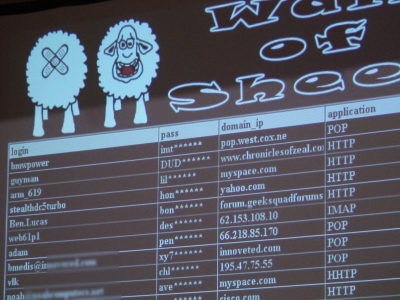
Wall of Sheep at DEFCON illustrates what not to do

By | August 4, 2006, 4:35pm PDT

Summary: Because most of the common web technologies used in the world are still using clear text authentication, hackers at DEFCON illustrate why this is such a bad idea. Every year at DEFCON when one would think that attendees should know better, the Wall of Sheep is populated with careless users. I actually stopped by because of my paranoia and breathed a sigh of relief when I verified that I wasn’t on the wall.

At DEFCON 2006 in Las Vegas, a few "lucky" attendees "volunteered" to be real life examples what clear text authentication protocols you shouldn’t be using.


User’s passwords caught and posted on Wall of Sheep.

Because most of the common web technologies used in the world are still using clear text authentication, hackers at DEFCON illustrate why this is such a bad idea.  Every year at DEFCON when one would think that attendees should know better, the Wall of Sheep is populated with careless users.  I actually stopped by because of my paranoia and breathed a sigh of relief when I verified that I wasn’t on the wall.


DiscDuce, CRYPTO, DooLittle, Damien, Riverside, Cedox

Here we have members of the Wall of Sheep team performing the traffic analysis and password harvesting off the wired and wireless network.

Kick off your day with ZDNet's daily e-mail newsletter. It's the freshest tech news and opinion, served hot. Get it.

Topics

Disclosure

George Ou

http://blogs.zdnet.com/Ou/?page_id=557

Biography

George Ou

George Ou, a former ZDNet blogger, is an IT consultant specializing in Servers, Microsoft, Cisco, Switches, Routers, Firewalls, IDS, VPN, Wireless LAN, Security, and IT infrastructure and architecture.

Talkback Most Recent of 14 Talkback(s)

  • You are right on with this
    Yes,

    A disturbing amount of people are using clear text. You would think everyone would have learned by now.
    ZDNet Gravatar
    IAHawkeye
    4th Aug 2006
  • secure open network comms with an ssh tunnel at least
    if you have a linux box and a broadband connection running on your home network, you can have secure browsing using an ssh tunnel to establish an http tunnel over the ssh connection to avoid clear text transmission completely. Here is a quick list of what is needed:

    -dynamic dns
    -sshd & squid running on a server (linux, osx, or cygwin)
    -home router w/ a port forward (to the server)

    Set up dyndns (or whatever dynamic dns you like) and run the client on the server. Configure squid so the localhost port is listening, a good example:
    http://www.howtoforge.com/linux_secure_browsing_squid
    I prefer to change sshd_config and add a second sshd port other than "22" like 2080 or whatever.
    Set up the port forward for the alt port on the router to the server.
    Then when you are at a public hotspot, just "ssh -L 8080:squidhost:8080 username@squidhost" and set up your browser to use the localhost:8080 port and all your web traffic is going through the secure tunnel!

    If you dont want or have a home server you can always use tor / privoxy, although I have found it a bit slow...
    http://tor.eff.org/overview.html.en
    ZDNet Gravatar
    ~doolittle~
    6th Aug 2006
  • Ouch...
    I see a few familiar websites on there. I will be sure to use a few extra precautions when I surf now.

    My guess is that old standby that I have for a password is no longer any good. Such a bummer.
    ZDNet Gravatar
    nucrash
    6th Aug 2006
  • POP is interesting
    I wonder how many people are just hitting "get new mail" and not realizing their password is going across the net in cleartext. Most mail programs let you type it in once and forgetaboutit ...
    ZDNet Gravatar
    Roger Ramjet
    7th Aug 2006
  • secure mail
    That's why I run my own mail server and access it using secure IMAP.
    ZDNet Gravatar
    JDThompson
    7th Aug 2006
  • Mail Server
    Any chance for setup info on this?
    thanks
    ZDNet Gravatar
    t2m@...
    12th Aug 2006
  • Most servers already support secure POP
    Problem is that most people just don't turn it on.
    ZDNet Gravatar
    georgeou
    7th Aug 2006
  • Good idea
    Everyone knows that safer, saner, security needs to be championed by someone, why not hackers? Hats off to them.
    ZDNet Gravatar
    michaeljg
    7th Aug 2006
  • Gmail security
    I notice that Gmail does the login via ssl, then turns off the ssl once you're logged in. So your password is safe, but email isn't?
    ZDNet Gravatar
    JetJaguar
    9th Aug 2006
  • force https
    I force HTTPS on every google service.
    either do this manually orwith Firefox extension
    ZDNet Gravatar
    (``-_-??)
    14th Aug 2006
  • Which Extension
    Which extension do you use to force https with Google?
    ZDNet Gravatar
    thefrozenpenguin
    19th Jul 2007
  • CustomizeGoogle extension...
    The best extension that fits the bill of what you're asking is CustomizeGoogle http://www.customizegoogle.com/.

    Keep in mind though, after you install it you MUST configure the extension properly (older versions set SSL by default but more recent releases do not). In fact, the extension will allow you to force SSL on all services that Google offers securely (and not just the sign-in portions). I know that GMail, Calendar, Docs, Reader, and History can all be forced to run over SSL connections while being accessed via Firefox.

    Although some other posts suggest to simply type in "https://mail.google.com/" (or whatever), this does NOT guarantee that your session will flow over https connections for their entirety. For example, I noticed that occasionally (w/out using the extension and manually typing in a https...) that after visiting an outside link in GMail (message is on a httpS page to start with), then navigating back to GMail, my connection may very well revert back to a non-secure connection. My guess is that vanilla http is Google's default and will revert back to that whenever it gets the chance (obviously, makes sense from their side...why host more CPU intensive secure pages if you don't have to).

    Anyway, give that extension a look; highly recommended (oh, another cool thing is it blocks Google Ads...yeah, I'm sure not something that Google smiles upon).
    ZDNet Gravatar
    Someguy2
    21st Jul 2007
  • Gmail ssl
    You can log into the secure gmail site by typing in https://mail.google.com/mail/
    Note the httpS For some reason, logging into the 'default' http://mail.google.com/mail
    does indeed lose you the secure connection.
    ZDNet Gravatar
    rpalmeri
    20th Jul 2007
  • even tech/security people don't follow the advice
    that's so funny to see, Wall of Sheep is getting more popular, as more people underestimate SSL for secure authentication .... Wireless networks are pools of clear-and-easy-to-steal data. Take the advice use secure connections!
    ZDNet Gravatar
    a.qarta@...
    12th Aug 2006

Talkback - Tell Us What You Think

Formatting +
BB Codes - Note: HTML is not supported in forums
  • [b] Bold [/b]
  • [i] Italic [/i]
  • [u] Underline [/u]
  • [s] Strikethrough [/s]
  • [q] "Quote" [/q]
  • [ol][*] 1. Ordered List [/ol]
  • [ul][*] · Unordered List [/ul]
  • [pre] Preformat [/pre]
  • [quote] "Blockquote" [/quote]
Click Here

The best of ZDNet, delivered

ZDNet Newsletters

Get the best of ZDNet delivered straight to your inbox

Facebook Activity

White Papers, Webcasts, & Resources