How to ruin a perfectly good Sunday with Windows Vista

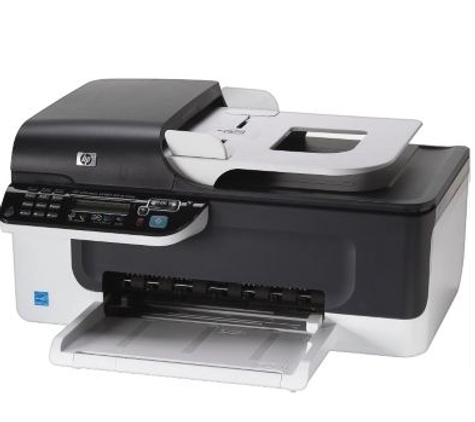
The HP J4580 Multi-Function Inkjet Printer, Scanner and Fax. The $99.00 multifunction device that was the icing on the cake that ruined my Sunday.
I always know when my weekend is going to be ruined. It usually starts like this:
Wife: Jason?
Me: Yeah?
Wife: Mom just called, we need to go to their house on Sunday, she's having computer issues. She can't print, or log on to dad's laptop downstairs.
Me: Oh @#$%.
Some perspective is required -- about a year ago, I got my mother-in-law a new Lenovo ThinkPad. It was pre-loaded with Vista Home, and I have been steadily maintaining it with patches, Service Pack 1 and everything needed to keep it healthy. So I was surprised that suddenly, things had started to go south.
Click on the "Read the rest of this entry" link below for more.
It turned out that it was a hardware problem. Her printer, an older HP 932c, had finally decided to die -- rather, the inkjet head was gummed up with dried up ink and her ink cartridges, which were several years old, were also well beyond their expiration date. Rather than try to fix this unit and buy new supplies, which could easily equal a good portion of the cost of a new printer, I thought it was a good idea that we replace her printer. Mom is a real estate agent, and also has to scan and fax, so I thought it was a good idea if we also at the same time pulled her old Fax and legacy Canon scanner out of the mix, and get her running with a multifunction device (MFD).
I myself have had varying levels of success with MFDs. Between my last two companies that I have worked at, I've had two different Lexmark-manufactured units (One a Dell AIO and the other an actual Lexmark) and now I'm evaluating the Epson Workforce 600, which is their top of the line wireless MFD (which I'll talk about in a future post).
While examining my Father-in-law's PC, I sent my wife and my Mother-in-law to their neighborhood Staples, where they had a number of MFD units in stock. Our choice came down to a Lexmark with built-in wireless which would have been $125 after rebates or a $99 HP J4580. After a quick determination that they really didn't need the wireless capability, as it was going to be plugged directly into the laptop via USB, we went with the HP. The cheap in-store price without having to go thru the rebate hassle also seemed to seal the deal.
While the women were out of the house, I cautiously approached my Father-in-law's low-end Acer Aspire laptop. I had him order one of these about six months ago from COMPUSA.com, when it was onsale for under $450. His old Toshiba laptop, which was running Ubuntu 7.10 for about six months had died, and he needed an inexpensive and quick replacement. It was pre-loaded with Vista. I had decided that the time I didn't have the energy or the wherewithal to wipe the system out with Ubuntu again -- I just set him up with his GMail icon and a few minor tweaks and let him have it. Besides, all this 72-year old retired securities trader does with his PC besides email is use Scottrade to watch the market, use Picasa, and play fantasy football on the web.
In hindsight, this was a bad idea.
I log in only to find that the pre-loaded virus scanner, Norton Internet Security 2007, had expired. Apparently, a few months ago, when it prompted my father-in-law to renew his trial subscription, he decided that $59.00 was too much money. He also apparently decided not to let Windows do any updates to his system. So it was now riddled with viruses and spyware, and in a completely unpatched state.
I then proceeded to clean out all the spyware, junk and viruses, by installing and running Advanced SystemCare 3 Free Editon, CCLeaner.com, Spybot Search & Destroy, un-installing the expired Norton and replacing it with Avast! Home Edition. Once the computer was verified clean, I accepted the Microsoft Updates which included Vista SP1 and a number of post-SP1 fixes. Total time investment to clean up the mess? We arrived at 1PM, it was now 5:30. Four and a half hours had now passed. I verify that mom can log into the box, and then proceed upstairs to hook up the new MFD on her Lenovo.
Generally speaking I like HP's printers and scanners -- they have solid inkjet technology and very good output quality. However, I have to say that after this last Sunday's experience, their software integration stack for the MFDs with Vista is awful. Bloated, buggy, and horrible.
Hooking up the printer itself was simple -- I unboxed it, pulled all the packing materials off, inserted the new cartridges, connected it up to the USB port with her old USB cable (the device doesn't come with one included) and powered it on. Vista recognized the device, and prompted me to insert the HP driver CD. I heard the characteristic "plonk" sound of the device being recognized, and Vista reported the hardware was working. I then installed all 500+ MB of HP's included MFD management software, which includes the scanning wizard, OCR, fax management, et cetera.
After about a half an hour of scripted software installs, I clicked on the HP Solution Center icon -- a few seconds later, I get a dialog box that tells me that "no HP devices have been detected, HP Solution Center will close now."
Huh? But Vista just told me the device was operational!
So I sent a manual test fax directly from the unit. Works. I checked Vista's printer configuration, the device is set as default printer. I send a test print and print out a few documents. No problem. But how do we scan if HP Solution Center is busted?
It then occured to me that the J4580 was probably TWAIN compatible. So what do I do? I install the Open Source GIMP For Windows, do an Acquire -> Scanner/Camera, pick the HP device, and perform a scan. Seconds later I have a high resolution image from mom's holiday calendar on her desktop.
Screw you, HP, and take your buggy software with you. Have a nice @#$%^ing day.
After instructing my Mother-in-law in how to perform scans with GIMP, I look at my watch, it's 7PM. I'm now starving and extremely punchy, having worked through the entire afternoon and the evening to get all this junk running. I check my BlackBerry, which is blinking wildly. My heart sinks -- someone at work needs me to stay up late and work on a Visio diagram of a VMWare environment for an important customer for Monday.
So much for going out for dinner with the in-laws. Chinese delivery at home, here I come.
Does my Sunday sound anything like one of yours? Talk Back and Let Me Know.