Tech Broiler

Jason Perlow and Scott Raymond

MFD Printers are Hell, and so is Family PC Tech Support.

By | May 23, 2010, 12:45pm PDT

Summary: According to TheOatMeal.com, Printers were sent from Hell to Make Us Miserable. I’ll raise him one — so is doing PC tech support for your family.

According to TheOatMeal.com, Printers were sent from Hell to Make Us Miserable. I’ll raise him one — so is doing routine PC tech support for your family.

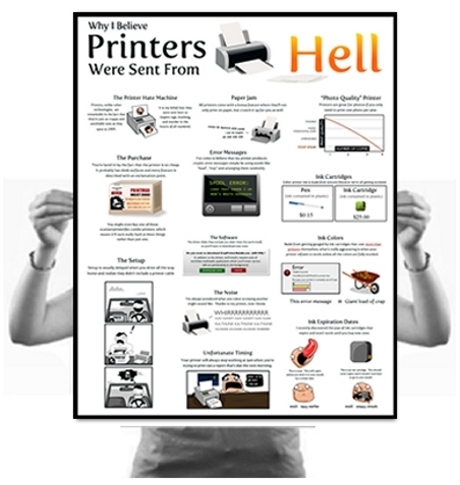
Recently a popular web cartoonist, Matthew Inman, who posts at his site TheOatMeal.com, released a funny “Printers were Sent from Hell” cartoon which echoes many of my thoughts about modern printers.

I share his hatred for modern PC printers, because they’ve become so much more complicated than they used to be. Inman’s cartoon is funny, only because so much of it is true. But it’s not just printers that suck, it’s doing PC support for your family that sucks, period.

Some of my most popular articles on Tech Broiler have been about experiences dealing with my In-Laws.

My Mother-in-Law is actually a very competent and careful computing user, so supporting her is actually not much of a problem in and of itself. She has a few special needs, such as the ability to log into her Real Estate Multiple Listings Service (MLS) over a browser connection and also has to be able to scan and print from a Multifunction Printing Device (MFD).

Things definitely improved when I moved her from Windows Vista to Windows 7, and after exchanging her awful Hewlett-Packard MFD for an Epson Workforce 600.

At least I thought they improved. She was fine for about a year. No problems, just the occasional “How do I do this” question. No biggie. No need for 3 to 4 hour visits doing OS refreshes, patching, problem resolution, et cetera.

So last week I get a call from my Mother In Law. It was bad.

Mom: “So, I let your (74-year old) Father-in-Law on my business laptop in my office because he was upstairs and didn’t want to go downstairs and use his computer. And now my account is locked out, and I can only log on as him, and the printer isn’t working anymore, I can’t see the icon for it when I choose Print.”

I went through the usual remote diagnostics. Her Windows 7 account, which had Administrator equivalency, was locked out. Obviously, she let my Father-in-Law on as her account, and he somehow managed to mangle everything. The main Administrator account was locked out as well. This was not good.

Me: “Sh17! I’m going to have to come over and fix it. There’s nothing I can do remotely.”

I believe there are certain types of people which should never be let near a Windows computer, or probably ANY kind of computer or technological device. It’s almost as if they are emanating some mystical energy force that manages to break things.

They have an impressive ability to essentially destroy a perfectly working system by virtue of their computing habits alone, refuse to listen when you tell them not to do certain things, and refuse to remember how to do things properly when they ask you how to do them. They don’t read the docs and they have no intention of ever reading them, because YOU are around to baby them every time they need it.

You may have told them 100 times over the course of 10 years how to attach a file in an email, or how to copy a file from one directory to another, but you always keep having to tell them these same basic things, over and over again. They simply refuse to learn.

Of course, despite the fact they remain utterly dependent on you for PC help, they naturally think they know better than you, and they’ve always done things their way, and they’re not about to start listening to you now either.

My 74 year-old Father-in-Law, a former securities trader and chemical engineer, is one of those people. And as he gets older, his computer-destroying powers increase in strength. Kind of like a Jewish computer-killing Yoda, where his computer-destroying Midi-chlorian count is now at its apex.

I’m happy to say that he’s finally achieved Grand Master Computer Killing Sith Lord status.

When I got there on Saturday morning I literally tried everything to bring this Windows 7 laptop back from the dead. F8 on bootup to restore to previous state yielded no improvement. Auto-repair yielded no improvement. Not looking good.

I had also forgotten to create a Password reset USB key when I made my initial visit to the machine about two years ago after weeks after my Mother-in-Law received it from Lenovo. An unfortunate oversight on my part, but I had never expected her Administrator account to be completely locked out either.

If there were other known methods of recovering the Administrator account I didn’t feel like researching them at the time, because I knew that it would probably only take me two to three hours to offload her essential data stored in her locked out user profile, re-format the hard disk and re-install Windows 7 with her important programs. And if the computer was this messed up after two years of use, it probably needed a refresh.

Armed with a System Rescue USB stick I had prepared the night before, I booted into a Linux recovery environment, mounted the NTFS partitions, and copied all her data from her profile and other key directories out to an external USB drive. That took a whole 30 minutes.

Then I did a complete re-format of the system and re-installed Windows. Another hour.

Then I brought the system up to current patch levels and installed all her laptop support drivers from Lenovo. Another hour.

Then I installed her Epson printer drivers. Fortunately, the unit was wireless and was already joined to the WPA2 network, but it was still annoying. I’ll have to give it to Epson though, their driver package was only 50MB, not the hundreds of megabytes I’ve seen from other vendors. This process of downloading the driver, installing it, and making sure everything was working took another 20 minutes.

Re-installing all of her apps, anti-malware programs, and setting up customized desktop icons, et cetera? Another hour.

Total time commitment to getting Mom’s computer back to the way it was before? Four Hours. Four hours I will never, ever get back. This time, I created a new “Administrator2″ account with a password only I knew, and set Mom’s account to be a regular user.

Also Read: On Windows Blogging and Technical Competence

And while I’ve instructed my Mother-in-Law to ban Lord Bob, the PC Destroyer of the Sith from her business laptop, If my Father-in-Law ever touches that machine again and attempts to get elevated privileges, he’s blocked.

My Father-in-Law, who is getting increasingly cranky and obstinate in his later years, claims to have “Done nothing” to mom’s PC. Right. This is the same guy who’s PC gets continually screwed up several times a year, despite every attempt of mine to secure his system.

Maybe Apple is right. Maybe people like these really do need to Get a Mac. But I bet he’d figure out how to mess one of those up too. I can’t blame Windows for pure user stupidity and self-destructive behavior.

What people like my Father-in-Law need are appliances, like the iPad. Hell, I’d buy my Father-in-Law an iPad for $500.00 for Father’s Day just to not have to deal with his issues anymore, except that the screen is too small and he’d probably drop it face down on solid concrete and shatter it into a million pieces.

What my Father-in-law really needs is a desktop or a laptop version of an iPad, with a real keyboard and a bigger screen and a mouse. A totally locked-down environment that just plain works.

I believe such a thing will exist in a few years, but it doesn’t exist today. Could I give him Ubuntu Linux in the time being? I might, the next time someone goes wrong with his Windows 7 laptop. It was tried before, and it worked, a few years ago, at least for the six months in which that system lived before it literally burned out and had to be replaced.

As I said, he kills things. But I’m not sure even Ubuntu is user-friendly enough or resilient enough for him yet, or if he’ll be able to use it by the time it’s ready.

And yes, I considered migrating my Mother-in-Law to Linux, she could theoretically do it, as I tested her MLS in Chrome and it works perfectly.

Her Epson Workforce 600 mostly works on Ubuntu out of the box — indeed, you can print to it with the Open Printer drivers in Ubuntu 10.04. I have the very same MFD at home, and as a Linux LPD device, it works just fine.

However, the network scanner capability of that MFD appears not to work at all, at least not without a proprietary software program called VueScan from some boutique software outfit known as Hamrick. Yeah, well I’m not shelling out 40 bucks for what amounts to a ‘friggin driver.

As Inman says, Printers are Hell. But family tech support is much, much worse. Have you killed a few hours recently cleaning up after a PC mess created by a family member? Talk Back and Let Me Know.

Kick off your day with ZDNet's daily e-mail newsletter. It's the freshest tech news and opinion, served hot. Get it.

Topics

Jason Perlow, Sr. Technology Editor at ZDNet, is a technologist with over two decades of experience integrating large heterogeneous multi-vendor computing environments in Fortune 500 companies.

Disclosure

Jason Perlow

My Full-Time Employer is IBM. I write as a freelancer for ZDNet.

Disclaimer: The postings and opinions on this blog are my own and don't necessarily represent IBM's positions, strategies or opinions.

I own no investments or direct financial instruments in the companies I write about.

Biography

Jason Perlow

Jason Perlow, Sr. Technology Editor at ZDNet is a technologist with over two decades of experience with integrating large heterogeneous multi-vendor computing environments in Fortune 500 companies. A long-time computer enthusiast starting the age of 13 with his first Apple ][ personal computer, he began his freelance writing career starting at ZD Sm@rt Reseller in 1996 and has since authored numerous guest columns for ZDNet Enterprise and Ziff-Davis Internet. Jason was previously Senior Technology Editor for Linux Magazine, where he wrote about Open Source issues from 1999 to 2008.

In his spare time, Jason is an avid amateur chef and food writer, where his work reviewing New Jersey restaurants has appeared in The New York Times. He is also the founder of the popular food web site eGullet and blogs about restaurants and cooking at OffTheBroiler.com.

Related Discussions on TechRepublic

Did you know you can take part in these discussions with your ZDNet membership?
149
Comments

Join the conversation!

Just In

RE: MFD Printers are Hell, and so is Family PC Tech Support.
i.c.hill@... 19th Dec 2010
I went through hell while my son went through his teens - he was a budding hacker at the time but now works constructively in IT support (phew!)..

Back then, after rebuilding our XP system multiple times after he messed it up, I thought "there has to be a better way!". From that point on, I placed user data on one partition, OS+apps on the other, and took a Ghost image of the OS+apps partition to CD immediately after it was completed. I lost count of the number of hours I saved from being able to return the image to a virgin state - rather than repeat the multi-hour Win+apps install process.

As the number of PCs increased in the house, I repeated the practice - again multiplying the number of hours saved when recovery was required.

Now he's grown up, the frequency of incidents where recovery is required has dramatically decreased (!) but I strongly recommend the approach to parents of teens (and maybe children of grandies too).
0 Votes
+ -
offer any assistance with windows PC. Friends and family looking for support would have to move to the Mac (preferably with Linksys router, specific ISP, Samsung MFP).

Apart from the odd hardware failure (typically HDD) the only calls I continue to receive are those who decided, against my advice, to stick with windows. They don't get any support. Life is again good.
0 Votes
+ -
Tough problems require tough measures
OS Reload 23rd May 2010
Why do people (even if relatives) think they have the right to go against the advice you give them by sticking with windows and then ruin your week-end fixing their windows machine?

That's abuse, just say NO, people must learn to live with the consequences of their poor judgment.
0 Votes
+ -
I'm sure you did, Richard
AllKnowingAllSeeing Updated - 23rd May 2010
Though I found an easier way

I have managed to move most or my relqatives to Windows 7, and to be totally honest, not a tech issue to deal with. I even convinced a few to stay away from Macs, which made life simply a pleasure because now I don't have to tell them, "go to an Apple store because you're dealing with Macs now, the most locked down system you can buy.
0 Votes
+ -
@Pliny the Elder. You really know how to chum the waters, Pliny! Grin.

Sent from my iPad while watching the final Lost episode. By the way, it will be revealed that Jacob used a white iMac while The Man In Black used a black Dell desktop PC ... Or maybe not!
Regards to all Losties,
Mike
  • Flagged
@Pliny the Elder
Please post a list of "ways the mac is locked down."
  • Flagged
0 Votes
+ -
Re: MIL and Ubuntu
nightbirdsf 23rd May 2010
You'll have to remember to disable 'sudo' on whatever computer he uses.
@nightbirdsf

Just remove his account from the sudoers list.
@luxapan

Um, or never put it there in the first place?
0 Votes
+ -
Easier ways to kill yourself
klumper Updated - 23rd May 2010
I know, since I've been doing these kinds of thankless tasks for roughly 20 years now. At least I get paid for my troubles, outside of family. Not everyone does.

You would have thought the pre plug and pray days were living hell by comparison. Think again.

Most have -NO- idea how good the Maytag Repairman had it. Trust me.
0 Votes
+ -
Karma!
javajunkie@... 23rd May 2010
Your FIL is just acting out on the grudge he is holding from you winning all the arguments over the years.

I'm not saying he's trying to break things, just that I'm pretty sure he doesn't mind the inconvenience he's causing when his tinkering goes South.
0 Votes
+ -
Remind me again
Yagotta B. Kidding 23rd May 2010
Why you don't just set up the operating system (whichever) as a client VM? At least that way you could reset to a reliable good state in no time (and probably by remote.)
0 Votes
+ -
Contributr
@Yagotta B. Kidding Tough to do on a 2GB ram laptop.
@jperlow I suggest putting him on ChromeOS the moment it comes out. Signed top to bottom. Self-healing. Tell him "You don't need anything but the web" and be done with it.
@jperlow
Better idea. 2 hdds. One small one for OS, drivers, programs, the other larger one for data. Works brilliantly. :P And image the OS when you install it, the drivers, update, etc.

Then when it dies, you just format the OS drive, "install" the image, do minor updates and done.

Reinstalling the entire OS, updating drivers from scratch.. It gets old after a while. -.-
0 Votes
+ -
Jason, can we play what if for a moment? I have a MacBook with an external HD used in conjunction with Apple's Time Machine automatic backup app. I feel fairly confident that if I hosed my MacBook HD, I could replace my HD contents (either with a new HD or a reinstall) in short order.

Does Win7 have something as easy as Time Machine? (I really don't know) or is this Apple feature something Linux has and could be used by you in the future?
Mike
0 Votes
+ -
Sure, if you buy a Windows Home Server
Snooki_smoosh_smoosh 24th May 2010
@kenosha7777: But personally I got that off of the marketing material, how it works is beyond me. Never bought a Windows Home Server, so how the process works I haven't clue.
@JM1981 And @ye. Thanks, guys. I have friends and relatives that use Windows. I'll pass your recommendations on to them.
0 Votes
+ -
For a little bit more than the cost of an external hard disk Windows Home Server (WHS) offers a simple and reliable backup solution. With it he could have performed a file or image restore of his parents systems.

Because I use WHS I am not familiar with Windows 7's built in backup tool. However I believe it offers a good backup solution.
0 Votes
+ -
Indeed...
Wolfie2K3 24th May 2010
@ye
Seems to me, if I recall correctly, you can set up WHS to do a bare metal restore - meaning you can restore the computer to the exact state it was before it went belly up - to a clean hard drive in short order.

But there in lies the rub... What if whatever corruption that was introduced into the system got restored as well?
0 Votes
+ -
There's no set up required.
ye 24th May 2010
@Wolfie2K3: Seems to me, if I recall correctly, you can set up WHS to do a bare metal restore...

It's something you can do from a default install.

But there in lies the rub... What if whatever corruption that was introduced into the system got restored as well?

The nice thing about WHS is you don't have to decide up front. You make the decision at the time you want to do the restore:

You can rebuild the system using OS media, install the WHS connector, and restore the individual folders / files you want.

You can boot from the recovery CD (which is essentially the same as the Windows 7 recovery CD) which will locate the WHS server and provide you a list of the same backups. Any of the backups on the WHS server can be used as the bare metal restore point.

WHS is a great backup solution. I highly recommend it for home / small business use.
  • Flagged
@kenosha7777

We get it, you're a Mac fan. And I've had to deal with those too in my tech support life. 'shrugs' Tech is tech is tech. It will, and always will have at least one problem with it. Mac, Windows, Linux. Time Mschine is actually far from ideal btw, I'll let you find out how much so tho. :P
0 Votes
+ -
@Cyberjester I know. I understand the limitations of Time Machine. (Although a friend's mac system was able to be restored after his seven year old son did something similar to what Jason's relative did - or did not do - to their PC system. Multiple users on a single PC system ... you gotta love the experience.) And, the few times that I had to use Time Machine, I was not disappointed. Although I never have had to do a full install "nuclear" option yet.

Still, as Jason pointed out in his next blog posting today, "On Windows Blogging and Technical Competence", he had to resort to the "nuclear option" to restore functionality to his relative's laptop. (Although to be fair, his article was mainly about his inability to remember - or familiarity with - certain Win 7 system restore options that could have eased his weekend experience.) I have to believe, that using Time Machine to facilitate a "nuclear option" on a Mac System should be a better experience than what Jason had to endure. (Provided, of course, that Time Machine had been correctly configured before hand to facilitate this option.)

I was also curious if the Linux systems had a similar "Time Machine" capability. Although I don't know Linux or its "flavors" too well, I was hoping that someone could expand my personal knowledge base on this issue. (I have the latest "non beta released" Ubuntu version installed running under a Parallels Desktop virtual machine. Primarily for learning purposes.)

Actually, I learned a few things from this blog and the comments generated by it that might greatly help some of my friends.

But to be perfectly honest with you, I really was a fan of the Commodore Amiga system of computers. For seven years, I was a very happy camper utilizing that system's capabilities. A Unix based system at its core, it provided the last time that I really indulged myself in learning to use the CLI (Command Line Interface) in a Shell or terminal window. The only times I had to worry about "backups" was regarding personal data files on floppy disks. In essence, every time I started an Amiga session, it was like booting into a clean install. (Two floppy disks, the "Kick Start" and the "WorkBench", was all it took to launch that remarkable system.) Those were the days! Then, of course, Amiga systems were integrated with internal HDs and then they became more "mainstream". But in some regards, the fact that all application programs, OS system files and data files were on separate and isolated floppy disks meant that it was very, very easy to recover from a virus (extremely rare) or system corruption. I wonder if that was the genesis for the concept of "sand boxing"? (It was easy to recover provided, of course, one had floppy disk backup copies of the disk in question. But floppy disks were relatively inexpensive and copy protection was relatively rare -- a much simpler, civilized era -- so the fuss of making backup disks was easily rationalized.)
You really should look into it so you'll be prepared should this happen again.
0 Votes
+ -
Contributr
@ye System restore did absolutely nothing. F8 gave me the option to return the system to a previous running state, and that one was still damaged.

The only way I could possibly get this system back "Next Time" should something similar occur is Acronis or some other similar system imaging solution combined with online data backup.
0 Votes
+ -
System Restore is a completely different thing. Here is a link with some helpful information so you can research what your options are:

http://windows.microsoft.com/en-US/windows7/What-are-the-system-recovery-options-in-Windows-7
  • Flagged
0 Votes
+ -
@ye: I find it interesting...
rick@... 24th May 2010
@ye I find it interesting to note how often articles like this are written by people who don't seem to know what they are doing. I agree with you, System Restore should have resolved this problem very easily. And yes, System Restore is not the same as "Last Known Good Configuration" from the boot menu.

Rick
0 Votes
+ -
Contributr
@rick knowing what the System Restore feature of Windows 7 is would not have helped in this situation. With any image or snapshot based recovery solution, whether it is Acronis or System Restore, you actually have to create a restore point. Certainly, it's possible that if the system had created an automatic restore point, I may have been able to return it to a previous state. However I am assuming you need elevated privileges to do this, and if the Administrator account was compromised, that wouldn't help.

As to "Not knowing what they are doing" I think you grossly exaggerate. I'm not a Microsoft Windows 7 certified PC tech, and may not know Windows 7 desktop technology as deeply as Ed Bott, but after over 20 years in IT I think I know my way around PCs. The field has grown way to big for one person to know everything.

I'm a Systems Architect by profession and an IT generalist, focusing more on enterprise technology and infrastructure. Would you ask a General Internist to do surgical work or even do routine work that an RN does? Probably not. They understand the concepts, but you'd want one of those specialists which do the work on a daily basis. I haven't had to do PC support professionally for over 15 years.
@jperlow: With any image or snapshot based recovery solution, whether it is Acronis or System Restore, you actually have to create a restore point.

Restore points are created automatically. Unless specifically disabled there should have been any number of restore points from which you could choose.

However I am assuming you need elevated privileges to do this, and if the Administrator account was compromised, that wouldn't help.

You can access System Restore from the Windows media.

I'm not a Microsoft Windows 7 certified PC tech, and may not know Windows 7 desktop technology as deeply as Ed Bott, but after over 20 years in IT I think I know my way around PCs.

It's obvious that you don't know your way around PCs. System Restore is not some hidden feature that was just introduced with Windows 7. It's been in Windows since XP was released back in 2001. It's been improved with Vista and Windows 7 (such as the aforementioned ability to use it from the OS media). I would expect someone who professes to know as much about PCs as you do to know this.

But, in the event you wish to continue with your claim of ignorance that's fine then stop writing about things you haven't a clue. Admit you were unaware of this capability and move on. Stop with the articles making Windows look bad.
  • Flagged
0 Votes
+ -
support
Badgered 24th May 2010
@jperlow . I'm not a Microsoft Windows 7 certified PC tech, and may not know Windows 7 desktop technology as deeply as Ed Bott, but after over 20 years in IT I think I know my way around PCs.

Funny thing is, I have family members who have asked me how to do a "System Restore" and exactly what it would do for them.

Please believe me when I say I'm not trying to be rude... just practical... For your In-Laws Windows support, perhaps they need someone a little more familiar with Windows to provide that support.
0 Votes
+ -
Contributr
@ye "Admit you were unaware of this capability and move on. Stop with the articles making Windows look bad."

Yes, I was unaware of this capability. However, you're confusing intimate knowledge of Windows 7 with general PC knowledge. Also, I'm not exactly sure what this article has to do with "making Windows look bad". If anything, it has to do with making self-destructive end-users look bad.

And as to "I would expect someone who professes to know as much about PCs as you do to know this." What can I say, it was a gap.

My area of expertise is primarily around enterprise systems, operating systems architecture, virtualization and IT infrastructure. Around PC's and regards to end-user issues, I do my best. I don't do PC support professionally anymore. What I do for my family is best effort.

In this column I relay my personal experiences with technology. Sometimes I know subjects extremely intimately -- as in the case with virtualization and Linux, and sometimes I'm simply an advanced end-user. If you want deep-dive Windows and PC hardware knowledge, you go to Ed Bott or Adrian Kingsley-Hughes.
That's not what this column is about.
0 Votes
+ -
Contributr
@badgered Beleive me, I'd do anything to offload support responsibility to someone who was A-Plus certified and had a Microsoft Windows 7 certification. But that requires house calls, and I don't know anyone like that. The alterative is having them to bring their PCs into a store like Best Buy and pay Geek Squad $150-$200 per incident. And at the rate of incidents that seem to occur in that household, we're talking a very expensive proposition for two senior citizens with limited income.

I'm not saying I'm the best guy for the job. Far from it. But unless someone wants to do it for free, I'm the only guy for the job. If I end up moving out of the area, they may very well have to start paying someone for it.
More than likely, I'm going to give them Linux next time.
0 Votes
+ -
System Restore is not intimate knowledge.
ye Updated - 24th May 2010
@jperlow: At least not for anyone who professes to have the extensive computer knowledge you do.

Also, I'm not exactly sure what this article has to do with "making Windows look bad".

Had you left the move to Linux and OS X out of it then it would have nothing to do with making Windows look bad.

What can I say, it was a gap.

Which is why I provided you with the information. Go back and read my initial post. It was an offering of help so that next time you would be aware of it.

If you want deep-dive Windows and PC hardware knowledge, you go to Ed Bott or Adrian Kingsley-Hughes.

I don't want or expect a deep dive of Windows from you. It's quite obvious you lack even the most basic Windows knowledge (an advanced user is not a characterization I would apply to you). What I do expect is for you to accept you're not very knowledgable about Windows and therefore for you to stop taking digs at it based on this lack of knowledge.

One other thing: I don't do PC support professionally either. Like you my PC support is limited to family and friends. With that said I know about System Restore.
  • Flagged
0 Votes
+ -
@jperlow: knowing what System Restore is
rick@... Updated - 24th May 2010
knowing what the System Restore feature of Windows 7 is would not have helped in this situation. With any image or snapshot based recovery solution, whether it is Acronis or System Restore, you actually have to create a restore point.

Yes, it would have helped. As others have pointed out, System Restore creates restore points daily, without any manual intervention. It also creates restore points any time you install new software or drivers. And you can run it from Safe Mode or by booting from the Windows installation CD, if you can't even get into Safe Mode.

I am an IBM z/OS mainframe system engineer. My day job involves supporting large mainframe systems in a big corporation. I am not an MCSE or even A certified. But System Restore has been a part of Windows since XP came out, and has been well documented in many articles by people like Ed Bott, etc. I knew about it just from occasionally reading articles like those posted on ZDNet.

I guess maybe I should just accept that *anyone* can get a blog and write whatever they want, rather than thinking that people who write these articles on ZDNet are supposed to be people who know what they are writing about. I understand that this was supposed to be an article about your experiences, but the way it is written seems to imply that you believe you are knowledgeable about fixing PCs, and yet you didn't know about System Restore. I mean, it's not like we're talking about tinkering around with manually trying to rebuild the Registry or something really deep and esoteric. We're talking about something that is meant to be used by the average Joe PC user.

Rick
  • Flagged
0 Votes
+ -
Contributr
knowing what System Restore is
jperlow Updated - 24th May 2010
@rick " I mean, it's not like we're talking about tinkering around with manually trying to rebuild the Registry or something really deep and esoteric. We're talking about something that is meant to be used by the average Joe PC user."

I bet if you asked Joe Average PC user what System Restore was, he probably wouldn't be able to tell you or even know how to use it.

By the way, at least from my initial research on System Restore, Windows 7 has several known issues about restore points "disappearing". So it's entirely possible that if the box was sufficiently screwed up, they might not have worked.

http://itexpertvoice.com/home/what-to-do-about-missing-windows-7-restore-points/
0 Votes
+ -
@jperlow: I bet if you asked Joe Average PC user what System Restore was, he probably wouldn't be able to tell you or even know how to use it.

We're talking about you. Your credentials are not those held by Joe Average PC user. Again this isn't about whether you do or do not know about System Restore. It's that you continuously write about something you appear to lack knowledge of. Is it unreasonable for the people reading your blog to expect you have even the most rudimentary knowledge about that which you write?

By the way, at least from my initial research on System Restore, Windows 7 has several known issues about restore points "disappearing". So it's entirely possible that if the box was sufficiently screwed up, they might not have worked.

Please stop trying to spin your lack of knowledge into a problem with Windows. Yes, there is the possibility it may not have worked. There's always that possibility. But if you knew how System Restore works you'd understand there's a high probability it would have worked. You're continuing to dig yourself into a deeper hole.
  • Flagged
0 Votes
+ -
Jason
Cylon Centurion Updated - 24th May 2010
I bet if you asked Joe Average PC user what System Restore was, he probably wouldn't be able to tell you or even know how to use it.

Actually all of my friends know what system restore is. Which is quite amazing considering they are not the technical kind.
0 Votes
+ -
Three words...
rock06r 24th May 2010
Microsoft...Windows...Steadystate. Sounds to me that the father-in-law is a good candidate for this. Here's a trick I learned: Set up a separate partition and point the "my documents" folder to that space. Otherwise all his files get erased when he reboots the system (provided you "lock" the system drive). Steadystate is provided for free, and works great in "shared" environments where unknown users can play around with the system. Not so great for everyday users, but it definately "locks" down a system and erases all changes made to the System Drive!
@rock06r Agreed! I've done exactly the same with great success. Any problem with the computer short of legit hardware failure, the call goes like this:

"My computer is telling me--"
"Reboot"
"But it says that--"
"Reboot"
"Are you sure?"
"Reboot"
"(skeptical)Okay..."
(pause, possibly some smalltalk)
"Hey, it works again! Thanks!"
"no problem"

Cut down my calls from one friend who I was over there on a nearly bi-weekly basis for virus attacks 'cuz they refuse to give up Limewire...but they had to give it up because I set their account to be a limited user with very tight control over installations that require the admin password that I know and they don't.

Also, Acronis FTW.

Joey
0 Votes
+ -
Some people
Cylon Centurion 24th May 2010
Should just avoid technology.

In order to do something like this, he had to have been fumbling around in the Control Panel.
0 Votes
+ -
Contributr
@NStalnecker Yep, and I'm not entirely unconvinced he didn't do it on purpose to mess my MIL up and to screw up my weekend as well.
0 Votes
+ -
Jason, have you tried this?
Cylon Centurion 24th May 2010
@jperlow

http://www.thewindowsclub.com/ultimate-windows-tweaker-v2-a-tweak-ui-for-windows-7-vista

It's a nice freeware app I have been using for a while now. Similar to the Power Tools utility that was available for Windows XP. It can disable features and links in explorer to make them hidden from view. Here is a quick view of all the things you can hide:

http://farm5.static.flickr.com/4058/4636157954_0300a3b747_o.png
OMG! This SO hits home! I have several "friends" that fits the description in the article to a tee.

They call, same problems, I give them guidance, saying the SAME DARNED THINGS I'VE SAID BEFORE. Nothing ever changes.

I am, however, learning to say NO!
0 Votes
+ -
Same here
Cylon Centurion 24th May 2010
@tombutler

No matter how many times I tell them, porn and poker always end up back onto the machine.
0 Votes
+ -
Saying NO is easier since....
arminw 24th May 2010
@tombutler
I now only have Macs. I tell relatives and close friends that I only work on Macs, since that is what I have and am familiar with. I do run Windows on a VM occasionally, because I have some software that is not available on the Mac. Whenever anyone asks me what kind of their computer to get, I always, without fail tell them to get a Mac, even though they initially cost more. Apple stuff, generally though not always, is better made and really does "just work".

Any relatives I have, who insists on running Windows, just have to go someplace else for help. Most of them now have Macs which I helped them set up initially. I'd make an administrator account, for which I do NOT tell them the password if they live within 50 miles of my home and a standard user account for one or more regular users. In all versions of OS X so far, since 10.2, I have only had one instance of where the user managed to screw their account to the point where they could not login. I was able to login just fine using the admin account, copy their data, wipe the account and establish a new user account.

In most instances, unless the hard disk itself is broken, a Mac will still show up as a disk drive, even if it won't boot on its own.
0 Votes
+ -
No more so than Windows.
ye 24th May 2010
@arminw: Apple stuff, generally though not always, is better made and really does "just work".

I use both and neither is less/more troublesome than the other.
  • Flagged
0 Votes
+ -
You probably could have saved yourself a few hours by using Offline NT Password & Registry Editor.

http://pogostick.net/~pnh/ntpasswd/bootdisk.html

It's a good thing to keep on a boot CD or thumb drive.
My sister managed the same scenario a while back (locked herself out of her netbook) I actually found a boot disc that will start your main OS, but disable password checking. I started it up logged in with a blank password (even though Windows asked me for one) and reset the password. I just wish I remembered what it was called....
Jason, You could have saved 4 hours and used a password changer.
I feel your pain. It's gotten to the point where I actually started charging my friends and family, mostly to discourage them from calling me for every single little thing. I still get the occasional stupid calls. For instance my friends calls to tell me his girlfriend's ancient HP is starting to exhibit some odd behavior, missing files, random lock ups things of that nature. I figure it's hardware, likely the hard drive since they have no internet connection to get a virus. I come over and pop the side to take a look and I almost screamed. I literally could not see any components because of the layer of dust inside the case. It took me thirty minutes with canned air and a vacuum to even start working on it. I turned in horror to my friend and his girlfriend and asked them when was the last time they had cleaned the thing.

"You have to clean them?" she asked.

I just buried my face in my palm and charged her for the part plus my time although I know the repair won't last. I think manufacturers should stop selling full PC's and instead just sell components. If everyone had to build their own, install the OS and all that long aggravating work they probably would take better care of the machine.
0 Votes
+ -
lol
Badgered 24th May 2010
@Str0b0 It's gotten to the point where I actually started charging my friends and family, mostly to discourage them from calling me for every single little thing.

hmm... interesting idea, though since those family members I do work for occasionally, have actually done more work for me (on cars, home repairs) I think I'd be poorer for trying that route.
I went through hell while my son went through his teens - he was a budding hacker at the time but now works constructively in IT support (phew!)..

Back then, after rebuilding our XP system multiple times after he messed it up, I thought "there has to be a better way!". From that point on, I placed user data on one partition, OS+apps on the other, and took a Ghost image of the OS+apps partition to CD immediately after it was completed. I lost count of the number of hours I saved from being able to return the image to a virgin state - rather than repeat the multi-hour Win+apps install process.

As the number of PCs increased in the house, I repeated the practice - again multiplying the number of hours saved when recovery was required.

Now he's grown up, the frequency of incidents where recovery is required has dramatically decreased (!) but I strongly recommend the approach to parents of teens (and maybe children of grandies too).

Join the conversation!

Formatting +
BB Codes - Note: HTML is not supported in forums
  • [b] Bold [/b]
  • [i] Italic [/i]
  • [u] Underline [/u]
  • [s] Strikethrough [/s]
  • [q] "Quote" [/q]
  • [ol][*] 1. Ordered List [/ol]
  • [ul][*] · Unordered List [/ul]
  • [pre] Preformat [/pre]
  • [quote] "Blockquote" [/quote]
ie8 fix

The best of ZDNet, delivered

ZDNet Newsletters

Get the best of ZDNet delivered straight to your inbox

Facebook Activity

White Papers, Webcasts, & Resources
ie8 fix