Samsung Galaxy Tab: iPad Rival or Handheld Computer?

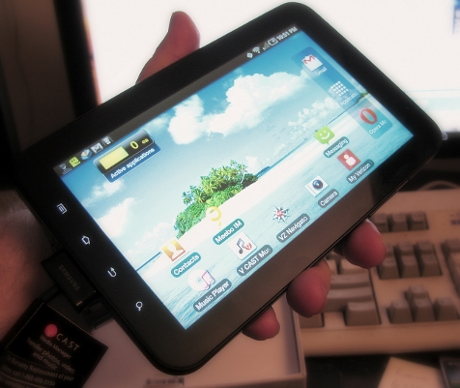
The Samsung Galaxy Tab is an impressive piece of technology, but it's not really an iPad competitor.
Yesterday, I decided to break down and purchase a Galaxy Tab, hoping it would finally fulfill the promises of being a general-purpose Android tablet that could fill the role that my iPad is currently performing today -- a device which I could use to browse the Web, do some productivity tasks, use tablet-style applications, and also use as an e-Reader.
Also See: Samsung Galaxy Tab (Gallery)
Also See: Samsung Galaxy Tab (C|Net Reviews)
Also See: Samsung Galaxy Tab (Jason Hiner)
As I am a current Verizon customer and I am happy with the carrier's overall 3G data coverage on my Motorola Droid, I decided to purchase the unit at my local Verizon Wireless store, in Paramus, New Jersey. It should be noted that unlike T-Mobile, which also just launched the device on their network, and can be purchased off-contract, that the Verizon model isn't currently being sold without an additonal data plan.You can buy a month-to-month, contract-free $20 1GB data plan, but there's a $35 activation fee (unless you're a corporate customer with special terms) for each time you re-activate service, should you decide to terminate the data plan and then turn it back on later. For those of you who don't want this device with 3G, a Wi-Fi only model is destined to hit the US shores shortly, and will be about $100 cheaper, so you should wait.
There are a number of comprehensive reviews of this device on the web already, most notably from our own C|Net sister site, The Wall Street Journal and the New York Times. If you're looking for a super nuts and bolts drill-down into this thing, stop reading this article and look at those instead.
What you're going to get here is not a review from someone who worked with Samsung PR to procure a review device and has had it in their possession for several days or longer who has been under non-disclosure until yesterday. This should be considered an off-the-street, first impression of someone who just laid down cold, hard cash for this thing yesterday morning.
So having plunked down $641.99 after taxes plus a $35.00 activation fee and a pro-rated $20 per month plan, I decided to give the Galaxy Tab a spin at my local coffee shop and on my home wireless network and see how the device performed in the real world.
First, a few observations about the hardware. I'm currently an iPad and a Motorola Droid user, so that's my two frames of reference regarding the software stack(s) and expectations about build quality. The Samsung 7" 1024x600 capacitive LCD touchscreen is absolutely gorgeous and extremely bright -- it's the first thing that jumps right at you. When compared with the iPad's 9.7" 1024x768 screen, it actually appears sharper, because of the higher pixel density. So no complaints there.
In terms of being able to use the device as an e-Reader, since the Galaxy Tab's Android 2.2 currently supports both the Amazon Kindle and Barnes & Noble Nook apps at native resolution, it has the same practical limitations as the iPad -- lousy outdoors in bright sunlight, but excellent indoors and during the evening. This is not a dig at backlit LCD technology, this simply is what it is.
Page 2: [Build Quality and User Experience] »
As far as actual physical build quality I do have to say that I'm rather disappointed that for $600 I'm still getting a device with a plastic case. It's a high-impact polycarbonate type of plastic, but it still feels cheap and less refined than the aluminum casing of the iPad, which costs roughly the same amount of money.
The plastic also seems to conduct heat more than the iPad's aluminum body, and the device gets noticeably warm when used for extended periods of time. I've had the iPad since February or so of this year, and it's never gotten warm at all.
The Galaxy Tab runs on a heavily-modified version of Android 2.2 Froyo, which is the most current build of Google's device OS. In terms of general UI responsiveness, the Galaxy Tab is extremely fast, and is comparable to what you'd see in the most current high-end Android smartphones, but with a larger, higher-resolution display. It feels like a really big smartphone, and the Android 2.2 UI even with Samsung's tweaks lends itself to the user feeling like they aren't using something that was really designed to run on this form factor.
This is in stark contrast to the iPad's iOS, which was originally derided for being just a big iPod Touch or a giant iPhone, and is actually more optimized to the target device despite originating as a smartphone operating system. Apple has put in a huge amount of effort to make iOS 3.x and 4.x work well as a Tablet OS. To date, much of Google's efforts have been put into making Android an excellent smartphone OS, which it is.
In terms of its suitability for larger form-factor devices, even Google admits that Android 2.2 Froyo isn't the droid you're looking for -- 2.3 Gingerbread, which is expected to be released shortly, and 3.0 "Honeycomb" which is expected during the middle of next year, are supposed to bring us closer to a Tablet-optimized version of the OS.
With that understanding, Samsung went and built the Galaxy Tab with the objective of releasing it with a "Tweaked" Froyo and upgrading it to Gingerbread and Honeycomb later on. As a product, it very much gives the user the impression that this device is a work in progress.
In my opinion, the prime motivator for purchasing a device that bills itself as a Tablet or a Slate is to use an Internet browsing device first, and then an application platform second. If it performs sub-par as a web browser, then most of the utility of the device is sacrificed.
There are others which may disagree with my assessment and weigh the importance of the apps above the browser, but I'm in the camp where most of my activities with a Tablet/Slate are going to be web-related. I would have had a very hard time justifying the purchase of my iPad if it performed poorly as a web-browsing device.
That being said, I am of the opinion that the Samsung Galaxy Tab is a poor performer as an Internet browsing device.
Why? Well, for starters, let's begin with the device's built-in browser. It's the same Webkit-based one that is used on Android 2.2 smartphones. For the most part, I'd consider the built-in browser on Android 2.2 to be acceptable, but not on par with what exists on iOS 3.2.2 or 4.2. It doesn't render pages and graphics nearly as quickly and the scrolling of pages is jerky and stuttery, and not at all fluid-like on the iPad, or even on the iPhone.
On my first generation Motorola Droid, which only has a 854x480 3.7" display and a 600Mhz CPU with 256MB of RAM, I'm willing to forgive a slower rendering speed than on an iPad, which has a 1Ghz CPU, better integrated video acceleration on its SoC and also 256MB of RAM. They aren't comparable in terms of raw hardware capability.
However, on a device with comparable integrated electronics and a similar 1Ghz ARM Cortex-A8 processor (Samsung actually manufactures the iPad's A4) and TWICE the RAM of the current generation iPad, I'd expect the browser and rendering of web pages to be at least as good if not significantly better. That's unfortunately not the case.
Part of the problem may lie in the fact that the built-in Android 2.2 browser has Flash installed and turned on by default -- so when you hit a non-mobile optimized web page with a lot of Flash elements, such as moving advertising boxes and such, it bogs down the CPU.
Still, even when you turn off the built-in plugins, the browser runs jittery, and pinch-to-zoom multitouch doesn't feel as polished as its Apple competitor either. Again, it feels and behaves like a big Android smartphone, with all of the built-in weaknesses of its smartphone cousins but magnified onto a larger, higher-resolution screen.
I was able to dramatically improve the performance of the browser experience, at least in terms of page rendering speed and overall scrolling fluidity, by downloading and installing Opera Mobile from the Android Market. However, I still wouldn't compare it in terms of overall user experience to an iPad, if you look and use them side by side on a fast Wi-Fi network with extremely fast broadband such as mine.
Now, having said all this, it begs that we ask if the Samsung Galaxy Tab is really an iPad tablet competitor at all, but instead more of a handheld computer, like an oversized PDA on smartphone steroids.
Page 3: [Handheld Computer or Half-Baked Tablet?] »
We certainly and probably shouldn't compare the two devices in terms of form factor, since you really can't hold the iPad in one hand where you can with the Tab. However, since the iPad is currently the leader in the space, and the media and analysts are insistent in shoehorning the Galaxy Tab into the same market, it remains our only frame of reference.
Where the Galaxy Tab excels is in the native, optimized Android applications, which look and run great on the device. Games such as Angry Birds look and run fantastic, and Samsung has also put in a large amount of work into writing a entirely new email client, video/music players, a calendar and contacts manager for the unit which are polished and work very well.
Samsung has also added some really cool memory/process management tools to the device which I'd love to see in stock Android builds, as these utilities are sorely missing from most of the Android smartphones on the market. One of Android's biggest problems is since it is a fully multitasking OS, it's very easy to start spawning a whole bunch of processes that chew up your memory and processor time. So on a tablet, the ability to monitor and/or kill processes is extremely useful.
That being said, we expect Android 2.2-compatible apps to run well on the Galaxy Tab, because it's an Android 2.2 device, right? If you're really into the Android apps, and most of your activities are going to be App-centric, you might like this device a lot more than I do.
Unfortunately, I don't really need an over-sized, 7" smartphone which can't make phone calls to run Twitter, email and Android apps and still have a sub-par web browsing experience.
So what about the device's other neat features? Like the dual integrated cameras? Or the integrated HDMI dock?
Well the device does indeed record HD video with its 3MP rear-facing camera, but the custom camera app itself appears to be unstable because it crashes virtually every time I use it. And the front-facing 1MP camera for video calls?
Well let's just say it doesn't quite work as well as FaceTime does yet.
While I was able to capture images with front-facing camera and see my own facial image displayed on the screen, I wasn't able to have a successful video chat session, despite the frightening screen shot in the link above. You see, as it turns out, Samsung doesn't ship a video chat application with the unit and Android doesn't have one natively yet -- that function is actually slated for a future version of the OS, possibly 2.3 Gingerbread or 3.0 Honeycomb.
You can download applications such as Qik, Fring and Yahoo Messenger which have video chat capability and work on some of the other Android smartphones, such as the T-Mobile MyTouch 4G and the Sprint EVO 4G, but they won't work properly with the front-facing camera on the Galaxy Tab and you won't broadcast video to the other end.
While I was able to initiate video chat sessions with my Tech Broiler co-blogger on his T-Mobile G2 Android smartphone, he was unable to see video coming from my end even though I could see him, during the times which he had his rear-facing camera pointed at his face.
I will add that all three of these chat applications, Qik, Fring and Yahoo Messenger had horrendous, completely inaudible voice quality and what video I was able to receive from Scott was horribly pixelated.
It should also be noted that we tested this with the most optimal broadband conditions possible -- both of our Android devices were connected to 5Ghz Wireless-N networks at 65Mbps, and each of our broadband uplink speeds were at least 5Mbps -- and mine was 15Mbps up and 100Mbps down, where Scott's was 5Mbps up and 20Mbps down, during evening hours.
As for the HDMI dock, the store didn't have those in stock yet, so you'll have to look elsewhere for reviews of that feature.
The Samsung Galaxy Tab is certainly an impressive piece of technology, and if it meets your needs, and does what you want it to do, and your mobile activities are primarily app-focused, then it's a product you should consider. However, as the product is currently shipped, I'm not seeing it as a keeper, and if you're expecting something analagous to an iPad you're definitely going to be disappointed.
Additionally, the product's rough edges, particularly in the areas of the built-in cameras and its lacking support for video chat diminishes the device's advertised utility. I expect that with future software updates such as with the forthcoming Gingerbread and Honeycomb releases the Tab and future product iteration will significantly improve, but I'm not going to suggest you buy this device with the intention of waiting on future software releases. As a Tablet, the device isn't fully baked. So I'm returning it.
Have you purchased a Galaxy Tab yet or are you going to wait for a more mature Android-based tablet device? Or something else entirely? Talk Back and Let Me Know.