Windows 8, Office 15: Get used to Metro, it'll be everywhere

Summary: From Windows to Office, cloud and server applications, and maybe a Metro-inspired dance remix on YouTube, Microsoft's next-generation user interface will be everywhere by Windows 8's launch.
Windows Phone-inspired, the Start 'screen' will replace the traditional Start menu, and will be the front-facing end of the next-generation operating system, Windows 8.
Pinching the user interface from existing Windows Phone 7 devices, in which the thin fonts and the application tiles reign free from the rest of the desktop, evolutionarily speaking it is truly a feat of ingenious for the mobile space.
But can Microsoft pull off the Start screen for desktops, and can Metro be successfully transposed to the desktop?
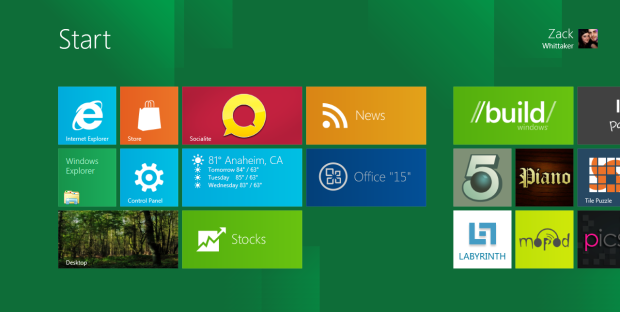
Microsoft is hedging its new operating system and its overall user interface design into its suite of other popular desktop software, including Windows and Office. It's a logical step, as Microsoft moves to bolster its image across the board in all avenues of its software and services.
Steve Ballmer, last week at Microsoft's Financial Analyst Meeting in Anaheim, California, did not rule out a'Metro-ization' of Office.
Speaking to analysts, he said: "We are rethinking and working hard on what it would mean to do Office Metro-style". An analyst asked: "The question is Metro interface for Office. How critical is it to Windows 8 adoption to have software that takes full advantage of Office with Metro?"
Granted, it is the gentlest of nudges in the direction we thought already would be the case. Whether it comes to fruition or not by the time Windows 8 comes out, we can only shrug our shoulders and guess.
For those plugged directly into the Microsoft matrix, it came as no surprise that while Redmond set focus on HTML5 and JavaScript for extensions and applications for Windows 8, it also made it clear that the same web-based languages would be core to the development of Office 15 -- the next-generation productivity suite.
But at what cost should a user interface direct the next-generation of a productivity suite? It's Office, not Windows. Not only does it have a different purpose, it has an entirely different ethos to the Windows ecosystem.
Take the BlackBerry PlayBook tablet as something to go by. Research and Motion focused its energies on getting its upcoming QNX-based operating system into its smartphones, but either lacked courage or the foresight to jump straight in there at the deep end with QNX-enabled BlackBerry phones
But if Microsoft is taking the 'RIM-approach' by using Windows Phone 7 as a cheaper, lesser public option, by limiting its public testing options to only a fraction of the mobile marketshare, it is forgetting one clear cut factor.
If Metro is brought not only to Windows, it all but has to tie into the Office suite. The two run seamlessly side by side. While one is an optional, though logical addition, to an already burgeoning feature set of applications and web-inspired content.
From here, we can expect the wider range of 2012/13 inspired applications -- from CRM Dynamics to server-side applications. Plus, if Office "15" and Outlook "15" are to become Metro-inspired, then the cloud-based Office 365 suite will all but have to follow suit as well.
Even the Microsoft website had a makeover last year to 'Metro-ify' itself.
Metro isn't going anywhere any time soon, and Microsoft is clinging onto it as its next-generation look-and-feel of its products, applications and services. Beginning with a phone operating system that barely scraped the 5 percent mark last month in marketshare statistics,
But Office, not Windows, be the greatest test for Microsoft's up and coming user interface, from phone to desktop. If it can be pulled off without sacrificing measures of productivity and functionality, it should be onto a winner.
If not, may the higher powers have mercy on the soul of Windows as a wider platform.
Related:
- Mary Jo Foley: Microsoft Financial Analyst Meeting: Live from Build
- Microsoft to focus on HTML5 and JavaScript for Office 15 extensions
- Will there be a new application in Office 15?
- Should Windows get the 'Metro' Windows Phone 7 interface?
More:
- ZDNet Great Debate: Windows right vs Windows wrong
- Windows 8, Windows Server 8, and Office 15: Tons of new information straight from Microsoft and its employees!
- Windows 8: Two new 3rd party apps using the new Metro UI
- ZDNet Video: Windows 8's Metro-style UI
Kick off your day with ZDNet's daily email newsletter. It's the freshest tech news and opinion, served hot. Get it.
Talkback
WOW
MS is going to double down on this dog?
Win 8 Metro is an epic fail on the desktop. It is orders of magnitude more difficult to work with. The masses are going to pass on Metro on the desktop. A Metro style Office? So sad it's funny.
Except
Unless you're hiding a crystal ball somewhere?
Good point
If anyone at MS has any brains at all the final product will default to a traditional desktop UI for desktops/notebooks.
If this turns out to be the case then I don't see any real advantage for desktop users over Win 7.
RE: Windows 8, Office 15: Get used to Metro, it'll be everywhere
There are improvements in speed, security, and stability. Ribbon UI for everything is good. I would say that even some aspects of the normal desktop are better and more responsive.'
And it only gets better (like making the mount ISO thing work correctly)
Ribbons, perhaps, but not Metro...
The improvements are subjective. There are just as many things wrong with the ribbon interface as there are right. However, this is about bringing Metro, not ribbons, to the rest of the desktop.
I can't get past Metro. It was designed to be used on a tiny phone screen, and now someone got the great idea of using it on a desktop PC. I'll stick to the default Windows UI, thanks.
RE: Windows 8, Office 15: Get used to Metro, it'll be everywhere
I think you're wrong about Metro being "meant for phones", but we'll have to see.
Also, I was answering the benefits (overall) that Windows 8 will have for desktop users over Windows 7.
RE: Windows 8, Office 15: Get used to Metro, it'll be everywhere
I think MS should work on optimizing ...
... Win 8's mouse / physical keyboard support. That said, it is very important that MS comes out with a metro version of Office, to show that it has confidence in the new UI. MS however can take a similar approach to Office as it did with Windows - provide 2 UIs; make improvements to both UIs; but make the metro UI show more innovation.
Windows 8 should be seen by MS as an opportunity to sell business on metro, while consumers adopt and use the interface at a fairly rapid clip. If everything goes well, business will start adapting the metro UI in significant numbers, on the version of Windows following Win 8.
MS needs to sell touch computing on desktops and all-in-ones to business. MS needs to show off Office and other complex apps like its Expression products, Photoshop, Autocad, etc. with metro UIs, and demonstrate the advantages of touch computing with these apps, over taking a GUI approach. I also believe MS needs to work hard on leading people away from their mice and physical keyboards, because they can act as an anchor, keeping people pinned down to legacy Windows and old PC form factors.
RE: Windows 8, Office 15: Get used to Metro, it'll be everywhere
MS needs to work on on leading people away from their mice and physical keyboards?!? Really?!? In what universe can anyone input anything original faster than on a keyboard? Yes, I've gotten used to the touch interface on my smart phone but any chance I get I return to my keyboard because I can enter text far more fluently on a keyboard than on any touch-based interface. Touch-based is fine for playtime, but if I need to get real work done I've got to have a real, full-size keyboard.
RE: Windows 8, Office 15: Get used to Metro, it'll be everywhere
If you have the advantage of age, this is all very deja vu.
Most of these bloggers are the DOS lovers who just didn't get Windows. They're the people who saw no need for word processing because Tex was all you needed. Well they're not the same people of course, as most of this lot weren't born then, but it's the same attitude - a hatred of change and an inability to grasp the future. Even Jason seems a bit shaky in his complaints as it's hard for anyone with any integrity to deny Windows 8 just looks and feels better than any other contender.
Windows Phone users understand, MS actually did some work to bring us a new modern interface based on lots of data, people and experts. The rest of you may be happy with a crowded desktop of static icons, but I'd like to move on.
Years from now when I'm gesturing at a virtual Windows 12 HUD display and hitting keyboards in the air, they'll still be thinking it's the year of Linux.
The only thing constant is change - deal with it ;-)
RE: Windows 8, Office 15: Get used to Metro, it'll be everywhere
I'm not too sure that AutoCAD users would share your joy with the "new modern interface".
Is this a fair understanding of one aspect of the Metro UI
One element is the Start screen shown in Zack's blog article. Another element is "Live Tiles" as opposed to static icons. And, more to my point that I wish to make, "Ribbons" are an element of the Metro UI.
If we agree that large, touch and dynamic content centric ribbons are an element of the overall Metro UI design than I propose that Microsoft has already "tried out" this design element in Office.
Consistency
Consistency from Win 95 through to Win 7 has been a strength for MS. Regardless of what one may think of MS or Windows. The Metro UI functions much differently in many ways and alot of users will experience frustration over the change. If they go with Metro as the default I give it a year before MS offers a fall back 'traditional Windows desktop' option allowing people the UI they expect and are used to.
Win 8 Metro may create a serious opportunity for KDE on Linux.
RE: Windows 8, Office 15: Get used to Metro, it'll be everywhere
"Ribbons" are NOT an element of Metro UI, even Windows 7 has Ribbon for MS paint. Ribbon fits with traditional Windows UI, its just a replacement for drop down menus, while Metro is complete replacement for whole Windows UI.
RE: Windows 8, Office 15: Get used to Metro, it'll be everywhere
Office has to use Metro, otherwise Metro will fail. Simple as that.
I think it's great that Microsoft are thinking outside the box
The UI design process and the many complicated issues that enter into why things look or behave a certain way may seem superficial at first but have to take into account a lot of issues.
Certainly, it was interesting to see what Microsoft is doing with Metro as I watch Jason Perlow's demonstration.
I take with a large 'grain of salt' what I see now as I know it will be continually refined through time along with feedback from beta testing.
Same goes to anything in any other operating system.
But remember, Enterprises prefer/crave stability over anything radical and will hesitate to move forward with any new technology paradigm until absolutely sure that all certification testing has been met.
*That* takes time--A LOT of time.
As such, it will be probably a few years out before Windows 8 gets adopted in this setting.
Again, interesting to see the new developments in Redmond.
RE: Windows 8, Office 15: Get used to Metro, it'll be everywhere
Zack's articles always makes me think on a rainy day.
Let me answer the second question first. I have gone on record in ZDNet's talkback comment sections as indicating my desire to purchase a Win 8 tablet. This implies correctly that I embrace and admire the Metro UI experience in a tablet design.
IMO, it is the best implementation of a "PC multi-tasking" experience adapted to a tablet enviroment introduced yet. IMO, it is better than WebOS, QNX and Android Honeycomb desktop metaphor experiences on a tablet design.
Now, is it better than iOS? Well, here is the rub. Apple never, IMO, meant for iOS on it's tablets to embrace the "multi-tasking desktop" metaphor that Google strove to embrace with their Honeycomb design or the other designs mentioned.
The iPad is a "single tasking" device. Every Apple commercial shown has depicted only one action being done on an iPad at a time. Apple's iOS design relegates multi-tasking (when it does occur) to a background task. And, as such, comparing the two design philosophies (single and multi-tasking) is really an exercise in comparing "Apples to Mangos"
For my money (literally), I will choose a Windows 8 Metro tablet for a mobile desktop experience. (Of course, a personal question that will not be answered for sometime is whether my 2 hour or so per day use of my iPad will stop and be replaced by a Win 8 experience. I tend to doubt it at this time, however. (Because of the apps.) I tend to envision my mobile experience as consisting of two tablets, one an iPad and one being a Win 8 based device. Both would be easy to carry along at the same time and both have their respective ecosystem advantages.
Now, back to the first question posed. I don't feel the Metro UI would be my first choice for a desktop UI experience. I like a task bar or dock approach. I wish my desktop real estate to remain "relatively" uncluttered until I place my open apps on them. The Metro UI uses up that desktop real estate area with blocks of live tiles which distract from my primary purpose at hand. And, "distractions" can pose a hindrance in productivity gains.
It has been noted in some reports that in certain enterprise environments where management has curtailed the use of social app use (Facebook, twitter, email browsing), measurable productivity gains have occurred.
IMO, the Metro UI facilitates the use of social app integration (a good thing) but in an enterprise environment, perhaps "not" a good thing.
When Balmer speculates?