Firefox thumbnails could expose private data; fix 'coming soon'

Summary: Users have warned that Mozilla's browser 'snapshots' browsing history --- including secure sites, such as online banking pages --- and could lead to identity theft.
Firefox 13's new thumbnail tab view could reveal sensitive private data, after Mozilla's latest browser was found to take "snapshots of the user's HTTPS session content."
Users have warned that SSL-protected websites --- such as online banking pages and web-mail services --- can reveal account numbers and email subject lines as they are 'snapshotted' and displayed in the browser's new tab page.
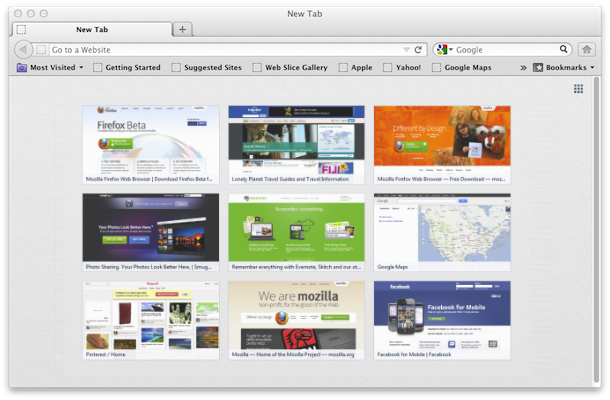
Mozilla admitted there was a "concern" with the browser's privacy, which was released on June 5, and said there would be a fix "in a future version of Firefox".
"Mozilla remains resolute in its commitment to privacy and user control. The new tab thumbnail feature within Firefox does not transmit nor store personal information outside the user's direct control," the browser maker said in an emailed statement.
Mozilla said that the thumbnails presented in tab view are based on the user's browsing history, and can be deleted from the browsing history at any time. Users can also use private browsing mode to prevent the recording of data.
Other browsers have similar features --- such as Chrome's tab view, and Opera's "speed dial" --- and the issue is certainly not new.
The Guardian dubbed Chrome a "security nightmare," as other users could see see similar private data in its tab screen view, among other highlighted issues. Firefox's thumbnails are far bigger and therefore pose a more significant problem --- while Chrome's thumbnails are far smaller and fixed in size.
Image credit: CNET. Article source: The Register.
Related:
- Silent auto-patching coming in Firefox 13
- Firefox users still waiting for Flash crash fix
- Mozilla moving towards 'transparent' Firefox versioning
- Ed Bott: Mozilla to enterprise customers: “Drop dead”
- Mozilla ‘crowdsourcing’ State of the Union address
- Chrome was world’s top browser — for a day
Kick off your day with ZDNet's daily email newsletter. It's the freshest tech news and opinion, served hot. Get it.
Talkback
Just disable it
Of course if someone has unauthorized access to my computer this is the least of my problems. But at least someone looking over my shoulder won't see something they should not.
How do you disable this "feature"
Steps:
2) Search for "browser.newtab.url"
3) Modify that to have the value "about:blank"
Firefox tabs
http://support.mozilla.org/en-US/kb/new-tab-page-show-hide-and-customize-top-sites?s=HOW+TO+TURN+OFF+NEW+TABS+FEATURE&r=0&e=es&as=s#w_how-do-i-turn-the-new-tab-page-off
Mozilla poisoned the browser
Mozilla has jumped the shark.
This is the year of the IE browser.
Did I miss any?
This worked for me
2. when the window pops up, promise that you'll be careful
3. search for Preference Name "browser.newtabpage.enabled" (without the quotes)
4. change the value from "true" to "false"
This works great
Better about:config pref in Firefox 14
and paste this in for the preference name:
browser.pagethumbnails.capturing_disabled
and set it to true.
This will also prevent Panorama from showing thumbnails of pages, which has been in since Firefox 4, but most people don't know it exists.
might also want to add this one ...
MEH
Firefox keeps copying the
But I do use Opera as a browser dedicated to banking etc., since I have no use for it --- it's kinda fugly --- and I am not dumb enough to do banking etc. on my regular browser.
This addition to Firefox is unwelcome ( although not one 100th as unwelcome as their new idiotic 'load on demand' feature for restarting tabs --- in essence when you start a large number of tabs each won't begin until you look at them, instead of silently loading in the background; which means everything is slow and much more work [ It can be altered, see link: http://forums.mozillazine.org/viewtopic.php?f=38&t=2490791 ]. ); but I've no idea if the excellent Showcase extension has the same drawback, though I doubt it.
Then again, if one only uses a separate browser for sensitive sites and clears history, it's unlikely that people can recover one's information.
Aha!
My FF13 only shows blank rectangles.
NoScript must be blocking it.