Building an AMD 'Trinity' desktop PC

Summary: Now that AMD's new "Trinity" APUs have hit the shelves, let's take a look at what you need to take advantage of these next-generation processors.
Now that AMD has officially released new desktop versions of its A-series APUs (Accelerated Processing Units), let's take a look at what you'd need to take advantage of these new processors.
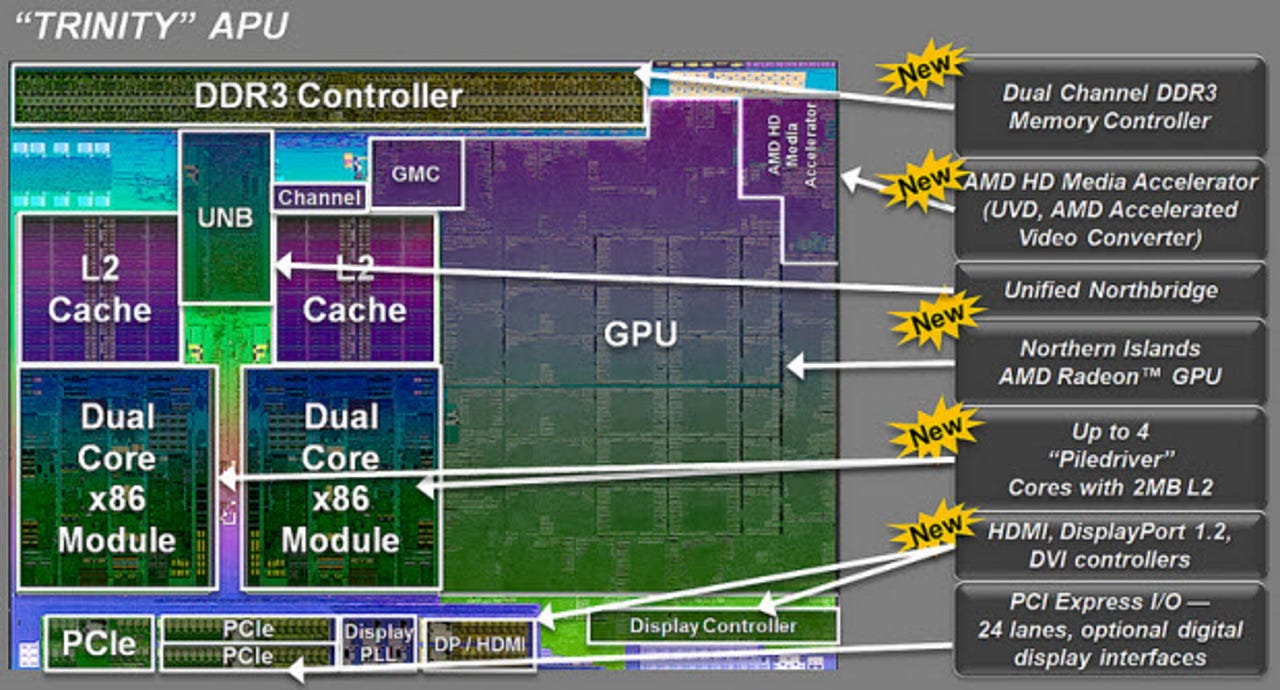
First, a little background. These processors are the second-generation iteration of AMD's all-in-one CPU and GPU silicon. They follow-on from the first-generation "Llano" APUs, but they offer a solid advantage over the old parts in every respect.
Mobile versions of the "Trinity" APUs debuted back in May, but it has taken some time for AMD to get desktop versions ready for release. Put simply, "Trinity" is AMDs answer to Intel's "Ivy Bridge" processors and contain much of the same functionality, such as a GPU and PCI Express connectivity. The idea is to integrate as much onto the chip as possible so as to save space, save power, and reduce costs.
Here is the current desktop "Trinity" line up:
| Model | Cores | Speed/Turbo (GHz) |
L2 (MB) |
GPU Clock |
TDP |
Price $ |
| A10-5800K | 4 | 3.8/4.2 | 4 | 800 | 100 | 122 |
| A10-5700K | 4 | 3.4/4.0 | 4 | 760 | 65 | 122 |
| A8-5600K | 4 | 3.6/3.9 | 4 | 760 | 100 | 101 |
| A6-5500 | 4 | 3.2/3.7 | 4 | 760 | 65 | 101 |
| A6-5400K | 2 | 3.6/3.8 | 1 | 760 | 65 | 67 |
| A6-5300 | 2 | 3.4/3.6 | 1 | 724 | 65 | 53 |
Note the processors featuring the "K" suffix have unlocked multipliers for overclocking.
If you're interested in building a "Trinity" based desktop system, here's what you will need. Note that I do not include a chassis or peripherals in the build, and you will also need an operating system -- most likely Windows -- to install onto the system.
Processor
Let's start with the most obvious component -- the processor.
After a quick shop around I've found four different models in stock. There's the top-of-the-line A10-5800K for $130, the A8-5600K for $110, the A6-5400K for $75, and the A4-5300 for $65. Take your pick of what you need based on your budget and performance requirements.
Motherboard
After you've picked the processor, it's time to choose the motherboard.
To make use of the "Trinity" APUs you will need a motherboard with the new Socket FM2. No amount of hammering will get these new APUs into existing Socket FM1 motherboards. Given that Intel made its Sandy Bridge and Ivy Bridge processors backward compatible, this socket switch by AMD might be seen by some as unnecessary.
There are three compatible chipsets for "Trinity" processors. A55 and A75 have been around for some time on Socket FM1 motherboards, but the A85X is new and brings some new enthusiast and gaming features to the Fusion platform. That said, there's not much difference between A75 and A85X chipsets.
Socket FM2 motherboards are available from a whole raft of manufacturers, including BioStar, ASUS, ASRock, MSI and Gigabyte.
Since these are relatively cheap processors, I don't see much point in spending too much on the motherboard, so my eye is drawn to the BioStar TA75MH2 running the A75 chipset for $80, or the BioStar Hi-Fi A85W with the newer A85X chipset for $95. Both are solid boards with a broad array of features, and both feature USB 3.0 ports. The main difference between the two boards is that the BioStar TA75MH2 has 2 x 240 pin DDR3 slots, while the BioStar Hi-Fi A85W has 4 x 240 pin DDR3 slots.
RAM
Nothing fancy here. 4GB (2 x 2GB) of Mushkin Enhanced DDR3 1066/PC3 8500 will do the trick for $20.
Power Supply Unit
To bring your system to life you will need a power supply unit (PSU). Again, cheap and cheerful is what you want and I like the Thermaltake TR2 W0070RUC 430W PSU for $40.
Storage
Finally, some storage.
What you pick here is really down to your budget and storage needs. The sweet spot in terms of price/storage seems to be around the 1TB mark, and the Samsung Spinpoint F3 HD103SJ for $85 is a very good deal.
Image source: AMD.
Kick off your day with ZDNet's daily email newsletter. It's the freshest tech news and opinion, served hot. Get it.
Talkback
Hmm, this looks perfect for an office machine, thanks
MSI over BIOSTAR
1 BIOSTAR - not so good
3 MSI - all great
***VERY BAD ADVICE ON RAM****
Not neceesarily ...
It is better for APU to wait...
In my case I built my last system with a AMD Phenom X4 9750 but did not go cheap on the RAM or motherboard and was able to upgrade just the processor to the Phenom II 1055T. No new board, no new RAM, no new GPU, no new HD's... As the addage goes... Pay now or pay later :) This methodology has always allowed me to do cheap simple upgrades over 5 to 8 years time while keeping up with gaming requirements. Average upgrade per year was around $55, as-with my current system I average $38 per year so far in upgrade costs and still able to play the latest intense games.
For sure my next system will be built on FM2 likely next year with my last build done in 2008. I keep regular tabs on AMD processor ever since my first K6/K7 in the mid-late 90's, this will be the next good chipset to sit with for a few years.
Phenom to FM2?
FM2 is suppose to be supported for next 2 generations
ryanstrassburg .. i'm not convinced
http://www.tomshardware.com/forum/321704-28-3500-phenom
http://forums.guru3d.com/showthread.php?p=4298166
http://www.youtube.com/watch?v=OwN56L87-P0
(..just a few examples)
I certainly wouldn't upgrade my Phenom II X3 720 B.E to any of the APU's first gen' or 2nd. I can see why a business would want to: less hardware requirements & power savings.
The other thing most people fail to take into account is the law of diminishing returns. That especially applies to die sizes on current technology processors. The return (MHz) / core actually decreases with each subsequent processor added. I think 4-5 cores is where the current architectures hit the sweet spot and believe the output / core tapers off somewhat beyond that. Don't interpret that as X4 > X8 .. just that return per core diminishes beyond a certain threshold.
It's hardly news, but until Intel and AMD devise an effective way of either (1) overcoming that logical 'stone wall' or (2) completely re-design and provide an architecture that aren't limited by current die space factors, than i don't see a huge reason to upgrade to 6-8 cores from 3-5 for most folk. Those in production environments (e.g. HD video production, gaming dev', CAD industries) certainly require more & more GPU-centric processing power, i'm not convinced most lay people do.
YEMV, but i think the Phenom II X3/X4/X6 ranges - or even the Intel i3/i5 ranges - are well equipped to handle what most folk will need, processing-wise for some time yet. Granted, these new generation APU's look sweet ... but call me old fashioned, i'll stick with my Phenom II.
Ryan and Ace are right.
True, Intel still has an advantage processing multiple threads due to HT and how the majority of instructions are written, but straight out price vs performance, Intel really has never been able to compete, even in gaming Trinity is proving to be extremely competitive with Intel CPUs costing 2x as much and higher.
Why do you need Socket FM2, you ask?
USE FASTER RAM!
Adrian, you didn't say anything about graphics cards.
Starter video card
Please note that I am not saying the IGP is top of the line, simply that it is adequate for most uses. If your son is not happy with the performance, adding a card such as the Radeon HD 7850 or GeForce GTX 660 for around $230 Cdn. Or try a HD 6670 in a CrossFire configuration for a lower cost alternative though many games are not dual graphics card friendly.
Starter video card
Please note that I am not saying the IGP is top of the line, simply that it is adequate for most uses. If your son is not happy with the performance, adding a card such as the Radeon HD 7850 or GeForce GTX 660 for around $230 Cdn. Or try a HD 6670 in a CrossFire configuration for a lower cost alternative though many games are not dual graphics card friendly.
My daughter build her new system around the A10-5800K with an ASUS F2A85-M motherboard and 8GB (Corsair 2x4GB 1866 kit) memory and so far seems fairly happy with the results though 11 days is not all that long to be testing a new system.
RAM - 1866 FTW
Adrian, you are lucky enough to have your words published, and have credibility. But that will shed with such bad info. Read more before you write!!
good choice of CPU, bad choice of ram
And nothing wrong with Biostar now that they use almost all solid capacitors. However, I wont buy any board that doesn't use all solid caps. Still, other than failures from bad caps, Biostar has never any other issues in the several boards I've installed for customers. Like no bios or setup issues.
I just ordered a pair of A8-5500 APUs to run in two servers. They were hard to track down on the web, since so newly released. Along with 8Gigs of DDR3 1866 (PC3 14900) ram for one of the servers, just to see how fast it goes on an FM2 board. Can't wait to get them!
Solid caps is just marketing-speak
Also, dust in the CPU heatsink is your enemy. Lots of customers don't know enough to keep dust out of their system. The CPU can take a lot of heat before it suffers any damage, but the VRM circuits and the capacitors around the CPU can't. This is where a lot of failures happen on crappy boards.
read it two days ago