DataStax 1.2 on Windows: A guided tour

DataStax 1.2 bring Cassandra to your PC
Cassandra is a major wide column store NoSQL database. It's popular in standalone form, and can be used with Hadoop to perform MapReduce analyses on Cassandra column families (tables). DataStax is the company that perhaps yields the most influence over Cassandra and its open source code. As such, its distribution of Cassandra is a great one to work with.
As you will see in this gallery, you don't need to be a Linux jock to get Cassandra installed, running and working with your applications. if you're a Windows user or developer, you can run a simple installer, then use a variety of tools or your own code against Cassandra databases.
Download the installer
The first step to getting DataStax 1.2 running on your PC is to download the Windows installer for it. The installer provides a positively Windows-like experience: there are no manual steps required, no scripts to run, or anything of that sort. Just run the installer and everything you need will be on your local machine.
To get the installer, head over to http://www.datastax.com/download/community and grab the appropriate installer. The Windows 7 64-bit installer (which also works on Windows 8) is highlighted here.
For your own protection
If you're running the installer on Windows 8, a screen-width message bar will pop up, making it look as if Windows is preventing the installation. The solution is easy, though counterintuitive: clik the More Info link, highlighted here.
Run anyway
The More Info screen is actually where the needed manual override option is placed. Click the "Run anyway" button.
Let 'er rip!
Now the Welcome screen of the installation wizard should appear. Click the "Next" button to proceed.
Automatic or manual?
Are you going to be using Cassandra frequently? If so, have the services run automatically. But if not, then uncheck the two options shown here. This way, everything will be installed, but it won't run unless you explicitly start it up. Once you've made your decision, click the "Next" button.
See installer run
The installer should now run without further necessary interaction.
Start the services
If you elected to have the services run manually, then you will need to launch Windows' Services applet and scroll down through the alphabetical list to the three DataStax services. One-by-one, click each service and start it. You can start the service through its context menu or by clicking on the "play" VCR-style button on the toolbar. Once all three services are running (they should display "Running" in the "Status" column), you're ready to start working.
OpsCenter Dashboard
One value-add you get with DataStax Community (versus the vanilla Apache Cassandra bits) is the OpsCenter utility. Bring it up on your machine by firing up your browser (as long as it's not Internet Explorer, which is unsupported) and navigating to http://localhost:8888.
Look around the dashboard and then, when you're ready to create a database, click the "DATA MODELING" link on the left nav bar (highlighted).
Keyspace inventory
Keyspaces are the units of replication in Cassandra, but you can also think of them as the rough equivalent of databases. The Data Modeling screen lists all existing keyspaces and provides an "Add Keyspace" button (highlighted) to add a new one. Click it now.
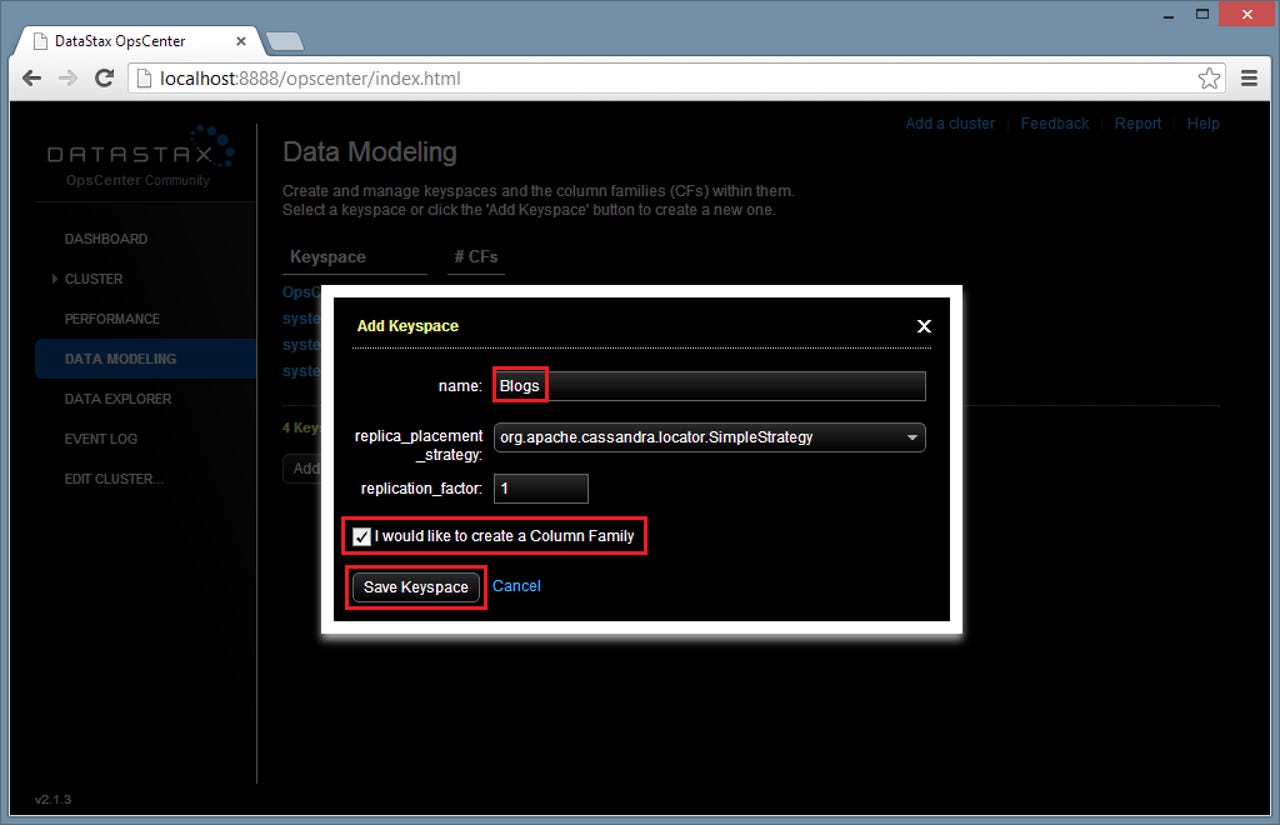
Add keyspace
The Add a Keyspace dialog should now pop up. Enter a name for for your new keyspace, then click the "I would like to create a column family" checkbox (a column family is Cassandra's rough equivalent of a table) and click the "Save Keyspace" button.
All in the (column) family
Now enter a name for your column family and set "column_type" to "Super" (a super column allows variable subcolumns in each row). Pick data types for the "compare_with" and "default_validation class" options (I used "AsciiType" in this instance), then click the "Save Column Family" button.
Keyspace added
Now the dialogs disappear and your keyspace should appear in the list. At this point we're ready to enter data, but we're going to do that from another tool: the CLI (command line interface) client.
The almighty bin folder
Open up a File Explorer window and head over to the bin folder. The default location for this folder on a 64-bit Windows machine is C:\Program Files (x86)\DataStax Community\apache-cassandra\bin. A bunch of important files are here, including the cassandra-cli.bat file, which runs the CLI client, and the cqlsh Python script, which runs the Cassandra Query Language (CQL) Shell.
Double-click the cassandra-cli.bat file to load the CLI client now.
The CLI client
The CLI client lets you run such commands as USE (to address a specific keyspace) and CREATE COLUMN FAMILY (which is self-explanatory), both of which are shown here. Make sure to end all commands with a semi-colon. When you're done, type "exit;" at the prompt (without the quotes) and tap the Enter key.
CQL, here we come
CQL, the Cassandra Query Language, looks very much like SQL. Run the CQL shell by running the "cqlsh" python script back in the bin folder (double click the "cqlsh" file, then specify the application to run it with as the full path to python.exe on your machine).
Once you're in the CQL shell, you can use the USE command as you did in the CLI client. Then, SQL-like sytax becomes the norm. Use the CREATE TABLE command to create a column family, and use INSERT and SELECT to create data and query it, respectively. The commands shown here create a column family called "emp", insert a row of data into it and read the data back.
Works from code, too
Connectors and libraries for Cassandra are available for almost any development environment, including Enterprise Windows environments like .NET and C#. Nick Berardi's Fluent Cassandra client is available as an open source NuGet package for .NET developers.
As shown here in Visual Studio 2012, you can grab Fluent Cassandra by entering the "Install-Package FluentCassandra" command in the Package Manager window.
Reference added
The Install-Package command doesn't just install the bits! The FluentCassandra assembly reference gets added to your .NET project as well, as shown here.
Code is as code does
The code shown here is a slightly modified version of some sample code provided by Nick Berardi. The code opens up an existing column family, adds a row to it, creates two super columns, adds columns and values into the super columns, adds the super columns as property values into the new row, attaches the row and saves all changes.
------------------------
As you can see, getting the DataStax Community version of Cassandra installed and running is pretty easy. And once DataStax is on your machine, you have a range of browser, command line and developer clients available to create and query Cassandra NoSQL databases.