InDesign CS6

InDesign CS6
InDesign has evolved over the years from its original print-oriented DTP focus to a multi-faceted digital publishing platform. That requires flexible tools for creating not only traditional page layouts, but also for adapting them to new platforms such as tablets and smartphones, as well as turning out interactive documents like PDF forms. In CS6, Adobe has analysed the workflows that today's designers routinely tackle and delivered new InDesign functionality that should make them more productive.
InDesign is in three out of the four CS6 suites: Design Standard (£1,032 ex. VAT; upgrade from £219), Design/Web Premium (£1,509 ex. VAT; upgrade from £298) and Master Collection (£2,223 ex. VAT; upgrade from £397). On its own, InDesign CS6 costs £556 (ex. VAT; upgrade from £95). InDesign CS6 is also available via a Creative Cloud subscription (£38.11 ex. VAT per month on an annual contract).
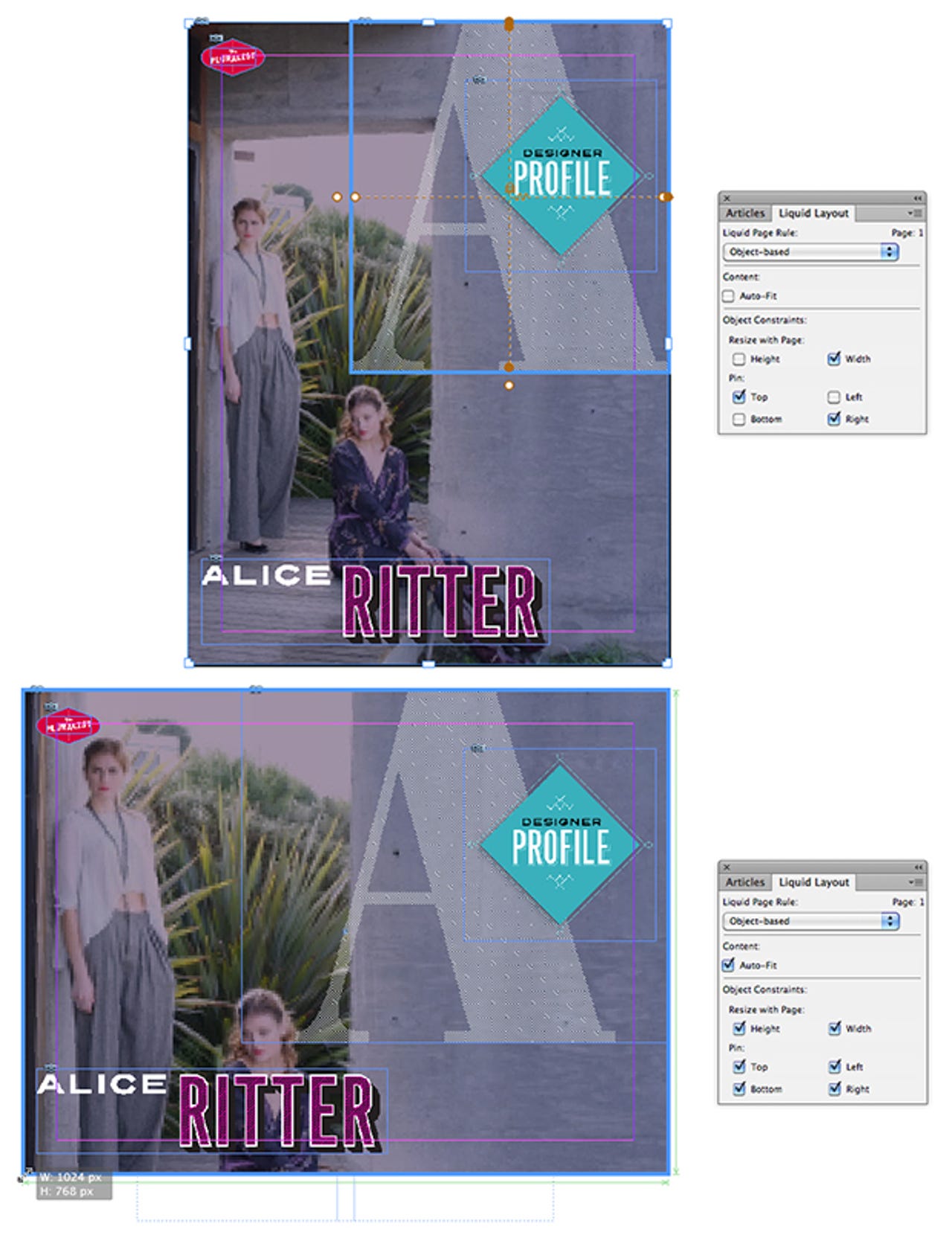
Liquid Page Rules
The proliferation of tablets has provided a new medium for designers to showcase their skills, but the different screen resolutions and orientations involved can make for a lot of extra layout work. InDesign CS6's new Liquid Page Rules help to alleviate the problem by allowing you to specify how content behaves when the page size or orientation changes.
In the example above, Object-based Liquid Page Rules have been applied to the different elements on the portrait-format (768-by-1,024-pixel) page at the top, so that when it's resized to landscape (1,024x768) mode the layout still works: the background image has been set to Auto-Fit its frame, resize horizontally and vertically, and is 'pinned' to all four edges of the page; the big letter 'A' resizes width-ways and is pinned to the top and right; the other elements ('Designer Profile', 'Alice Ritter' and the red logo) are pinned to their respective edges but don't resize.
Screenshots: Charles McLellan/ZDNet UK
Alternate Layout
To help repurpose an entire document, InDesign CS6 provides the Alternate Layout feature. This automatically duplicates an existing layout (in this case the portrait-mode 'iPad V') to a specified page size or orientation (in this case the landscape-mode 'iPad H'). After choosing whether to apply Liquid Page Rules and other options, a new set of pages is generated and displayed alongside the original in the Pages panel.
In the above example, Guide-based Liquid Page Rules (light blue dashed lines) are used to determine which elements resize and which don't: the image is touched by a vertical but not a horizontal guide, and so only resizes horizontally; the column of body text is touched by both vertical and horizontal guides, and resizes in both dimensions (a Flexible Width text frame option also means it adds a second column in landscape mode); the pull quote has no guides crossing it, and remains unchanged in the new layout.
Content Collector tools
Many documents use the same pieces of content in multiple places, and items — logos for example — are also often shared across multiple documents. The new Content Collector tools in InDesign CS6 — Content Collector, Content Placer and Content Conveyor — provide functionality that should help designers avoid endless copying and pasting.
Click on the Content Collector tool in the Tools panel and Content Conveyor (shown above) opens up, initially at the bottom of the screen. This element — which can be thought of as a floating content library or pasteboard — is only present while the Content Collector tool is selected, and itself carries several further tools. Using the Collector tool, you can go through a document, selecting individual or marquee-grouped items, which then appear as thumbnails on the Conveyor. To load even more content at once, you can click the Load Conveyor button and choose a whole document, or a specified set of pages; the entire set of items — headlines, images, text — is then loaded, either singly or as an expandable set, into the Conveyor.
To place an item, you scroll until the relevant one is at the left-hand end of the Conveyor and select the Content Placer tool, which is then 'loaded', ready for placing in a frame of whatever size you drag with the cursor. Various options, including linking and style mapping, are available; you can also place multiple items at once, and keep or remove items from the Conveyor once you've used them.
Content linking
Consistency throughout long documents, or across multiple documents in a series, is a hallmark of editorial quality — but it can be hard to keep tabs on every change that occurs. InDesign CS6's new linking functionality allows you to propagate changes to 'parent' content through linked 'child' items, with options for preserving local edits to the latter if required.
In the example above, a 40-pixel square layout has been created from the original vertical layout, with Link Stories checked in the Liquid Page Rule section of the Create Alternate Layout dialogue box. A couple of text changes in the (left-hand) parent document are flagged by yellow triangles in the relevant frames in the (right-hand) child document, which you simply click to update.
An InDesign CS6 link is actually in two parts — one for the frame and another for its content. This allows you to, for example, change the size and shape of an image frame in a child document, but still update changes to the parent image.
Interactive PDF forms
InDesign CS6's new PDF form creation tools are designed to eliminate the need to shuttle back and forth between InDesign (for setting the look-and-feel of the form) and Acrobat Pro (for adding the form's interactive elements). Now, without leaving InDesign, you can add form objects of various kinds, some of them customisable, with accoutrements such as tooltips and PDF actions — printing or emailing the form, for example. You can also set the tab order of the fields, to make filling in the form as logical and painless as possible.
The PDF form shown above includes text fields, a drop-down box, radio buttons and an action button — all designed in and exported from InDesign CS6.