Microsoft details Windows 8 graphics performance gains through hardware acceleration

Summary: The company says it's been working hard on improving overall performance with its new OS, and a new developer blog post describes in great detail how Microsoft's done it.

Windows 8 is getting buzz for its Metro interface, touch-screen capabilities, and even for Microsoft's decision to remove the Start button from the legacy desktop view. But the company says it's been working hard on improving overall performance with its latest OS, and a new developer blog post describes in great detail how Microsoft's done it.
In particular, Rob Copeland, a Microsoft group program manager for its graphics team, discusses how Windows 8 makes greater use of hardware acceleration from graphics chips as well as taking advantage of new DirectX features. The tweaks have led to improvements in the following capabilities, according to Copeland:
- Text rendering, including paragraphs, titles and headings, and UI controls
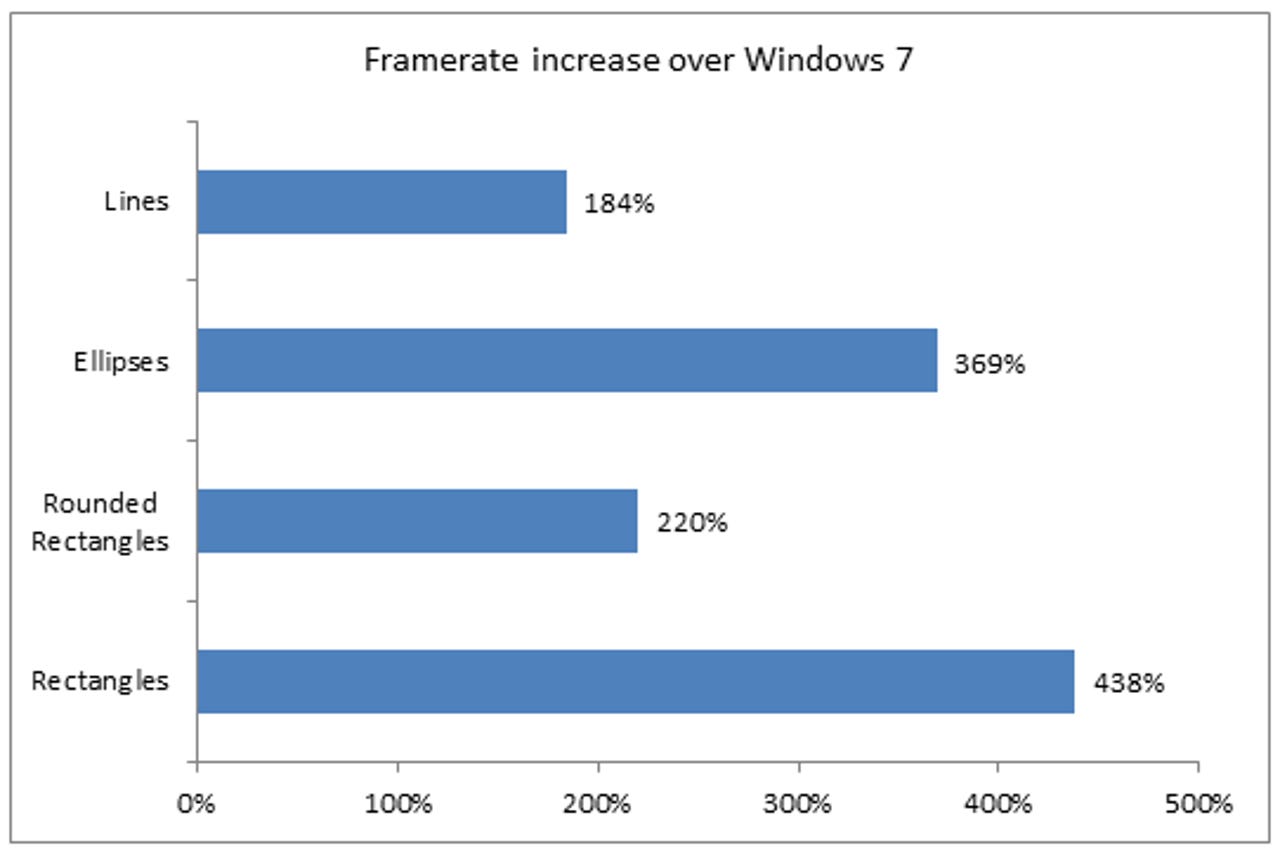
- 2D geometry rendering for lines, ellipses, rectangles, and rounded rectangles
- Image rendering for popular formats like JPG, PNG, and GIF
- Optimizing mainstream (non-game) app rendering performance using DirectX
According to internal benchmarks, the performance gains over Windows 7 are indeed impressive -- such as a 336-percent framerate increase in handling titles and headings, a 438-percent framerate increase in rendering rectangles, and a 40-percent reduction in time to render a group of 64 images.
Microsoft also says Windows 8 is relying on the improved power of today's powerful graphics cards to help accelerate different types of content using the new Direct3D 11.1 API. On the other end of the spectrum, it's also trying to perfect the balance between performance and battery life in mobile devices running Windows 8, like forthcoming tablet PCs using the new operating system. For example, it allows graphics hardware to render using less precision in order to process more data simultaneously and improve power efficiency.
Of course, how this all correlates to the performance you see on your system is yet to be determined. If you've downloaded an early version of Windows 8, have you noticed an increase (or decrease) in performance in apps and games? Let us know your findings in the Talkback section below.
Kick off your day with ZDNet's daily email newsletter. It's the freshest tech news and opinion, served hot. Get it.
Talkback
In a vacuum
What would be useful is to provide some measure of the real world speedups. If drawing has gone from 0.000001 to 0.0000001 then so what? Also does the PC's graphics card affect the threshold of observability: is Intel's integrated Ivy Bridge 4000 'good enough'. Otherwise the claims exist only in a vacuum.
No difference
Terrible Font Rendering
•Text rendering, including paragraphs, titles and headings, and UI controls................."
Ha ha ROFLMAO!!
What have those people at Microsoft have been smoking?
Text rendering in windows 8 is as bad as I have ever seen.
It is so bad, Windows 8 is completely unusable.
I value my job, so I wouldn't dare roll Windows 8 out, even as a pilot, while font rendering is this bad.
I guess if you make the GUI resemble something made by 5 year olds
Windows 7 2020 all the way!
The Windows 8 desktop looks
Synergy
agree with you
Doesn't matter, it's going to fail
Feature ripoff
Can you name something in Win8 that is being touted as a new feature that Apple came up with completely on it's own accord?
You opinion I suppose
I like the minimilist approach with the stylish Metro font a lot.
Works fine for me.
8ista is going to fail
really?
Or the links across social sites... that it has on its windows 7 phone, contacts as well (apple hasnt figured out yet)?
Or is is that MS is consolidating into 1 operating system that you'll be able to use across all devices?
Because for now Apple has a long long way to go to catch up to MS.
Graphics Performance Gain
My NVIDIA graphics driver got to crashing on me on a regular basis; tho to MSoft's credit, they made the recovery of that crash happen in under 1 second. So, I had a flash and checked NVIDIA's site and found a driver for W8 and installed it.
Now, the graphics driver only crashes occasionally.
A related behavior, I think, is the inability to display entire page of text now... including this site. But I've found the fix to that is to scroll down to the empty screen and left-click / drag mouse down and the text appears. It's getting to be a huge bother.
If I ever come into some money, I want to get a MSoft Slate "pablet" computer. THAT, should, eliminate the problem altogether.
isBeta==true
Works faster
(dual cpu's, 24gb mem, crossfire ati cards)
Great - I say see for yourself...