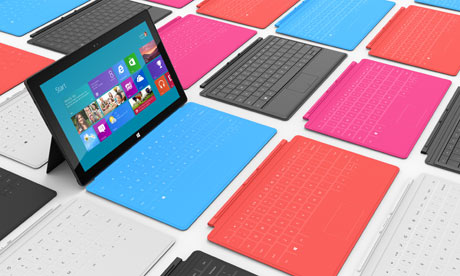
More apps are available at launch for Microsoft Surface than seen for iOS and Android

Summary: I have been using my Surface for a couple of days and am convinced it is a keeper as it bridges the gap between my phone and a laptop while replacing my laptop for many daily needs. There are over 10,000 apps available right now, which is more than we saw from Apple or Google.

A couple weeks ago when the Surface went online for pre-order I decided it was worth the money to take a look at one and figured I could return it if I didn't like it. I read the reviews as mine was enroute for delivery and most left me thinking the hardware was great, but there were not many apps and all I could really use it for was Office. I am very pleased to now have it in my hands and see that many of the apps I use on Windows Phone, iOS, and Android are indeed available and the hardware really does rock!
If you recall, Windows Phone 7 launched with about 1,000 apps and then was the fastest mobile phone OS to hit 10,000 in about four months. The Windows Phone Marketplace continued to grow over the next year and half when it hit the 100,000 apps level in June 2012. The apps came fairly quickly and I believe they will come for Windows RT as well. It helps that developers now have a common core with Windows 8, Windows RT, and Windows Phone 8 too.
I understand there are currently something like 10,000 apps in the Windows Store for Windows RT and I think that is a very healthy number given it just launched. You can't compare these numbers with what is now available for iOS, Android and even Windows Phone, but as I wrote above when you compare the number available at launch then Windows RT wins. Here are the ones that I already have installed on my Surface:
- Netflix
- Skype
- MLS MatchDay (Go Sounders!)
- Rowi: A Twitter app
- Cut the Rope
- Evernote
- Slacker Radio
- Wordament
- YouVersion Bible
- Lync
- Jetpack Joyride
- Amazon Kindle
- Kobo
- Soccer Coach's clipboard
- Kayak
- MetroTwit
- New York Times
- Fox News
- ABC News
The Windows Store is enjoyable to browse with apps found in the following categories. On each category page you will find links to Top Free and New Releases.
- Spotlight apps
- Games
- Social
- Entertainment
- Photo
- Music & Video
- Sports
- Books & Reference
- News & Weather
- Health & Fitness
- Food & Dining
- Lifestyle
- Shopping
- Travel
- Finance
- Productivity
- Tools
- Security
- Business
- Education
- Government
As you can see this is quite a list of categories, but I like when things are organized where I can find them and don't find this breakdown to be a problem. There are free and paid apps and unfortunately it looks like you have to purchase apps on both Windows RT and Windows Phone 8, but it is this way for many apps on iOS as well. Android doesn't have that many tablet apps and on my Nexus 7 I just run the phone apps I already purchased for my smartphones.
What apps are you looking for on a Microsoft Surface?
Kick off your day with ZDNet's daily email newsletter. It's the freshest tech news and opinion, served hot. Get it.
Talkback
Windows 8 -store search
search charm
store search
Search works
To invoke search charm, type Win+Q or swipe from the left edge of the screen. Swiping from the left edge of the touch pad might work, too. If you have Surface keyboard, use the search key in the top row.
While the search dialog is opened, you can switch to another app and get results for the same search string from another app without entering the search string again. For example you can start searching for your favorite radio station in the Start screen. You might find your station there, if you pinned it. If the Start screen shows no results, select the TuneIn Radio icon from the list of search-enabled apps below the search string to get the search results for the radio app. Or you can try web search by selecting the IE icon or yet another radio app, all without retyping the search string. Of course, if you know that you didn't pin you favorite station to the start screen yet, it may be more convenient to start the app first, because the search charm will start showing the search results for the current app immediately.
Seems Samsung is right...
Ironically, both reasons make me doubt your assertion @Matthew Miller that apps are coming, precisely because WinRT has a negligible market share and Win8's eight market share is gonna always mislead, due to the opt-out.
Wow
.......http://goo.gl/SVEkl
Ugh
Could they have made it sound less like a kids' toy?
Marketing dept needs an overhaul.
Unlike Android
lol, and jellybean
Harvey_hypocrite_rabbit
TIP: Pin frequently searched 'places' to the sidebar
Also, don't forget that you can deep link folks from your People hub and it puts their faces on your start screen so you can do things like jump to their twitter and facebook updates.
I do the same thing for my mail accounts. If you have like 3 separate mail accounts which you access from the Mail App. You can actually pin each account to the Start screen so that you jump right to the appropriate Inbox.
there is a problem regarding payments from some countries
It Already Searches Across All Mediums, Even Windows Store & SkyDrive
Store Search
Lenovo Lynx
or the ASUS VivoTab Smart
yes, but the RT is a great learning tool while
try the Search Tiles App
Something I wish they had...
There is no way to show just the apps for one developer.
In iOS, you can go to a developer page to show published apps by just that publisher. I wish the Windows Store had that. Regular searching doesn't work because it searchs all of the description content of any given app. For instance, if you type in "Microsoft", it doesn't just show Microsoft apps, but also includes any app that has Microsoft's name in the description. That's frustrating and can be somewhat misleading too.
If someone knows if you can use some kind of fancy search syntax that will do this, it would be much appreciated.
Apps at launch?
I'm always a firm believer in buying and using what is best, not who does something first, or if their "first" seems better or bigger... its always current vs current.
currently 275,000 made for iPad apps... not even counting the iPhone designed ones that will run too... vs 10,000? Hopefully those are some really essential and good 10,000.
also forgot to say...
All the major players that ignored making iPad apps and told everyone to use the iPhone versions on their iPad didn't have that luxury this time.