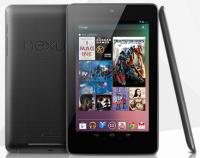
Nexus 7 with Jelly Bean: a large smartphone without the phone

Summary: As Google readies the Nexus 7 for shipping, more information about the new tablet and latest version of Android is appearing. Unlike earlier versions of Android, Google has turned off some of the tablet bits.
Like no doubt many tablet enthusiasts, my order for a Nexus 7 tablet is in the queue at Google waiting for shipping to begin. The new tablet is an outright bargain for the advanced design and hardware inside, and I am anxious to get my hands on one.
While the shipping date is drawing nigh (Google is quoting 2 - 3 weeks), more information about the Nexus 7 and Jelly Bean is appearing on the web. This information indicates that Google has taken a step back with Jelly Bean to tone down the tablet interface used in Honeycomb and Ice Cream Sandwich.
The Nexus 7 home screen, the first thing that new buyers see, is restricted to work in portrait orientation. Google has decided that the 7-inch form factor of the Nexus 7 is better operated like phones, in portrait. Having used 7-inch Android tablets with earlier versions of the OS, I think that's a mistake.
Tablets are very personal devices given they are used in the hands, and all users do not use them the same way. Giving them the choice of operating the tablet in either landscape or portrait is a good thing, but not to be on the Nexus 7, at least on the home screens.
Having used other tablets that restrict operation to one orientation, I find this to be jarring at times. I can see using an app on the Nexus 7 in landscape and then hitting the home button. Even though the tablet is in landscape orientation, the home screen/ launch will appear displayed sideways in portrait. That is jarring to say the least. Choice for the user is always better and I wish Google would turn landscape on by default.
I also noticed in demos and early reviews appearing that in Jelly Bean on the Nexus 7 Google has dropped the tablet interface of Honeycomb and ICS, and gone with a large phone interface. Gone is the system bar at the bottom of the screen, and the phone style bar is at the top of the screen. Google has apparently decided that the simpler phone interface is better for the 7-inch tablet form factor.
I suspect this decision has a lot to do with the advanced notification system in Jelly Bean. Having the notifications at the top of the screen makes sense, better than at the bottom as in the earlier versions of Android.
That may be a good thing, I have never been overly fond of the complicated tablet interface in Android. But it does raise concerns about how well existing tablet apps (and there are a few) written for the tablet interface will run under the phone style UI of Jelly Bean.
I'm sure properly written tablet apps will work just fine, but good developers build the UI to fit the platform. The UI has now changed with the Nexus 7 and Jelly Bean, so some apps may no longer have a UI that fits smoothly. We'll have to see how that works.
Of course Android is very hackable, and the homebrew community has already found a way to turn the tablet UI back on for the Nexus 7. I suspect the notifications won't work as well, but the option is there for those who don't like the big phone UI. Rooting the Nexus 7 and changing system files is required to make the change, so casual users should avoid this.
Google's choices for the Nexus 7 may be due to the smaller 7-inch display, even though it is high resolution (1280x800) for the size. If that's the case, then will Jelly Bean on larger tablets (10-inch) run with the older tablet interface? If that's true then it's going to get confusing with two different tablet interfaces depending on screen size.
Hopefully one of the 10-inch tablets will get an update to Jelly Bean and we can figure out where this is going. Until then, let's get those Nexus 7 tablets shipping to buyers, Google. We are an impatient lot.
Related posts:
- How to fix the Android update mess: Paid updates
- New Year’s resolution for Google: Fix the Android update situation
- Cutting through the FUD about Windows Phone updates
- Microsoft is in the driver’s seat for Windows Phone updates
- AT&T’s business model: why your mobile bill keeps going up
- The Flawed Android Update Process; Too Many Cooks
- Will the new Android consortium fix the update fiasco?
Kick off your day with ZDNet's daily email newsletter. It's the freshest tech news and opinion, served hot. Get it.
Talkback
Ok, I might as well state the obvious. The Android OS is a work in progres
Android, however, in the few years that it has been available to the public has been constantly changing. From "smartphone" to "tablet" to "simplified" (Amazon Kindle Fire) and now back to "smartphone" UI styles, Android can only be termed an evolving work in progress.
One would think that this is not a bad thing for the consumer. After all, more and advanced features are added to the OS in each following generation. Except, as James pointed out, the Android developers might find it had to constantly tweak their applications and, as all tablet users are aware of, the app ecosystem is everything.
Apple developers were able to tweak their apps for each generation of iPad tablets. Now, it is the Android developers "moment to shine" when it comes to supporting this new Google Nexus 7 tablet ecosystem. Here's hoping they are up to the challenge.
Android changes
Some changes might be able to be blamed on Apple
Android 4.1 Jelly Bean works in both portrait and landscape
http://blogs.computerworld.com/mobile-and-wireless/20653/android-41-tablet-layout
Because most android apps are designed for a phone
Before the iPad, most iOS apps were designed for the phone also.
That is not correct.
"...and stretched out to conform to all screens"
Isn't any tablet just a large version of a phone, without the phone?
And for the iPad it's true
The Android tablet OS was completely different for Honeycomb and the phone and tablet OSes merged in ICS. On Android, it makes sense primarily because of the existence of Widgets. The extra real estate allows larger widgets on the tablets - especially useful for mail, calendar etc. The next advantage I'm sure Google is considering is running apps side by side on tablets. Samsung's done that with the PIP feature for YouTube videos on the S3. I expect that Google will abstract that out for all apps.
Not quite
Also, Hugo Barra in an interview (with Wired I think), said that the 10" tablets will continue to be in landscape mode and the notifications will be initiated from the bottom as well for Jelly Bean.
I also received a Nexus 7 at I/O last week
http://michaelevans.org/blog/2012/07/03/nexus-7-review/
home screen portrait mode is almost a must for 7" screen
while i agree, it will be annoying when doing something in landscape, pressing the home button and having to rotate to portrait there really isnt another option. users would be complaining more if the icons and widgets shrunk to fit in the page. i personally rarely use landscape on my galaxy nexus except for when viewing video.
UI Design
Apple gives us portrait and landscape modes but their UI is basically a big sea of icons, it is neither innovative or interactive.
Google's Android UI is far more sophisticated then Apple's. With a combo of icons and widgets you can customize the look and feel easily, toss in a live wallpaper and you've got a device that is personalized for you. Pushing its users into a portrait only shows that while icons can easily be reflowed from portrait to landscape, the same cannot be said for widgets and wallpapers.
Microsoft is doing what it does best, taking the best pieces of their competitors and combining them. Windows 8 is a great example of this. Instead of icons, we have tiles and instead of widgets we have "live" tiles. The tiles make it easier to switch from landscape to portrait BUT as you see with the Surface tablets the UI was really designed with a landscape only approach and you cannot customize your wallpaper beyond the handful Microsoft provides.
Personally I find Windows 8 the most appealing but it is far from perfect.
iPad is also a phone with a giant screen
They're staying away in droves
Android is Just Like the Chrome Browser
PS - GOOGLE - GROW UP ALREADY ON VERSION NAMES!
What feels unfinished
I would say Jelly Bean is a sign of growing up
"Android is Just Like the Chrome Browser " ...really?