Photos: building a Sandy Bridge PC

With Intel's latest 32nm processors, codenamed Sandy Bridge, now out in the wild, we decided to build a brand-new PC using the top-end Core i7-2600K processor. We asked Intel for a motherboard, and the company came up with a DP67BG, containing the P67 Express chipset. Intel also sent a heatsink, but we wanted a top-end device that would also fit an AMD chip, so Quietpc.com came to the rescue. Quiet PC loaned us a case, the excellent Fractal Design Define R3, a Scythe Stronger 600W power supply and a Noctua NH-C14 heatsink, the top of whose two 140mm fans takes centre stage here.
Why specify AMD compatibility? Because our plan was to face off two desktop PCs — but AMD declined to take part after we'd placed our order.
Other components include an Intel 80GB SSD, which we already had in the cupboard, an Nvidia 9600GT-based graphics card, a pair of Ballistix 4GB DDR3 PC1600 memory modules from Crucial Technologies, and of course the Core i7 CPU itself.
Photos: Manek Dubash
Inside the unassuming shell of Intel's 3.4GHz Core i7-2600K, which has four cores and an 8MB cache, is a brand-new architecture, the second to be introduced on Intel's 32nm manufacturing process after Westmere. Sandy Bridge is the latest 'tock' in Intel's 'tick-tock' CPU development process. It includes Hyper-Threading, which enables multiple threads to run on each CPU core and so improves overall performance on threaded software, and a new version of Turbo Boost, which allows all cores to overclock simultaneously for ten to twenty seconds if the chip was previously running cool. The Core i7-2600K will boost to 3.8GHz, if doing so will not overheat the chip.
Unless you count them, you may not notice the reduction in the number of connection pads (1,155) from the previous generation of Core i7 chips (1,156). On the CPU die, in addition to the four cores, is Intel's HD Graphics module, which is fully integrated on the ring bus and shares the top-level cache with the processing cores, boosting performance. We haven't made use of that in our system, however, opting instead to install an nNvidia PCI-E card. The range-topping Core i7-2600K supports overclocking and is aimed at those requiring maximum performance, yet consumes only 95W.
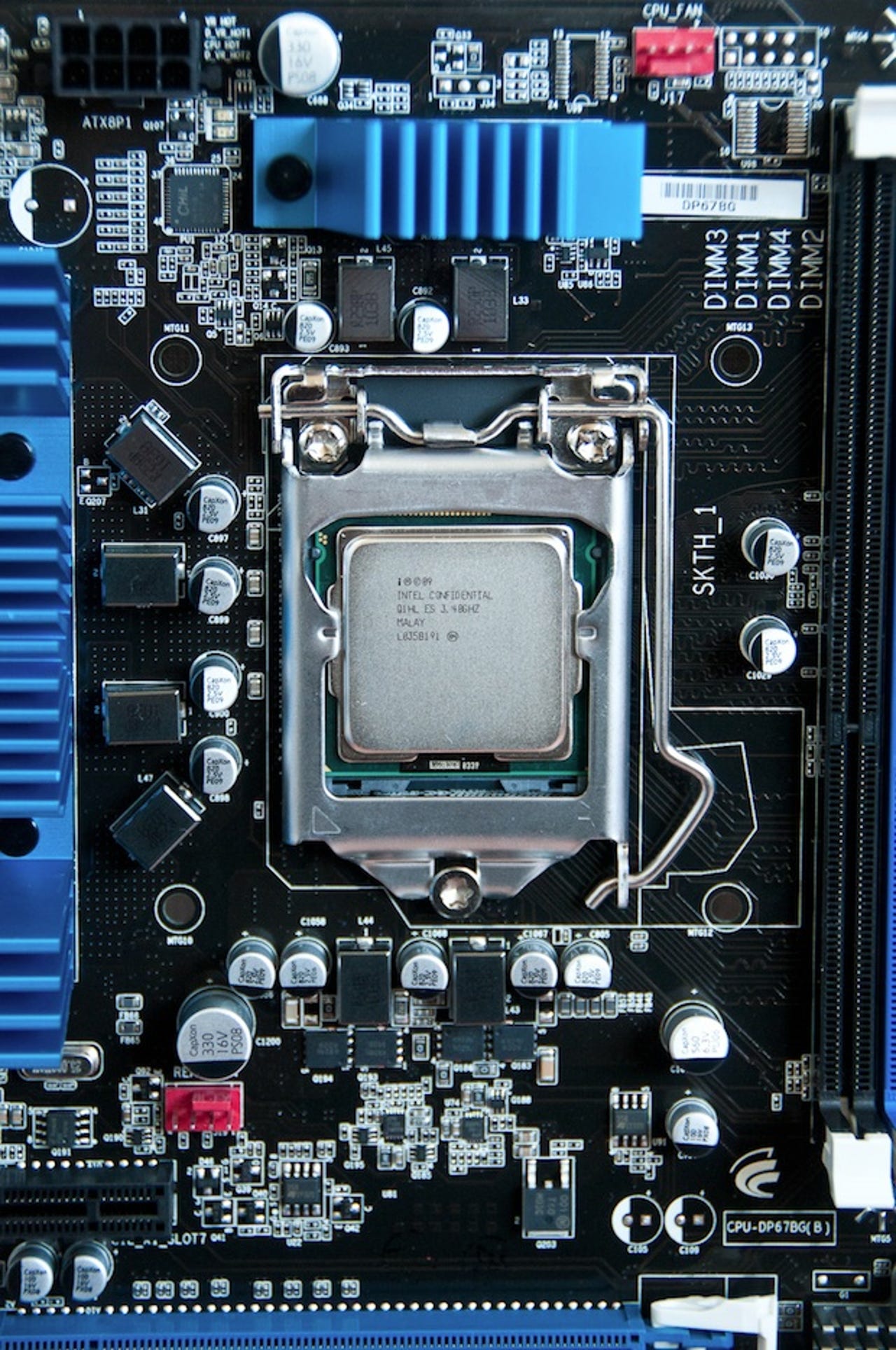
Installed in a brand-new (also top-of-the-range) Intel DP67BG motherboard, this Sandy Bridge processor needs a new 1,155-pin socket, one fewer than the previous generation. Intel's argument for the change is that the new architecture is too different to make compatibility worth maintaining and that the performance increase is worth it. The DIMM sockets, supporting a maximum of 32GB of DDR3 memory up to 2,400MHz, sit right next to the CPU as you'd expect, while at the bottom you can just see the first of the two PCI-E slots. The header at the top of the photo supplies the CPU fan, while the one lower down supplies the rear chassis fan.
This view of the motherboard shows the general arrangement of components. Note the two blue PCI-E x16 slots, which are separated by enough distance to fit a pair of double-width SLI-enabled graphics cards, and the trio of PCI-E x1 slots. At the bottom sit six outward-facing SATA sockets — two of them 6Gbps-enabled, the rest 3Gbps — and an eSATA socket. The on-board RAID function offers RAID levels 0, 1, 5 and 10.
Under the 'Desktop Board' heatsink lurks the P67 chipset, which provides what Intel calls the Platform Controller Hub. There's a single Gigabit Ethernet socket, support for 7.1 audio, 14 USB 2.0 sockets and a pair of USB 3.0 sockets on the back panel. Also noteworthy is the 'Back to BIOS button' on the back, which forces the board to power-on to the BIOS menu using default values while retaining previously saved changes.
This shot showcases the Noctua NH-C14 heatsink and its six heatpipes with dual 140mm fans, which are very quiet in operation. The system includes two sets of cables that slow the fans' spin speed from 1,200rpm to 900rpm or 700rpm. This promotes quietness, and a 140mm fan shifts a lot of air — 110.3 m3/hr at 1,200rpm, 83.7 m3/hr at 900rpm and 71.2 m3/hr at the slowest 700rpm setting. We used the 900rpm setting and the CPU temperature hardly shifted from 33 degrees C. Despite the overhang of the fans, we managed to install memory modules with the heatsink installed, although you could probably take the lower fan off to make DIMM installation a bit easier, as well providing greater noise reduction while retaining plenty of thermal headroom.
The Fractal Design Define R3 tower case has a clean appearance that carries through to the internals. The bulk of the inside is finished in black, but the eight drive bays are fitted with white slide-out trays that make it simple to swap drives in and out. This diminutive 80GB Intel X25-M SSD, secured using the supplied thumbscrews, looks a bit lost in all that space.
With the motherboard installed in the case and everything up and running, this machine is a riot of light. The Ballistix DIMMs include red LEDs (we didn't notice that when specifying them), and right next to them is a pair of seven-segment diagnostic panels. Cables are kept to a minimum thanks to the Scythe Stronger PSU's plug-in cable sets, so you only install as many sets as you need; this avoids having lots of redundant cabling to tidy away and potentially block the airflow. The green reflections off the top of the PSU casing will be explained later. One thing this photo doesn't show is that the fan on the Sweex-built graphics card was the noisiest component by far.
Zooming in shows the diagnostic panels, the system battery, the pair of DDR3 DIMMs (complete with LEDs) and the power and reset switches that Intel has mounted on the board. This makes benchtesting much easier — helping you to test over-clocking before full installation, should that prove necessary. Just above the battery, you can also see the cable plugged into the front fan header, while over on the left is a corner of the heatsink and fan assembly.
Lower down the board, below the graphics card whose fan and heatsink assemble occupy the top half of this image, are seven green LEDs mounted directly on the board. As you can see from the logos, they provide POST diagnostics (from right to left): CPU, memory, video, optional ROM, USB, hard disk and OS start. If any of these devices fails, the LED glows red and a beep sequence lets you know what the problem is. Also in this shot are, on the right, the front panel indicator headers (as fiddly as they always are) and on the left, unused auxiliary fan and S/PDIF headers.
The final shot shows the motherboard's fun stuff: the skull, which sits just to the right of the graphics card, is LED-illuminated. The red LEDs only light up on hard disk activity — we ran chkdsk continuously in a batch file to grab this image — and it's a setting you can even turn off in the BIOS, just in case you don't want them lighting up. To the left of the skull is the BIOS reset jumper, which allows you to recover to default settings in the event of an overclock that locks up the machine.
How much did it all cost? Here's the bill of materials:
| Item | Price (ex. VAT) | Supplier |
| Intel Core i7-2600K 3.4GHz processor | £259.59 | Intel |
| Intel Desktop Board DP67BG | £138.46 | Intel |
| Intel X25-M SATA II 2.5in. solid-state drive | £124.35 | Intel |
| Fractal Design Define R3, Silver Arrow (no PSU) | £76.59 | Quietpc.com |
| Scythe Stronger 600W Ultra-Quiet Plug-in PSU | £76.59 | Quietpc.com |
| Noctua NH-C14 Top-Flow Flexible CPU Cooler | £57.86 | Quietpc.com |
| 2x 4GB Ballistix Tracer 240-pin DIMM | £53.99 | Crucial Technologies |
| Sweex nVidia 9600GT graphics card | £45.19 | UKDVDR |
| Total | £832.62 |