How to buy the perfect laptop

It wasn't so long ago when the basic decisions you had to make when buying a laptop were how much you were willing to spend, the screen size, weight, chip power, and internal storage. Now it just begins with form factor.
Check out this gallery of advice based on a post by that will help make your decision a lot easier.
1. Choose your form factor
We break notebooks down into five categories by weight, with some overlap: netbooks (usually less than 2.2lbs.), ultraportables (3.3lbs.-4.4lbs), thin and lights (2.2lbs-3.3lbs, mainstream models (4.4lbs-8.8lbs) and desktop replacements (generally 8.8lbs or heavier).
New netbooks are rare things, but you can still get one if you really try. They were effectively killed off by the price drop of considerably more powerful mainstream laptops, the MacBook Air 11 and ultrabooks bringing portability at a good price.
These days, you can pick one up for under US$300, but we'd advise you to steer clear; there are simply better options and experiences available now.
While there are still a few ultraportables around, like Sony's Vaio Z series and Alienware's M11x R3, they have effectively been killed off by thin-and-light laptops, or what Intel calls ultrabooks. Occupying the 11- to 13-inch space, thin-and-light laptops can now genuinely claim extra portability with minimal performance sacrifice. Going for between US$999 and US$2300 depending on build quality, storage capacity, aesthetics and branding, thin and lights are the natural evolution of the category defined by Apple's MacBook Air. Don't expect optical drives here, but battery life in this category is generally excellent.
Mainstream laptops are like budget desktops; they're good for general tasks, but they won't win any contests for their performance. They're significantly thicker than the newest thin-and-light laptops to hit the shelves, but typically come with more ports and generally have more powerful processors and dedicated graphics cards, usually at the detriment to battery life.
This category is set for a shake-up in 2012, with many analysts expecting things to get thinner — whether this is at the sacrifice of ports remains to be seen.
If you want desktop power, you need a desktop replacement. With screen sizes of 16- to 18-inches, weight as heavy as 6 kilograms and average battery life of less than three hours, these behemoths are not for people on the go. They can accommodate a wide range of performance parts, however, and are just right for power users of all kinds.
The CPU and you
When it comes to processors, a general rule of thumb is to buy the fastest that you can afford. Problem is, it's not all just about speed these days. A GHz from one family of CPUs doesn't equal a GHz from another.
There's also the question of how many cores you should get. Entry level these days is dual core, which will suit most people just fine. There are also triple-core and quad-core processors out there, but keep in mind that not all applications take advantage of this extra power. Some video-encoding applications, 3D applications and games will use them, though, so if you're a content-production maniac or a gamer, it'll likely be worth investing in a quad-core machine. If you mainly just browse the internet, then dual core is perfectly fine.
You have a lot of options, so below are the basics.
High performance
Intel Core i7
Now in its second generation (and about to enter its third), Intel holds the fastest chips in the mobile space. As the performance part, Core i7 is often paired with a discrete graphics processing unit (GPU).
Keep an eye out, though — some are dual core, some are quad core and some have low-voltage chips (meaning lower performance, but also much longer battery life). These days, low-voltage chips are generally found in thin-and-light laptops — what Intel calls ultrabooks.
AMD's strategy in the CPU world seems to be changing; it no longer competes at the high end.
Mainstream performance
Core i5
Available in dual- and quad-core configurations, as well as low-voltage variants, the Core i5 is the workhorse of the industry, filling many a fine mainstream laptop. Just make sure that you pick up a second-generation part, easily identifiable by the model number starting with a two. It'll usually come with Intel HD graphics, although it's often paired with a discrete graphics card from AMD or Nvidia, as well.
AMD A8
A quad-core part, the A8's performance falls somewhere between Intel's dual-core Core i3 and Core i5, depending on the clock speed.
Budget
Core i3
Now in its second generation, these dual-core processors are almost exclusively paired with Intel HD Graphics, and are for those who only do the basics: word processing, image viewing, music listening and internet browsing. It's a small step above the processors below, and is usually what we consider as being the minimum for hassle-free computing.
Intel Pentium and Celeron; AMD A6, A4
These are low-performance machines that tend to be used in sub-AU$700, 14-inch to 15.6-inch laptops, primarily to keep the cost down. If you're on a strict budget and have modest needs, then these may do the job for you.
Low power, low performance
Intel Atom, AMD C series, AMD E series
These tend to be used in the 8.9- to 11.6-inch space, in laptops often incorrectly termed "netbooks" — a phrase that is actually reserved for laptops featuring Intel's Atom CPU.
These are generally low-power, very low-performance chips best suited to basic internet browsing and office tasks.
While Atom really hasn't progressed much in the performance stakes in the past year, AMD's competing E series does provide a much better computing experience at the budget end, as evidenced by HP's Pavilion dm1.
The (not-so) great outdoors
Sunlight is not ideal for computing — specifically, for seeing the screen. If you want to work outdoors, you'll need to hunt for a matte screen. While some consumer laptops have matte screens, most come with glossy screens, maximising reflections and making it hard to see anything when outside.
As a general rule of thumb, most business laptops still come with matte screens, and some laptops, like the MacBook Pro 15, have matte options if you're willing to pay a little more.
The CPU and you
When it comes to processors, a general rule of thumb is to buy the fastest that you can afford. Problem is, it's not all just about speed these days. A GHz from one family of CPUs doesn't equal a GHz from another.
There's also the question of how many cores you should get. Entry level these days is dual core, which will suit most people just fine. There are also triple-core and quad-core processors out there, but keep in mind that not all applications take advantage of this extra power. Some video-encoding applications, 3D applications and games will use them, though, so if you're a content-production maniac or a gamer, it'll likely be worth investing in a quad-core machine. If you mainly just browse the internet, then dual core is perfectly fine.
You have a lot of options, so below are the basics.
High performance
Intel Core i7
Now in its second generation (and about to enter its third), Intel holds the fastest chips in the mobile space. As the performance part, Core i7 is often paired with a discrete graphics processing unit (GPU).
Keep an eye out, though — some are dual core, some are quad core and some have low-voltage chips (meaning lower performance, but also much longer battery life). These days, low-voltage chips are generally found in thin-and-light laptops — what Intel calls ultrabooks.
AMD's strategy in the CPU world seems to be changing; it no longer competes at the high end.
Mainstream performance
Core i5
Available in dual- and quad-core configurations, as well as low-voltage variants, the Core i5 is the workhorse of the industry, filling many a fine mainstream laptop. Just make sure that you pick up a second-generation part, easily identifiable by the model number starting with a two. It'll usually come with Intel HD graphics, although it's often paired with a discrete graphics card from AMD or Nvidia, as well.
AMD A8
A quad-core part, the A8's performance falls somewhere between Intel's dual-core Core i3 and Core i5, depending on the clock speed.
Budget
Core i3
Now in its second generation, these dual-core processors are almost exclusively paired with Intel HD Graphics, and are for those who only do the basics: word processing, image viewing, music listening and internet browsing. It's a small step above the processors below, and is usually what we consider as being the minimum for hassle-free computing.
Intel Pentium and Celeron; AMD A6, A4
These are low-performance machines that tend to be used in sub-AU$700, 14-inch to 15.6-inch laptops, primarily to keep the cost down. If you're on a strict budget and have modest needs, then these may do the job for you.
Low power, low performance
Intel Atom, AMD C series, AMD E series
These tend to be used in the 8.9- to 11.6-inch space, in laptops often incorrectly termed "netbooks" — a phrase that is actually reserved for laptops featuring Intel's Atom CPU.
These are generally low-power, very low-performance chips best suited to basic internet browsing and office tasks.
While Atom really hasn't progressed much in the performance stakes in the past year, AMD's competing E series does provide a much better computing experience at the budget end, as evidenced by HP's Pavilion dm1.
The (not-so) great outdoors
Sunlight is not ideal for computing — specifically, for seeing the screen. If you want to work outdoors, you'll need to hunt for a matte screen. While some consumer laptops have matte screens, most come with glossy screens, maximising reflections and making it hard to see anything when outside.
As a general rule of thumb, most business laptops still come with matte screens, and some laptops, like the MacBook Pro 15, have matte options if you're willing to pay a little more.
Finger fitting
As notebooks shrink in size, so do their keyboards. If possible, try some simple typing exercises before you buy it. The smaller the keyboard, the more creative the vendor may have been with key size and placement. Pay particular attention to the space bar, Shift, Ctrl and Backspace/Delete keys. Be sure that all are in good locations for your hand size and typing style.
Vying for video RAM
With the introduction of Intel HD Graphics on Core i3 processors and above, the bar has now been raised enough for integrated graphics to suit most peoples' needs. If you want to play games, though, you'll need a dedicated GPU — try to grab something with 512MB to 1GB of video RAM. Ignore the salesperson who insists that video memory is an indication of performance; while larger video memory does tend to be paired with higher performing cards, it's not the thing that's primarily responsible for the performance increase.
Keep an eye out for backlit keyboards, as well — these help immensely when typing in dim light.
Get connected
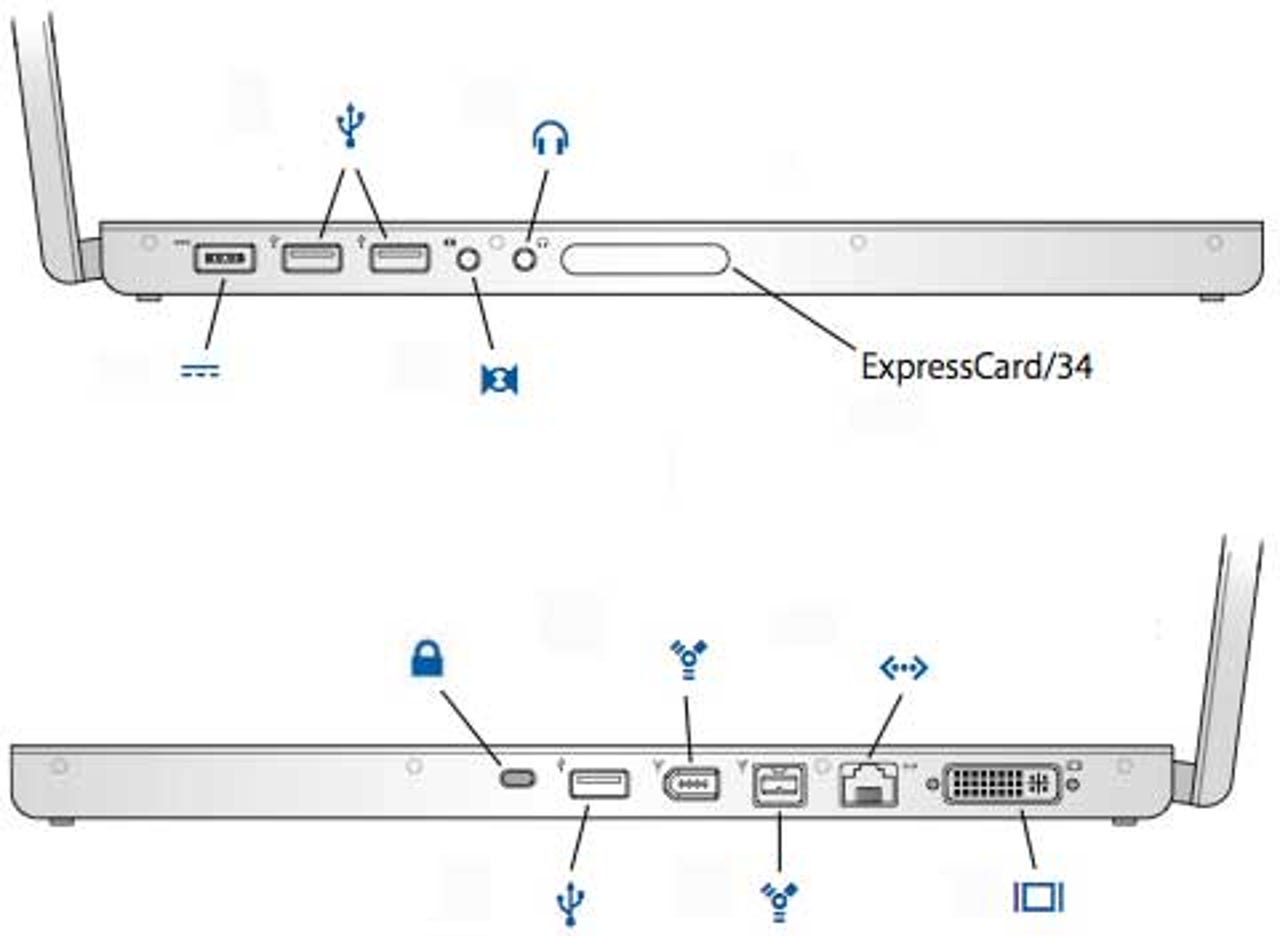
Make sure that you have enough ports on your laptop — at a minimum, look for two USB ports (although three to four is better). If you'd like to use a digital camcorder with your notebook, you may need a FireWire (IEEE 1394) port. Connecting a monitor will require a VGA port at minimum (if you'll be giving presentations, a VGA port is also where you'll connect a projector), but for extra image quality look for a DVI, HDMI or DisplayPort connector in addition to this. A lot of PC laptops these days also have a combined USB and eSATA port — eSATA allows faster connections to external hard drives, provided that your external hard drive supports it.
These days, there are two newer ports doing the rounds — USB 3.0 (often indicated by a blue USB port or an "SS" symbol above the port) and Thunderbolt. USB 3.0 can offer significantly better speeds than USB 2.0 (up to 254MBps in our tests so far), providing that what you're plugging in is capable of those speeds.
Thunderbolt is really only found on Apple computers at this stage, and is the fastest connection on the block; it's expected to hit Windows-based laptops in Q2 2012. It can also double as a DisplayPort connection, meaning that it can be plugged in to some modern monitors.
Thunderbolt's accessories are extremely few at this point in time, limited to some displays and high-speed storage applications. Cables are also expensive, at AU$55 a pop. For most users, it won't be important right now, but this may change over time.
Like a PCI-Express slot in a desktop, an ExpressCard slot provides expansion opportunities. Additional USB, FireWire, SATA and Ethernet ports, sound cards, wireless cards and TV tuners are all available in ExpressCard format. It comes in two sizes — 54 and 34, representing how many millimetres wide they are. Both sizes end in a 34mm connection, with the 54mm end of the bigger card used to store extra circuitry. As such, an ExpressCard 34 will fit into a 54 slot, but not vice versa.
These barely exist on consumer laptops any more, and are generally only found on business machines. These very same business machines may still have the older PC Card (or PCMCIA) included, as well. PC Cards and slots come in three sizes: Type I, II and III. Type I cards are normally used for memory, Type II for input/output devices and Type III for mass storage and firewalls.
Go wireless
Integrated wireless networking (Wi-Fi) has become an indispensable feature. Most notebooks ship with a variant of 802.11n these days, although some (such as netbooks) still use 802.11g. Public hotspots typically use 802.11g; fortunately, 802.11n is backwards compatible, along with 802.11b.
Most mainstream laptops come with 2.4GHz 802.11n, whereas the premium ones come with both 2.4GHz and 5GHz. The difference: 2.4GHz has greater range, but lesser throughput. It also has more chance of interference, either from your neighbour's Wi-Fi or from other implements that use the 2.4GHz spectrum, like microwaves and cordless phones.
5GHz has less chance of interference and higher throughput, but has smaller range. Your wireless router will also need to support it for you to take advantage of it.
Power without the plug
While you might have a two- or three-year warranty on your laptop, your battery is generally only covered for one year.
Two specs to look for in laptop batteries are capacity (measured in milliamp hours, or mAh) and the number of cells. Typical batteries have an mAh rating of between 2000mAh and 6000mAh; higher is better. Cells are the actual compartments where power is produced, and can range from four to 12; the more the better. Keep in mind, though, that this may cause the battery pack to stick out from your laptop in potentially awkward positions.
Some laptops don't have easily swappable batteries, in an attempt to cut down on physical size and to lengthen battery life. Be aware of this — and when your battery dies, you may need to take your laptop in for a service rather than simply swapping the battery out yourself.
On the other hand, some can take a second battery, either by replacing the optical drive or by placing a shim on the bottom. Check your accessories before you buy.
Tiny, tinny sound
Laptops are notorious for having terrible speakers. While a lot of laptops these days are including some version of Dolby, THX, Beats or other sort of "branded" sound, this is done in software, and often paired with such tiny speakers that it doesn't make that much of a difference.
Our recommendation: get a good set of headphones, or a stereo or 2.1 speaker set. You can even get speakers powered by USB if you want something portable that doesn't require a power point.
Is it pretty?
Just because the laptop on the shop shelf may look a little dour, doesn't mean that there aren't any options. Many models these days sell in different colours, and Dell, for instance, even has a huge range of swappable back covers available for sale for certain laptops.
Going for the perfect drive
Notebook hard drives tend to start at the 64GB point, and work their way up to 1TB in size. If you have a choice, select a drive with a rotational speed of 7200rpm instead of 5400rpm. The faster it spins, the faster you'll get your files.
Solid state drives (SSDs) are also an option, bringing significantly faster sequential and random read and write speeds, and a much higher cost as a result. Disappointingly, most manufacturers won't tell you what brand SSD that they put in their laptops, and not all are created equal — in many cases, you're better off buying aftermarket so that you can ensure you'll receive an Intel, Samsung 830 or SandForce-based drive.
While they are diminishing in importance these days, optical drives of all kinds are available for laptops — from basic CD ROM units to Blu-ray/DVD±RW combos. We like DVD±RW drives for notebooks; they burn and play both DVDs and CDs. Blu-ray is a good choice if you're a movie buff, but make sure that your notebook can display a Full HD resolution (at least 1920x1080, usually only seen on desktop replacements), or can at least output the video to a screen that can — otherwise, you'll lose the benefits of all of that clarity.
When good notebooks go bad
Every notebook is susceptible to accidents and system failures. Keep an eye open for longer than usual warranties, and check to see if the manufacturer offers an international warranty rather than local — particularly useful for travellers.
We recommend, if available, paying for a good three-year warranty with express service. Try getting it direct from the manufacturer rather than dealing with in-store warranty extensions.
What's it made of?
Most laptop cases are still made from moulded plastic, but you can find some encased in metal, which dissipates heat better. Look for models made from light, strong metal alloys. If you're in the market for a desktop replacement, check that the case has adequate ventilation for the powerful (and hot-running) components inside.
Connect the docks
A docking station quickly turns your notebook into a desktop. You connect your peripherals (monitor, keyboard, mouse) to the dock, which stays at your desk. Simply attach the notebook to the dock, and you instantly get the conveniences of a desktop without having to unplug everything when it's time to go.
Most manufacturers offer docks designed to go with their notebooks, while third-party docks, such as the Logitech Alto Cordless and Belkin High Speed Docking Station, are also available.
Another advantage of a docking station is increasing the number of ports your laptop has, whether it be extra video connections, more USB ports, or legacy ports like serial and PS/2. Thunderbolt is likely to shake things up here. For instance, Apple's recent Thunderbolt Displays, through one cable not only offers a monitor, but more USB ports, a FireWire port and gigabit Ethernet for your MacBook.
If you don't need all of the features of a dock, but could still use the extra connectivity, check whether the notebook maker offers a port replicator, which is basically a pared-down version of a dock.
Are you the tablet type?
Before the iPad, tablets meant something entirely different.
Comparable in size and weight to ultraportable notebooks, tablet PCs occupy a different niche, allowing the full productivity of a Windows machine, as opposed to the content consumption focus of Android and iOS tablets.
They're available in two basic designs: convertibles, which are laptops that have displays that swivel and fold flat facing outwards; and slates, which have no attached keyboards, but can be connected easily enough to one.
This space is set for lots of changes with the introduction of Windows 8, expected in October 2012.
32- or 64-bit?
Most vendors should be selling laptops today with Windows 7 64-bit, with only business laptops being the exception for compatibility reasons. If the choice is presented to you, you'll want a 64-bit version of Windows, as the 32-bit version can't address 4GB RAM or greater.
Are you an Apple person?
Perhaps you've been curious about Apple' MacBooks — just be aware that if you were previously a Windows user, you'll need all new software to go with that Mac purchase, and the transition might be a little daunting. If you're planning on becoming a first time Mac OS X user, we've got a guide here to help you make the switch.
Also be aware that Apple's extended warranty option, called Apple Care, can be quite expensive. We recommend you do purchase Apple Care so you're covered for a longer period of time — just be prepared for the price hike.