Installing Web plug-ins as a Vista non-administrative user
On a fresh installation of Windows Vista, we took screen shots when it came time to install Adobe's Flash plug-in into Internet Explorer for the first time. The sequence is especially interesting given Microsoft's emphasis on using Windows Vista as a non-administrative or "Lesser Privileged User" (LPU). Why? Because our first couple of attempt's failed. As it turns out, though, as best as we could tell, the failure had nothing to do with Vista, being an LPU, or Adobe's Flash. It has more to do the Web site that's calling for the Flash plug and how it responds when the Flash plug-in isn't there. In other words, depending on what site you go to, mileage may vary.

1 of 27 Matt Conner/ZDNET
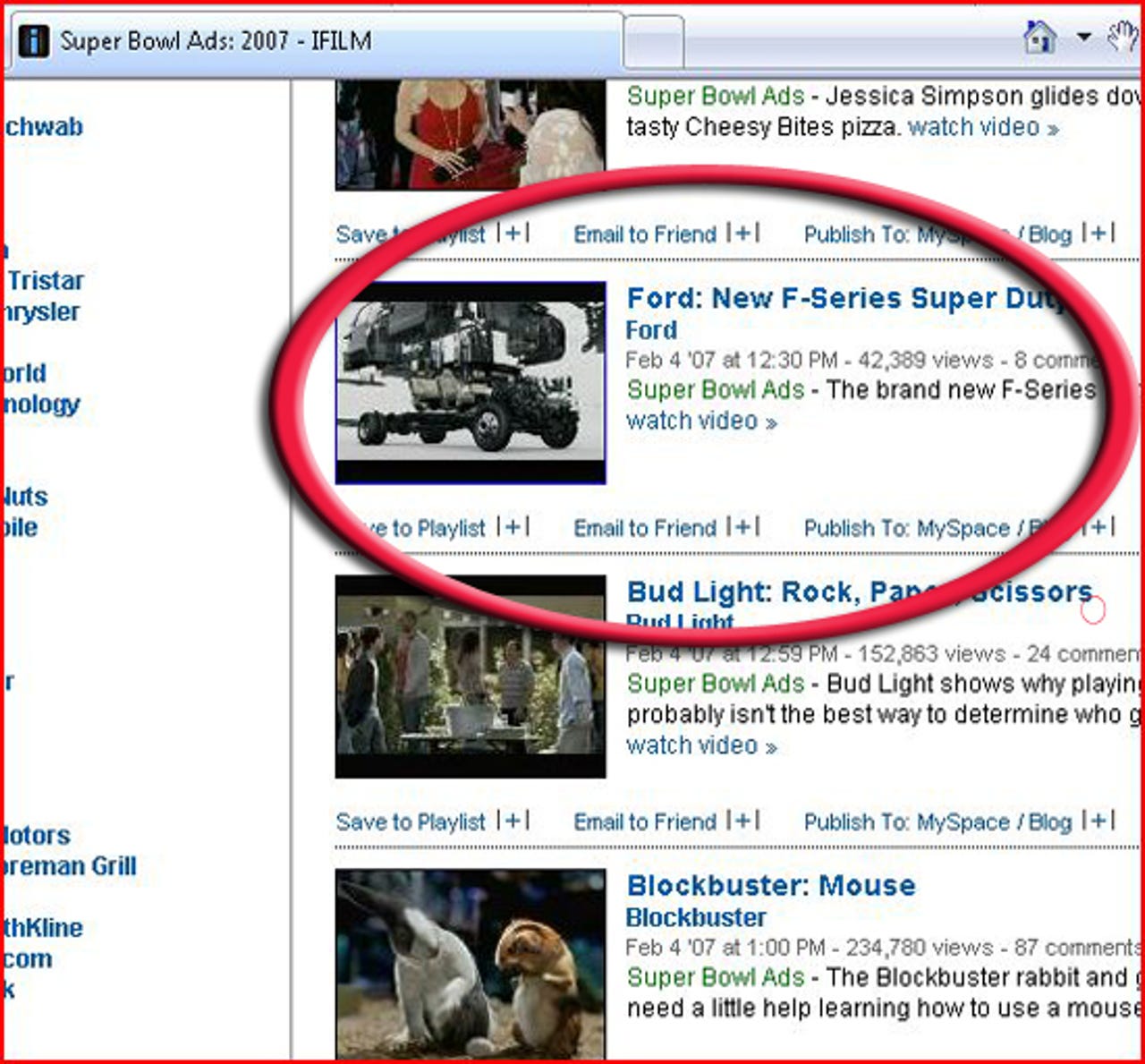
Just prior to the Super Bowl, we went to iFilm.com to get an early peek at some of the commercials that were going to air during the football game. I picked the commercial for a Ford F-Series pickup truck.
For David Berlind's write-up on ActiveX control security in Vista and Internet Explorer 7, see his post in ZDNet's TestBed blog.
For David Berlind's write-up on ActiveX control security in Vista and Internet Explorer 7, see his post in ZDNet's TestBed blog.
2 of 27 Matt Conner/ZDNET
After clicking on the advertisement for the Ford F-Series pick up truck, iFilm.com looked for Adobe's Flash player to load, but couldn't find it. So it presented this message: This content requires Adobe Flash Player 9. Would you like to install it now?
For David Berlind's write-up on ActiveX control security in Vista and Internet Explorer 7, see his post in ZDNet's TestBed blog.
For David Berlind's write-up on ActiveX control security in Vista and Internet Explorer 7, see his post in ZDNet's TestBed blog.
3 of 27 Matt Conner/ZDNET
I followed the dialog's directions and closed the browser. But I half-wished it gave a little more explanation as to what I was supposed to do next. Wait for a new browser window to open? Restart the browser and go back to the Web site? Reboot the computer? I decided to close the browser, reopen it, and go down the same path to see if the Flash player loaded. Theoretically, it shouldn't have since I was logged in as a non-administrative or "Lesser Privileged User" (LPU).
For David Berlind's write-up on ActiveX control security in Vista and Internet Explorer 7, see his post in ZDNet's TestBed blog.
For David Berlind's write-up on ActiveX control security in Vista and Internet Explorer 7, see his post in ZDNet's TestBed blog.
4 of 27 Matt Conner/ZDNET
After relaunching the browser and going down the same path on iFilm.com back to the commercial for the Ford truck, I got the exact same dialog as the first time. But this time, when it told me to close the browser (see previous screen shot), I clicked on the link for the Adobe Flash Player Support Center.
For David Berlind's write-up on ActiveX control security in Vista and Internet Explorer 7, see his post in ZDNet's TestBed blog.
For David Berlind's write-up on ActiveX control security in Vista and Internet Explorer 7, see his post in ZDNet's TestBed blog.
5 of 27 Matt Conner/ZDNET
After arriving at Adobe's Flash Player Support Center, I clicked on the link that said "I'm having trouble installing the Adobe Flash Player."
For David Berlind's write-up on ActiveX control security in Vista and Internet Explorer 7, see his post in ZDNet's TestBed blog.
For David Berlind's write-up on ActiveX control security in Vista and Internet Explorer 7, see his post in ZDNet's TestBed blog.
6 of 27 Matt Conner/ZDNET
Next, I clicked on the link that asked "How do I install Adobe Flash Player on a Windows Computer?"
For David Berlind's write-up on ActiveX control security in Vista and Internet Explorer 7, see his post in ZDNet's TestBed blog.
For David Berlind's write-up on ActiveX control security in Vista and Internet Explorer 7, see his post in ZDNet's TestBed blog.
7 of 27 Matt Conner/ZDNET
According to Adobe's troubleshooter, there are a bunch of steps I need to follow before attempting to install the Flash Player. I followed the directions (see the next screen shots).
For David Berlind's write-up on ActiveX control security in Vista and Internet Explorer 7, see his post in ZDNet's TestBed blog.
For David Berlind's write-up on ActiveX control security in Vista and Internet Explorer 7, see his post in ZDNet's TestBed blog.
8 of 27 Matt Conner/ZDNET
The first thing you're told to do is open Internet Explorer, choose Tools, Internet Options, and then choose the security tab. This is where it puts you. Then it says to "Enure that the 'Download Signed ActiveX controls' and 'Run ActiveX controls and plug-ins' options are enabled. Unfortunately, the instruction are missing one little step.. the fact that you have to press the "Custom Level" button to get to the options.<
For David Berlind's write-up on ActiveX control security in Vista and Internet Explorer 7, see his post in ZDNet's TestBed blog.</
For David Berlind's write-up on ActiveX control security in Vista and Internet Explorer 7, see his post in ZDNet's TestBed blog.</
9 of 27 Matt Conner/ZDNET
It was set to "prompt" by default. I followed the directions to enable the downloading of signed ActiveX controls. But I could see where doing so would concern many users since it says doing this is "not secure."
For David Berlind's write-up on ActiveX control security in Vista and Internet Explorer 7, see his post in ZDNet's TestBed blog.
For David Berlind's write-up on ActiveX control security in Vista and Internet Explorer 7, see his post in ZDNet's TestBed blog.
10 of 27 Matt Conner/ZDNET
By default, "enable" was already checked under "Run ActiveX controls and plug-ins." Next I went back to the troubleshooter to find a download link now that IE7 was "seasoned" for to accept a download.
For David Berlind's write-up on ActiveX control security in Vista and Internet Explorer 7, see his post in ZDNet's TestBed blog.
For David Berlind's write-up on ActiveX control security in Vista and Internet Explorer 7, see his post in ZDNet's TestBed blog.
11 of 27 Matt Conner/ZDNET
Back on Adobe's troubleshooter page, I found the link to Adobe's Flash Player Download Center and clicked it.
For David Berlind's write-up on ActiveX control security in Vista and Internet Explorer 7, see his post in ZDNet's TestBed blog.
For David Berlind's write-up on ActiveX control security in Vista and Internet Explorer 7, see his post in ZDNet's TestBed blog.
12 of 27 Matt Conner/ZDNET
Of course, I clicked download now. End user license agreements? Who reads those?
For David Berlind's write-up on ActiveX control security in Vista and Internet Explorer 7, see his post in ZDNet's TestBed blog.
For David Berlind's write-up on ActiveX control security in Vista and Internet Explorer 7, see his post in ZDNet's TestBed blog.
13 of 27 Matt Conner/ZDNET
By design, if you're logged into Windows Vista as a lesser privileged (non-administrative) user and you try to install software, Windows Vista will stop you. To install software, an LPU must, for a brief moment, switch to an administrative mode.
On the Lenovo X60 tablet I was using, the admin user's id is "David". Unfortunately, when this dialog comes up, it shuts down the entire user interface (see the darkened background) and I couldn't take a screen shot. So, I took a picture of what the User Access Control dialog looked like with my digital camera instead.
One other interesting point.. check out the "action" that this User Account Control dialog is flagging. It says "Internet Explorer Add-on Installer." It doesn't say anything about Adobe's Flash Player. Why is this interesting? Check out what the same dialog says when you're installing the plug-in for Java (next screen)
For David Berlind's write-up on ActiveX control security in Vista and Internet Explorer 7, see his post in ZDNet's TestBed blog.
On the Lenovo X60 tablet I was using, the admin user's id is "David". Unfortunately, when this dialog comes up, it shuts down the entire user interface (see the darkened background) and I couldn't take a screen shot. So, I took a picture of what the User Access Control dialog looked like with my digital camera instead.
One other interesting point.. check out the "action" that this User Account Control dialog is flagging. It says "Internet Explorer Add-on Installer." It doesn't say anything about Adobe's Flash Player. Why is this interesting? Check out what the same dialog says when you're installing the plug-in for Java (next screen)
For David Berlind's write-up on ActiveX control security in Vista and Internet Explorer 7, see his post in ZDNet's TestBed blog.
14 of 27 Matt Conner/ZDNET
Here's the same User Account Control dialog during the installation of the Java SE Runtime Environment. In this case, the dialog is very specific about the plug-in that's being installed. It left me wondering whether other applications could intercept the installation of an ActiveX control that uses the generic "Internet Explorer Add-On Installer" language... one might never no that the wrong control (or a malicious control) is being installed.
For David Berlind's write-up on ActiveX control security in Vista and Internet Explorer 7, see his post in ZDNet's TestBed blog.
For David Berlind's write-up on ActiveX control security in Vista and Internet Explorer 7, see his post in ZDNet's TestBed blog.
15 of 27 Matt Conner/ZDNET
Just because you gave Vista permission (and the administrative password) to install some software (it doesn't necessarily have to be a plug-in to IE) doesn't mean that Internet Explorer doesn't need its own permission. Here, I have to explicitly say its OK to install this software. Going back to the Java vs. Flash instalaltion, this is where you get to double check the that the right control is installing itself. This dialog indicates that the control is named and signed by the publisher.
Later in this screen gallery (and in the associated blog), I ask if this Authenticode dialog shouldn't be presented before Vista asks for the administrative password (instead of after).
For David Berlind's write-up on ActiveX control security in Vista and Internet Explorer 7, see his post in ZDNet's TestBed blog.
Later in this screen gallery (and in the associated blog), I ask if this Authenticode dialog shouldn't be presented before Vista asks for the administrative password (instead of after).
For David Berlind's write-up on ActiveX control security in Vista and Internet Explorer 7, see his post in ZDNet's TestBed blog.
16 of 27 Matt Conner/ZDNET
Adobe's Web page turns on an animation after Flash has been successfully installed.
For David Berlind's write-up on ActiveX control security in Vista and Internet Explorer 7, see his post in ZDNet's TestBed blog.
For David Berlind's write-up on ActiveX control security in Vista and Internet Explorer 7, see his post in ZDNet's TestBed blog.
17 of 27 Matt Conner/ZDNET
Earlier, as a result of following the instructions to set Internet Explorer to allow the downloading of signed ActiveX controls, recall that there was some text that said it wasn't secure. Allowing signed ActiveX controls apparently triggers two other behaviors in IE7. The first shown here, where the information bar tells me that "Your current security settings put your computer at risk. Click here to change your computer settings."
What's wrong with this message? First, I don't want to change the settings because then I don't know if Adobe's Flash will continue to work (although my instincts tell me that it will since the ActiveX control is already downloaded).
Second, this message cannot be suppressed. If I close it by left-mouse clicking on the X (to the right), it simply comes back when I go to another Web page (and beeps at me). I understand that Microsoft wants to leave no stone unturned into attempting to secure our computers. But at some point, Internet Explorer 7 should allow us to decide whether we want to incessantly be bothered with error messages like this or with what you'll see in the next image.
For David Berlind's write-up on ActiveX control security in Vista and Internet Explorer 7, see his post in ZDNet's TestBed blog.
What's wrong with this message? First, I don't want to change the settings because then I don't know if Adobe's Flash will continue to work (although my instincts tell me that it will since the ActiveX control is already downloaded).
Second, this message cannot be suppressed. If I close it by left-mouse clicking on the X (to the right), it simply comes back when I go to another Web page (and beeps at me). I understand that Microsoft wants to leave no stone unturned into attempting to secure our computers. But at some point, Internet Explorer 7 should allow us to decide whether we want to incessantly be bothered with error messages like this or with what you'll see in the next image.
For David Berlind's write-up on ActiveX control security in Vista and Internet Explorer 7, see his post in ZDNet's TestBed blog.
18 of 27 Matt Conner/ZDNET
This is a variation of the last image. When you set IE7 to allow signed ActiveX controls to be downloaded, everytime you start IE7, this is what the opening page will look like. There's no way to suppress the display of this page.
For David Berlind's write-up on ActiveX control security in Vista and Internet Explorer 7, see his post in ZDNet's TestBed blog.
For David Berlind's write-up on ActiveX control security in Vista and Internet Explorer 7, see his post in ZDNet's TestBed blog.
19 of 27 Matt Conner/ZDNET
Here, to show how the Web site plays a role in the ultimate user experience when it comes to dynamically loading new plug-ins into IE7, instead of starting with iFilm like we did with the last sequence of screen shots, I started with a ZDNet page that contains video. As you can see, ZDNet detects the absence of Adobe's Flash Player and offers a link to downloaded it.
For David Berlind's write-up on ActiveX control security in Vista and Internet Explorer 7, see his post in ZDNet's TestBed blog.
For David Berlind's write-up on ActiveX control security in Vista and Internet Explorer 7, see his post in ZDNet's TestBed blog.
20 of 27 Matt Conner/ZDNET
Originally, when you clicked on a link like the one in the last image, it would do a search in CNET's Downloads.com download library for Adobe's download. Since I did this testing, the process has now changed. Instead, we take you straight to Adobe's Web site where you can acquire the plug -in. It just seemed more straight forward, involved fewer steps, and guaranteed that you got the latest download. But it is demonstrative of how the Web site that needs the Felash player can take over the experience that the end user sees when it comes time to actually get it.
For David Berlind's write-up on ActiveX control security in Vista and Internet Explorer 7, see his post in ZDNet's TestBed blog.
For David Berlind's write-up on ActiveX control security in Vista and Internet Explorer 7, see his post in ZDNet's TestBed blog.
21 of 27 Matt Conner/ZDNET
Here, in the old way that ZDNet helped you to get the download, you would get another page after clicking on one of the search results that were displayed in the previous image.
Again, this proves how much of the user experience is under the control of the first Web site that you would acquire an ActiveX control through. As said earlier, these extra steps have been eliminated since I discovered them in the course of testing how Internet Explorer 7 responds to ActiveX control requests in the context of running as a Lesser Privileged User (LPU).
For David Berlind's write-up on ActiveX control security in Vista and Internet Explorer 7, see his post in ZDNet's TestBed blog.
Again, this proves how much of the user experience is under the control of the first Web site that you would acquire an ActiveX control through. As said earlier, these extra steps have been eliminated since I discovered them in the course of testing how Internet Explorer 7 responds to ActiveX control requests in the context of running as a Lesser Privileged User (LPU).
For David Berlind's write-up on ActiveX control security in Vista and Internet Explorer 7, see his post in ZDNet's TestBed blog.
22 of 27 Matt Conner/ZDNET
No that all the barriers to installing the Flash player have been removed, it's time to actually install the player. I clicked install.
For David Berlind's write-up on ActiveX control security in Vista and Internet Explorer 7, see his post in ZDNet's TestBed blog.
For David Berlind's write-up on ActiveX control security in Vista and Internet Explorer 7, see his post in ZDNet's TestBed blog.
23 of 27 Matt Conner/ZDNET
By default, before Internet Explorer will allow pop-ups or plug-ins from a newly visited destination to work, it alerts the end user to the clickable yellow-tinted information bar (has the text "Adobe Flash Player from Adobe Systems Incorporated" in it). In this case, the user must take action by clicking on the information bar before the Flash Player Installer will be allowed to work. I had to click the close button to get access to the Information Bar.
For David Berlind's write-up on ActiveX control security in Vista and Internet Explorer 7, see his post in ZDNet's TestBed blog.
For David Berlind's write-up on ActiveX control security in Vista and Internet Explorer 7, see his post in ZDNet's TestBed blog.
24 of 27 Matt Conner/ZDNET
After clicking on the Information Bar, you get a drop down menu, the top choice of which is to proceed with the installation of the relevant ActiveX control (in this case, Adobe's Flash Player).
For David Berlind's write-up on ActiveX control security in Vista and Internet Explorer 7, see his post in ZDNet's TestBed blog.
For David Berlind's write-up on ActiveX control security in Vista and Internet Explorer 7, see his post in ZDNet's TestBed blog.
25 of 27 Matt Conner/ZDNET
As was the case before, if you're logged into Windows Vista as a lesser privileged (non-administrative) user the way I was, and you try to install software, Windows Vista will stop you. To install software, an LPU must provide the administrator's password.
For David Berlind's write-up on ActiveX control security in Vista and Internet Explorer 7, see his post in ZDNet's TestBed blog.
For David Berlind's write-up on ActiveX control security in Vista and Internet Explorer 7, see his post in ZDNet's TestBed blog.
26 of 27 Matt Conner/ZDNET
Just like before, giving Vista permission (and the administrative password as I did in the last step) to install some software is one step. Giving Internet Explorer its own permission is another Here, as with the iFilm Flash Player installation sequence earlier, I have to explicitly tell IE7 that it's OK to install this software. One question this raises is whether there are too many requests for permission. In other words, if you've supplied the administrative password for Vista already, should IE7 subjugate itself to that permission?
Another question, mentioned in the blog where I discuss this screen gallery (see link below) is whether or not this "Authenticode" dialog should be presented before Vista asks for the administative password to the machine. After all, should Vista be asking for the administrative password after the user is absolutely 100 percent certain they want to install the software (certainty which would be based on examining the Authenticode dialog)?
For David Berlind's write-up on ActiveX control security in Vista and Internet Explorer 7, see his post in ZDNet's TestBed blog.
Another question, mentioned in the blog where I discuss this screen gallery (see link below) is whether or not this "Authenticode" dialog should be presented before Vista asks for the administative password to the machine. After all, should Vista be asking for the administrative password after the user is absolutely 100 percent certain they want to install the software (certainty which would be based on examining the Authenticode dialog)?
For David Berlind's write-up on ActiveX control security in Vista and Internet Explorer 7, see his post in ZDNet's TestBed blog.
27 of 27 Matt Conner/ZDNET
After agreeing to everything we have to agree to, the Flash animation once again confirms a succesful installation.
For David Berlind's write-up on ActiveX control security in Vista and Internet Explorer 7, see his post in ZDNet's TestBed blog.
For David Berlind's write-up on ActiveX control security in Vista and Internet Explorer 7, see his post in ZDNet's TestBed blog.
Related Galleries
Holiday wallpaper for your phone: Christmas, Hanukkah, New Year's, and winter scenes
![Holiday lights in Central Park background]()
Related Galleries
Holiday wallpaper for your phone: Christmas, Hanukkah, New Year's, and winter scenes
21 Photos
Winter backgrounds for your next virtual meeting
![Wooden lodge in pine forest with heavy snow reflection on Lake O'hara at Yoho national park]()
Related Galleries
Winter backgrounds for your next virtual meeting
21 Photos
Holiday backgrounds for Zoom: Christmas cheer, New Year's Eve, Hanukkah and winter scenes
![3D Rendering Christmas interior]()
Related Galleries
Holiday backgrounds for Zoom: Christmas cheer, New Year's Eve, Hanukkah and winter scenes
21 Photos
Hyundai Ioniq 5 and Kia EV6: Electric vehicle extravaganza
![img-8825]()
Related Galleries
Hyundai Ioniq 5 and Kia EV6: Electric vehicle extravaganza
26 Photos
A weekend with Google's Chrome OS Flex
![img-9792-2]()
Related Galleries
A weekend with Google's Chrome OS Flex
22 Photos
Cybersecurity flaws, customer experiences, smartphone losses, and more: ZDNet's research roundup
![shutterstock-1024665187.jpg]()
Related Galleries
Cybersecurity flaws, customer experiences, smartphone losses, and more: ZDNet's research roundup
8 Photos
Inside a fake $20 '16TB external M.2 SSD'
![Full of promises!]()