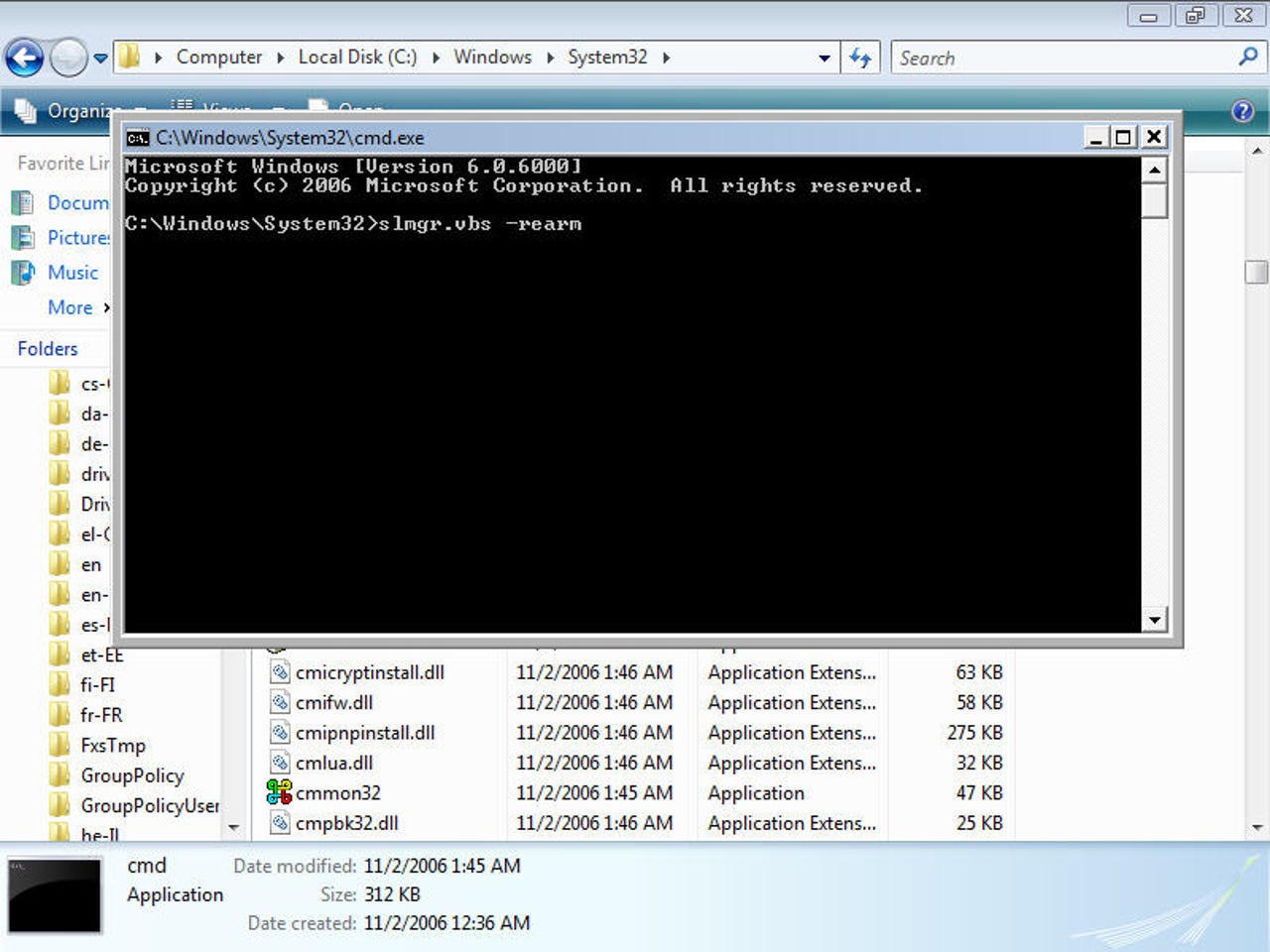
Restoring Vista functionality once in reduced functionality mode

by ZDNet Author  |  February 27, 2007 1:21pm PST  |  Image 1 of 10

Previous  |  Next

Restoring functionality

Hwere's how you can restore full functionality back to a Windows Vista system that's in reduced functionality mode. To do this you need to use Internet Explorer to access the file system (type C:\ into the address bar and hit enter - give this permission in any security prompts). Then navigate to c:\windows\system32\cmd.exe and run this.
27
Comments

Join the conversation!

Just In

RE: Restoring functionality (Restoring Vista functionality once in reduced functionality mode)
krish85 5th Feb 2009
vista is perfect n rocks
0 Votes
+ -
vista
Rpokeytruck@... 27th Feb 2007
After all I've read about vista and all the contorsions
its put folks through I'll stick with XP. What the heck were
they thinking? Maybe "Gee,lets sell them buggy agrivating software that they have to do 2 intalls to get,make them pay more in the process and then when they add something it doesnt like confuse the heck out of them so they have to pay to make it work. Great sales gimmick.
0 Votes
+ -
I like Windows, but Im not going to upgrade to any OS that has an even more stringent level of WGA then XP. We all know that any form of software based DRM dosnt work for ever, not even usually for very long. It dosnt matter a single scrap what Microsoft has done with their new fancy WGA/DRM activation nonsense because those who are real pirates will soon be getting around that as if it never existed in the first place. Then this new Vista version headache of WGA/DRM will only affect ligitimate users for the most part. Always keep in mind, the reason why these software producers keep jamming software based DRM down our throats is because they just keep thinking how nice it would be if one day they actually created software in the form of DRM that could not be uncreated. Of course thats something like saying your hopeing to put together a picture puzzle thats so big and complex that once you have the peices together people wont be able to figure out how to get the peices apart again. Common sense tells you reality dosnt work that way.
0 Votes
+ -
Agreed
funnyusername 16th Mar 2007
Too right - let all the other lemmings go find the vista bugs and pull their hair out trying to get it to work. I'll switch from XP PRO in about a year - maybe wink
0 Votes
+ -
Restoring functionality
RusOckwell@... 27th Feb 2007
Thank you for all your hard work.
At least now we have something to get us out of trouble if things go wrong when we upgrade.
0 Votes
+ -
Why upgrade?
mari_232@... 28th Feb 2007
After all the trouble stories I have read, I wonder whether it is worth for users in office environments to upgrade. I shiver only to the thought of loosing functionality of my pc and access to my documents. I think that the practices of microsoft are pure escroquerie, and from what we have discussed here with colleagues from other companies, none intends to upgrade to vista or office 2007, at least not before 1 - 1 and half years have elapsed and info from actual users in office environments confirm it's safe and practical to do so.
0 Votes
+ -
Vista
rmikey 28th Feb 2007
I agree, our It dept has told us they will wait it out on Vista. Let them find all the bugs and do all the updates before upgrading.
0 Votes
+ -
Wait
jmsfmtex 28th Feb 2007
I certainly could not agree more. Why do I want to upgrade and wonder if I am going to be locked out of my own computer or told that I am operating at a lower functionality and not knowing what to do. This is not why I own a computer. I am not a technician nor do I want to be. I just want to run MY computer and not MS. Now if they want to buy me a new one then maybe I will agree with them to control mine.
0 Votes
+ -
Uprade to Vista, why?
robert@... 28th Feb 2007
I guess I am like a lot of support people, having spent some time learning the ins and outs of XP. There is no way I am going to recommend "upgrading" to Vista until I am sure I can support it. The problem is though the new computers we buy all have Vista so its either support them or wipe them and put XP on, which we are doing.Interestingly the XP runs super fast on these machines so is Vista an upgrade, No way.
0 Votes
+ -
There is no way I am going to recommend "upgrading" to Vista until I am sure I can support it.

Well, of course you're not going to upgrade until you can support it! That would be like the blind leading the blind.

But I would suggest that, somehow, you begin to get yourself up to speed with Vista (and I am not a Microsoft shill, I don't work for them). Take one of those boxes your company is buying and instead of wiping out XP, activate Vista and start learning it. I assure you, being another experienced I-T professional (21 years), that it's not as bad as you imagine. The file and folder system looks a little different and some other features have been moved around but it's still Windows!

Here's something else to consider ... I participated in the Customer Participation Program (the beta testing program) simply to get the experience with Vista on my resume. I also upgraded from Windows XP Home Edition) that came with the laptop I purchased in Dec. 2006) to Vista Ultimate and I'm glad I did. While I have observed a couple of issues, they've both been minor and have given me some troubleshooting experience with applications and Vista. You're tellin' me there's no value in that?

At some point, you're going to need to have Vista expertise also. Why wait indefinitely? Do you want to be ahead of the curve or behind it?
0 Votes
+ -
yes upgrade, sort of
Jim Johnson 1st Mar 2007
My full time job is consulting & training corporate users in doing their jobs that incidentally use a web-based tool I support (the emphasis is more on getting the job done rather than the tool that enables them). I also run a part-time home-based IT consulting business for mom & pop and slightly larger businesses. In other words, I see a pretty broad spectrum of IT.

In my opinion, most existing PCs are not good candidates for upgrade from XP to Vista. These PCs should be patched to exist nicely within a mixed network (Vista's discovery service)and allowed to finish out their useful life with XP.

But IT shops who won't install a new PC with Vista, in my opinion have ostriches for management - they are sticking their heads in the sand hoping to retire before they have to deal with something new. Folks, Vista was 5 years in the making and I have never seen a beta (dare I say gamma) testing program as large. So far as I'm concerned, this OS has already been around for a year. Will there be issues? sure. I saw issues with shops just starting with XP months after SP2. Change always involves friction with existing systems and waiting isn't going to change that. I'm not advocating a wholesale swap here. Start small by letting new club members be Vista, work through the issues of a new kid entering the old boy network and develop your expertise. When it comes time to replace large blocks of PCs, your IT staff will be experienced and ready.

Regarding the comment about programs running faster under XP than Vista... have you thought about returning to DOS? It should REALLY run fast on current hardware versus the hardware it used to run on. Come on. It's a fact of life that most business users won't see a significant performance hit because they will also be using more powerful hardware. And many of those same applications will take better advantage of the Vista environment (OS and hardware) in the next release or two and run faster than they did on the old hardware under XP - probably about the same point as you are ready to retire those XP PCs mentioned above.

As for actually upgrading a specific PC from XP to Vista - take it on a case by case basis. It might make sense in some cases if this is a powerful almost new PC with a power user at the mouse.
0 Votes
+ -
Excellent points
chas_2 1st Mar 2007
Excellent points, one and all. Common sense can guide Vista into I-T shops with a little smart planning. Within 2 to 4 years, everyone with current hardware will be running Vista anyway. You may be able to defer Vista, but you won't be able to refuse to use it indefinitely.

Ask any Windows 95 user...
0 Votes
+ -
Tnq god for Vista !
papeca@... 2nd Mar 2007
Another m$ windows full time job ?
My money, my time, my nerfs ?
No, tnq !
0 Votes
+ -
vista the new Me
akcole@... 2nd Mar 2007
Sounds like vista is the new version of win Me. instead of instability and blue screens you apparently get reduced functionality until what..just solitaire works. will try vista maybe in a year or 2
0 Votes
+ -
It's good information, but without a "Print Article" choice, I have to print each screen if I want to save this for future reference, resulting in lots of wasted paper.

OK - make me view all the screens separately if you must (to drown me with the ads (that admittedly pay for the free service you offer) - but in the end, please give me a way to save a concise version of the information.

Thanks for the great info - please make it more usable.

Bruce
0 Votes
+ -
Older is better
rpmyers1 2nd Mar 2007
There's some old fashioned technology you might want to try. It's called "pencil and paper", or if you aren't a luddite, "notepad.exe"

It's not that hard to take notes from these instructions. 4 steps total.
0 Votes
+ -
Well, heck
frgough 7th Mar 2007
Just disable printing for everything, since we all have access to paper and pencil. For
crying out loud, there's nothing worse than a luddite snob.
0 Votes
+ -
Next Vista Update
davidr555 5th Mar 2007
If this really allows for unlimited use in 30 day cycles I see a fix coming up for this real quick.
0 Votes
+ -
Not unlimited use.
zarathustra2010 11th Mar 2007
This does NOT allow "unlimited" use.
It allows it exactly 3 times, for a total of 120 days.
This is rather generous of Microsoft, in my opinion.

How many other software manufacturers allow one to use their product freely for 120 days, before he must purchase a license to continue using it?

You people LOVE making a molehill into a mountain, don't you?
I doubt whether Microsoft will make any such changes, since it could only have been put into the Vista bits by Microsoft programmers with their employers permission (and at their direction).
0 Votes
+ -
Let's get back to basics.
Joe.Smetona 20th Mar 2007
Personally, I can't type faster than my old 1.47 MHz Atari.

It's in our nature to periodically replace items regardless if they need it or not. The Vista release is more a marketing exercise than a true OS development. Many authors have declared that everything works fine already with their present XP Platform.

The gadgetry is getting immense in order to try and differentiate and sell the product. (If you build it, they will come.)

The most unfortunate side I see is the eventual removal of XP in order to promulgate Vista.

I've seen the severely restrictive licensing terms for Vista and experienced the DRM fiasco with my XP-SP2 after upgrading to IE-7 & Media Player 11. That "upgrade" required a complete rebuild to straighten out. Also, XP had enough zero day exploits and critical updates to fill a laundry basket. Will Vista be any different?

I don't use MS anymore at home. The feeling of freedom when using alternatives is overwhelming. You can't imagine all the garbage you are going through unless you get away from it for a while.
0 Votes
+ -
Couldn't agree more
blackRiver 21st Mar 2007
I was a dedicated Windows user through XP, but this Xmas I switched over to a Mac. I know that the Apple experience isn't perfect, but so far it beats the Microsoft one. My kids and wife love our new MacBook, and I haven't missed the PC with my new G5 iMac.
0 Votes
+ -
How many times ...
blackRiver 21st Mar 2007
can this be done? Can you rearm forever? It seems that you shouldn't be able to exceed the grace period.
0 Votes
+ -
Why upgrade to Vista???
?????? ?????? 26th Mar 2007
There is absolutely no reason for it.
0 Votes
+ -
You are absolutely correct.
xuniL_z 26th Mar 2007
In the same way there is absolutely no reason to buy an overpriced Mac w/OS X or the load and learn a Linux distro and spend too much time trying to find hardware and applications that work with it.
So, in that much, I agree. If you are running XP and see no need to move to .NET 3.0 and RIAs and Office 2007 integration and WPF and WCF and 3D graphics and system wide search, then by all means stay with XP or whatever you have now....forever. Why would you ever need more.
0 Votes
+ -
Basic Computing is available now.
Joe.Smetona 31st Mar 2007
XP when fully patched (with the Active-X disabled in the registry) can provide somewhat secure operation. Virus threats are now attacking the Anti-Virus programs themselves. The zero-day exploits will come right on to your computer without you or your virus program even knowing it. I would bet the TJ Max customer information was stored on a Windows system. I use Linux and would recommend it to anyone with moderate experience. Please keep in mind Linux has changed dramatically in the last year. It is now much easer to install and configure and the "Click and Run" system (orginally for Linspire) makes software installation a snap. Not to mention there are thousands of free programs available for install with just one click. (You just have to sign up CNR up for free). I use Freespire with a generic Pentium 1.8 Ghz Workstation, 512 MB Ram, Verizon DSL, Brother HL-2040 laser printer and various USB pen drives. I can also play .MP3 files and burn data and audio CD's and DVD's. My family uses the OpenOffice (included with the distribution for free) to write, edit and create documents in the .doc (Word), .xls (Excel), .mdb (Access) and .ppt (Powerpoint) formats. Browsing is done with Firefox, you can read Adobe .PDF files and view web pages with Flash content. I use Gmail Web based email, but if you are used to Outlook, you can get the Mozilla Thunderbird email client (for free also). In six months, I haven't installed any anti-virus software, spyware detectors or firewalls. I haven't had any problems either.
is it correct?
so
each time we LOGIN
there would APPEARED the windows asking for activation?
then WE SHOULD ALWAYS CHOOSE
ASK ME LATER...???

whaaa.... that's still not solution...
how to remove it?? removing the asking windows activation?
0 Votes
+ -
Error g_objWMIService
ericlee85 29th Dec 2007
I run slmgr.vbs -rearm but I still get an Error "Object require: 'g_objWMIService'. What is that?!

Join the conversation!

Formatting +
BB Codes - Note: HTML is not supported in forums
  • [b] Bold [/b]
  • [i] Italic [/i]
  • [u] Underline [/u]
  • [s] Strikethrough [/s]
  • [q] "Quote" [/q]
  • [ol][*] 1. Ordered List [/ol]
  • [ul][*] · Unordered List [/ul]
  • [pre] Preformat [/pre]
  • [quote] "Blockquote" [/quote]
ie8 fix

The best of ZDNet, delivered

ZDNet Newsletters

Get the best of ZDNet delivered straight to your inbox

Facebook Activity