The beginner's guide to Pinterest and learning

While Pinterest may be seen as being a female-focused social networking site full of cupcake pictures, and Instagram-altered pouting girls, some educators have demonstrated concern that the site, due to its lack of monitoring, may bookmark images deemed inappropriate -- which results in restricting Pinterest from use in class.
Perhaps in the future there will be a way to localize Pinterest for educational use -- but in the meantime, properly supervised and with the right age group, these digital noticeboards can be a valuable resource for learning.
Pinterest, the latest addition to hybrid forms of social networking, hosts a platform where users can 'pin' their favourite images to share with the world.
At first glance, such a service may not seem to have much academic value -- but teachers around the world are utilizing Pinterest to make lessons more interactive. Not only can it be used to share ideas and lesson resources, but the notice-board styled platform allows for better organisation of ideas and images than other sites generally support, such as Facebook or Twitter.
First of all, Pinterest is a social networking site based on bookmarking images, similar to the blog-roll site Tumblr but on a more organised and structured platform, and focused purely on visual content.
The concept is simple: Once a user joins the site, they can create 'boards' with image and descriptions linked to content around the web. According to comScore, Pinterest is the fastest social media platform to break the ten million unique visitors mark -- perhaps due to its visual appeal. In addition to sharing pictures, you can pin video and discussion groups.
Every item you 'pin' becomes a digital bookmark that can be used to access the original content. Links can be shared by other users deciding to re-pin the link on another board -- which also shows up on the visitor's profile.
If you decide to create themed boards that others find interesting, you may end up with followers -- in the same manner as Twitter. These users will be notified when new pins are added, and you can subscribe to others in return to see their updates on your front page news feed.
Pinterest is still invitation-only, but if you want to set up a profile, it doesn't take long once you've registered to receive it through an email address -- it was only six hours for me.
Once you've logged in with an email address and password, you'll see the latest pins from those on your 'following' list -- by default, you'll have ten. Through the setup process, you will be prompted to find others, if you wish, that may interest you.
If you want to find people you know, go to your name and click on the arrow.
A drop-down menu will appear, and you can click on "Find Friends" to conduct a search.
A user can follow boards instead of people if they wish -- so if one particular board interests you, such as "Technology for Children", then you can subscribe to updates on this board only.
- In order to follow a person, click on their name, and "Follow all".
- To chose a particular board, click on the board title, and then select the large red 'Follow' button in the centre.
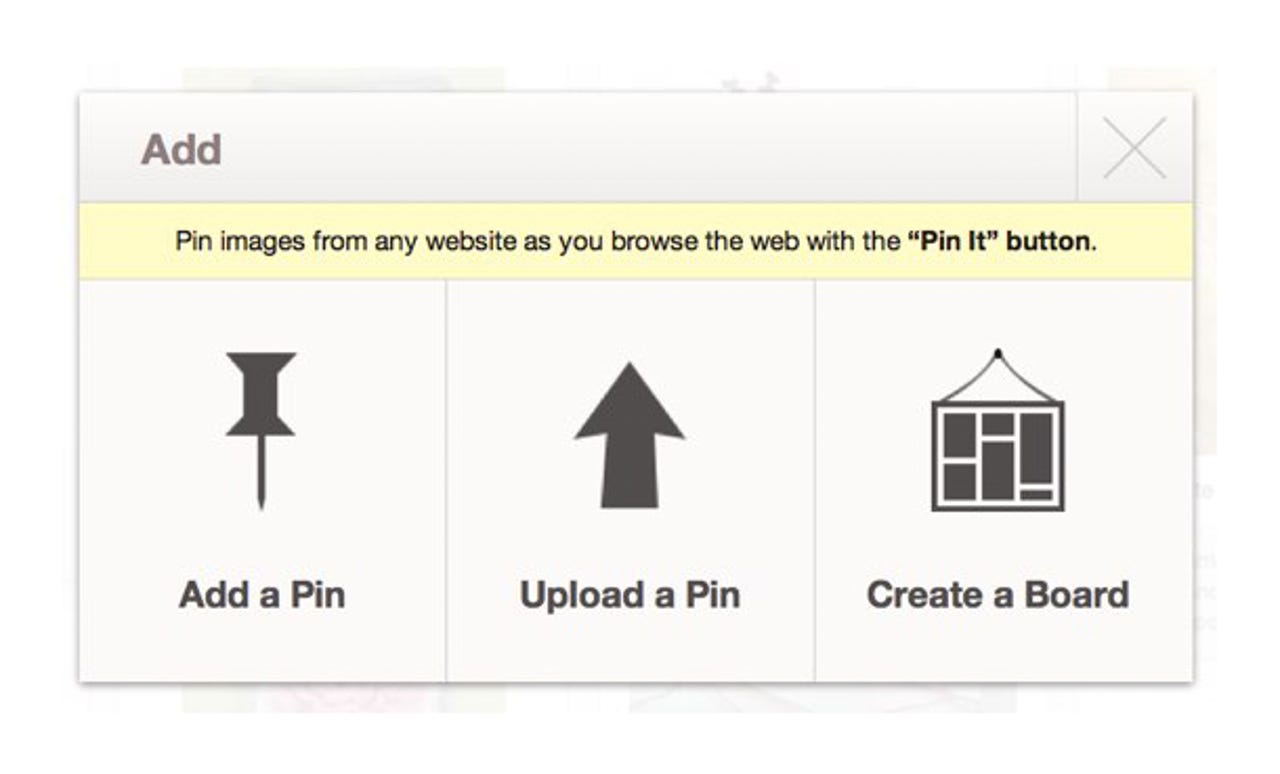
When you first sign up, Pinterest leads you through a process of creating boards for you, or you can create your own.
Highlight your name in the top-right corner, and use the drop-down menu to select "Boards" to edit any existing boards, or to rearrange them.
To add a new board, use the top menu to select "Add +", and the following options appear: Add a Pin, Upload a Pin, Create a board.
Once you have found an image, article or video you want to pin that is already hosted on Pinterest, hover over it and the "Repin" option appears.
Once you click this, a menu will appear, allowing you to select the correct board you wish to deposit the pin in. If you want, you can also write a short description of the item.
There are some websites that now include a "Pin It" button, but most currently do not.
Instead, you can add a "Pin It" option to your bookmarks bar on your Internet browser.
Hover over the "About" option in the right-had corner of Pinterest. Once you select the second option, "Pin It Button", you will be taken to a "Goodies" page.
By selecting the white button in the middle, it can be dragged to your bookmarks bar. Then, if you find an image you want to pin, you simply have to click the button for the link to be saved, and for you to be taken to a board and description selection page.
Searching for themes
As a visual resource, Pinterest can be used to search for pins or boards concerning a particular theme -- such as 'China' or 'the ocean' quickly. The images you find and repin will have a linked source, so you can find additional information about the content from these links.
Anything you search for can be divided between individual pins, people, or boards.
As a former teacher, I think the potential this kind of platform has for learning lies within its application to project-based learning.
By being able to organise web sources, folders and files via themed boards, collaboration among students can become easier and more interactive. Not only this, but finding the source of such items is as easy as clicking on the pin -- which can save time for the teacher if they wish to double-check an entry.
When boards are categorised, teachers and students can create them based on unit, subject, or project theme.
If you do use the platform for projects, remind your students about online etiquette -- copy and pasting an entire work or article is a demonstration of poor manners, or could result in accusations of copyright infringement.
The core focus of Pinterest is to share content and ideas. Not to be confused with a content aggregator, the bookmarking facility can be used to exchange and resources pertaining to particular subjects.
In order to share content and ideas, not only can it be used to pin resources or themed content for lessons, but there are several examples of classrooms using the site to create their own class pinboards -- hosting events and images personal to each student. Businesses are also slowly beginning to see the value of these visual boards -- and I predict product placement and marketing will surge in the next few years.
In the same way that copying and pasting images or articles is at the least considered bad manners -- at the most, copyright infringement -- Pinterest is a linking service and not a host.
If you are linking to work, including the source and no more than either the title or a small excerpt from an article.
Pinterest's etiquette rules state:
Pins are the most useful when they have links back to the original source. If you notice that a pin is not sourced correctly, leave a comment so the original pinner can update the source. Finding the original source is always preferable to a secondary source such as Image Search or a blog entry.
We do not allow nudity, hateful content, or content that encourages people to hurt themselves. If you find content that violates our Terms of Service or Acceptable Use Policy you can submit the content for review by pushing the ”Report Content“ link.