Surface Pro: My week as engineer and train commuter

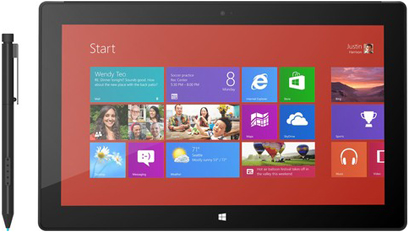
The Microsoft Surface Pro is not for everyone.
But after snagging the elusive 128GB Pro and using it daily for over a week -- at home, at the office, and during my two hour daily train commute -- I find that so far it is perfect for me.
I wrote why the Surface RT couldn't cut it for me while I was on the road, which drove me to the Surface Pro. While I could have purchased another Windows 8 computer or a MacBook Air (running Windows for my engineering apps), the attraction of the Surface Pro was the extreme portability with the two pound weight and ultra-slim form factor. I used to carry my 4.5 pound work laptop during my daily commute; having the Surface Pro at less than half the weight is great.
Engineering applications and use for work
In my previous article, people wanted to know what types of applications I needed to run on a Windows computer. Some of the apps I use include GHS (General Hydrostatics), Deadweight, Deltek Vision, Microsoft Project, Rhino, and AutoCAD. I also need full access to the drives on my company's servers and the VPN connectivity of the Surface Pro works perfectly.
Read this
I was concerned that the screen size of the Surface Pro would limit the usability of these kinds of applications. While the smaller screen is not optimal for design work, it works just fine for when I am out and about. Previously with the Surface RT or iPad, I couldn't even use these applications so the ability to get most of the same experience on the Surface Pro meets my needs.
I also have the ability to output to a second larger screen and am setting up an external display to test this out this weekend.
My friend Johan Tweeted that he found a way to change the viewing angle of the Surface Pro and also use a larger keyboard. I ordered the Microsoft Wedge Mobile Keyboard and should be able to try it out this weekend. So far I haven't been bothered at all with the viewing angle, but if I am going to make the Surface Pro my main computer for when I work at home then I need a larger keyboard to increase my writing speed.
Windows 8 Metro applications
I was a bit confused about Windows 8 after using the RT first and thought the Metro UI was simply a front end part to full Windows apps. After the Pro arrived, I discovered that all the great apps I used on the Surface RT also worked on the Pro in the Metro interface. This was made apparent after I logged in and saw all the app icons I had on the RT appear. This means I get slick apps like ABC Player, Netflix, Nook, Kindle, Audible, and more with a great touch interface while also having full Windows applications accessible from the home screen.
I looked at my iPad and compared it to Windows 8 apps in the Microsoft Store to see if there were any gaps on the Surface Pro. I have been using my iPad primarily for media consumption and -- after loading up several apps on the Surface Pro from the Windows Store -- I have a difficult time justifying the iPad. The social apps, Twitter and Facebook, are better on the iPad, but I primarily use my phones for these types of applications. While the Surface Pro is not a direct competitor to the iPad, in my case it can replace the iPad while also meeting the needs of a laptop.
Media consumption
I rented a movie, streamed Netflix and ABC TV, enjoyed Audible, and listened to songs on the Surface Pro. There is plenty of available content and everything looked and sounded great to me. I honestly don't find any limitations on media consumption, other than the battery life, and don't see why someone can't use it as a media device. It's actually nice to enjoy Xbox Music content in the background while working on the same device.
Form factor
The Surface Pro is clearly optimized for landscape orientation with the keyboard, but over the last week I have been using it quite a bit in portrait mode with the pen and finding that to also be a good experience. It is heavier than the iPad and other tablets, but so much lighter than any laptop I have ever used.
I was worried about fan noise and heat, but honestly haven't heard the fans even running over the past week. The Surface Pro design is excellent; I love the quality feel of it when walking around to different conference rooms at the office.
I do wish there was an integrated silo for the pen, since the magnetic attachment to the side doesn't keep the pen in place while in my bag. The pen comes in handy, especially when using the BlueStacks Android emulator, but it is not essential.
I have a charger at home and at the office for the Surface Pro and I do top it off in both places before my commute. I haven't yet been out and killed the battery, but I do notice it getting quite low as I get around and I do wish it was more like the Surface RT in that regard.
I have many more things to test out with the Surface Pro, but after a week I am convinced it was the right purchase for me. I'll be taking a business trip to New York next week and another to Alaska the week after. I plan to travel with my Surface Pro serving as my computer.
Related ZDNet Surface coverage:
- Microsoft Surface Pro review
- Microsoft blows Surface Pro launch, but Best Buy and Staples provided excellent customer service
- Surface Pro versus MacBook Air: Who's being dishonest with storage space?
- Forget about difficult Surface Pro repairs, Microsoft Complete coverage is just $99
- Run Android apps on your Microsoft Surface Pro with BlueStacks
- Goodbye Surface RT, hello Surface Pro: I won't miss getting work done again
- Is the brilliant, quirky, flawed Surface Pro right for you?
- Surface Pro versus MacBook Air: Who's being dishonest with storage space?
- Microsoft's Surface Pro: Floor wax or a dessert topping (and does it matter)?
- Microsoft Surface RT gesture and keyboard shortcut guide