CoolBook adjusts Core Duo voltage and frequency

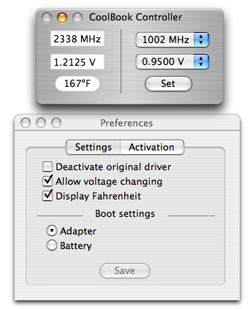
Summary: Hot on the heels of my story yesterday about undervolting your Core Duo CPU to save on battery and heat comes a nifty piece of shareware. CoolBook is a GUI to control CPU clock speed and voltage. It's like the author was reading my mind!
Hot on the heels of my story yesterday about undervolting your Core Duo CPU to save on battery and heat comes a nifty piece of shareware. CoolBook is a GUI to control CPU clock speed and voltage. It's like the author was reading my mind!
CoolBook is a $10 shareware application for the MacBook and MBP that allows you to adjust the frequency (clock speed) and voltage of Intel Core Duo and Core 2 Duo CPUs.
According to the author's published benchmarks his MacBook (1.83GHz) temperature decreased by as much as 14°C (25.2°F) just by dropping the voltage from 1.2125 V (Apple default) to 0.95 V (the minimum).
Other programs I've convered here before allow you manually control the MacBook and MBP's fan speed which can greatly reduce operating temperatures.
In my experience Core 2 Duo MacBook Pros can run as much as 40°F cooler than Core Duo machines. I don't consider these voltage/frequency/fan tweaking applications necessary on newer C2D machines, but they're practically required for Core Duos. Especially if you want to use your machine on your lap.
As I mentioned yesterday, there is almost no downside to lowering processor voltage other than constant crashing. If your MacBook starts getting crashy, it's easy enough to crank the voltage back up a tad until it's stable again.
Although I still hope that Apple will include fan and temperature threshold control in a future version of the OS, you can rest assured that they'll never allow us to adjust the voltage. But that's what shareware developers are for.
Kick off your day with ZDNet's daily email newsletter. It's the freshest tech news and opinion, served hot. Get it.
Talkback
Cool Math
"temperature decreased by as much as 14?C (57.2?F)"
A 14?C temperature change is 25.2?F, not 57.2.
RE: Cool Math
14?C is indeed 57.2?F. Confirmed via Dashboard converter, the National Weather Service's webpage (for Buffalo, NY) and Wikipedia (?F = (?C ? 1.8) + 32)
bad math (was cool math)
poor state of science education in the United States. If something
cools by 14 ?C, that is a [i]change[/i] in temperature, not an
absolute reading. Since 1 ?C is 1.8 ?F, that means that the
reduction in temperature is 1.8*14 or 25.2 ?F.
Math updated
- Jason
bad idea
This is why this even works at all. But it is a very bad idea. Why do
you want to risk crashes to get a few degrees cooler? Very bad
idea.
True if...
Describe the Badness of voltage adjustment, please.
does happen when this voltage is dropped? Why is it such a bad
idea?
Thanks,
Curious Programmer
It is actually only positive effects of this.
Silicon degradiation is slower with lower energy.
Your cpu fan will get a longer life.
The battery aging slows with lower temperatures.
So undervolting is actually only good for your computer.
until it crashes intermittently
were done worst case at a certain frequency closer and closer to
failing. And worse - they could fail intermittently.
This is a **very bad** idea. Go with the way the engineers
designed it.
iqnqflr 53 nfs