IE9 FAQ: how to install, uninstall, and tweak the IE9 RC

Update: Now that Microsoft has released the final version of IE9, this FAQ is out of date. Please see the expanded and updated IE9 FAQ: How to install, uninstall and tweak the final release of IE9
This morning, Microsoft officially made the long-awaited Release Candidate build of Internet Explorer 9 available to the general public. As usual, my inbox is overflowing with questions. Here are the answers.
How is the Release Candidate different from the beta?
I’ve published a write-up that covers the important differences: IE9 Release Candidate review: will Microsoft's big browser bet pay off? For an overview of the differences between IE8 and IE9, see my earlier review of the IE9 beta: Internet Explorer 9 beta review: Microsoft reinvents the browser . Microsoft has an official document listing new features in the RC, which is available in both PDF and XPS formats here .
Will there be additional changes in the final release?
In terms of features or the user interface, no. What you see in the RC is what you will get in the final release. As for when it’s ready, Microsoft isn’t talking, but the smart money says it will be on or around the MIX conference in April.
I’m running Windows XP. Can I install IE9?
No. XP is officially out of the mainstream support phase and is not eligible for updates like this. Plus, many of its features are specifically tied to Windows features found only in later versions.
Where can I download the release candidate code?
Direct download links are here: http://www.beautyoftheweb.com/#/download
You’ll find separate versions for 32-bit (x86) and 64-bit (x64) Windows.
Should I install the x86 or x64 versions?
You should choose the installer that matches your version of Windows. The setup program installs a 32-bit version of IE9 and makes that the default choice when you launch IE. If you’re running 64-bit Windows, use the 64-bit installer. It installs the 32-bit IE code and also installs the 64-bit version. Even on 64-bit Windows, IE makes the 32-bit version of IE the default. For most users, that’s the correct configuration. The 32-bit browser is preferable, primarily because most add-ins aren’t available in 64-bit versions yet.
Can I install over the IE9 beta?
Yes, that is a fully supported installation scenario. You don’t have to uninstall the beta. If you were running any interim builds, however, I strongly recommend uninstalling those builds first.
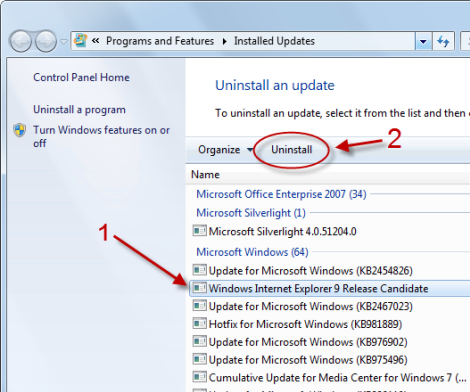
How do I uninstall IE9? It’s not in the list of installed programs.
That’s because it’s considered an update to Windows, not a program. To find the uninstall link, open Control Panel, got to Programs and Features, and click View Installed Updates. (You can also type Installed Updates in the Start menu search box to find a direct link.) Scroll down to the Microsoft Windows section, select the Windows Internet Explorer 9 Release Candidate link, and click Uninstall.
Can IE9 coexist on a PC with earlier versions of IE?
No, unless you use virtualization software to run the other IE version in a separate virtual machine.
Page 2: Tweaks and customizations-->
<-- Previous page
How do I make the status bar, Favorites bar, and Command bar visible?
If that layout is a little too refined for you, you can restore the missing UI pieces. Right-click the empty space to the right of the New Tab button and select any of the standard toolbars or third-party toolbars you might have installed.
As an alternative, tap Alt to display the old-style menus, and then choose View Toolbars.
How do I turn on In-Private Filtering?
Click Tools, Safety, Tracking Protection. Click to select Your Personalized List, and then click Enable. By default, all entries are blocked. To be more selective, click Settings to open the list, click Choose Content To Block Or Allow, and then choose Block or Allow for each entry on the list.
Are there any Tracking Protection lists available from third parties?
According to Microsoft, Abine , TRUSTe , PrivacyChoice , and AdBlock Plus have committed to developing TPLs. I’ll take a closer look at these solutions when they appear.
Update: a reader points to a new Tracking Protection Lists page at Microsoft, where you can install and configure a selection of TPLs - four of them, currently.
What happened to Quick View?
Quick View is the feature that allows you to see thumbnails of all open tabs in the main browser window. It was enabled by default in IE8 and is turned off in IE9. To re-enable, click Tools (the gear icon in upper right corner), Internet Options. On the General tab, under the Tabs heading, click Settings. Select the check box shown here:
Restart your browser and you can switch to Quick Tabs view by pressing Ctrl+Q.
What happened to the RSS icon?
It’s available only on the Command bar, which must be visible for you to see and add RSS feeds for a web page.
Seriously, no spell checker?
Seriously.