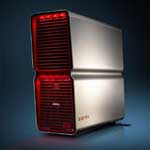
Dell XPS 700 vs. DIY PC

Summary: Here I look at how much would it cost me to build a system that’s functionally similar to the XPS 700.
Yesterday Dell officially announced their next-generation XPS gaming systems. Of particular interest to me was the desktop model – the XPS 700. On paper the system looks good (although it’s hard to fully peg it down because some of the details about the system are vague), however, as someone who prefers to build PCs rather than buy them ready-assembled, the price struck me as being high. Very high.
This got me wondering. How much would it cost me to build a system that’s functionally similar to the XPS 700? Or, putting the question another way, how much extra is Dell charging the consumer for the XPS 700?
I decided to find out.
Before I go any further, a few caveats.
- Dell is somewhat vague about the specification of the XPS 700 on their website (odd for such an expensive PC – I would have expected a much more detailed spec). Because of this I’ve had to make a few guesses as to which parts to choose.
- Everything I list for my PC is straight out of the Newegg online catalog. I’ve done this for convenience - I have no affiliation with Newegg and encourage you to look for good deals from your own favorite vendor.
OK, first off I went to the Dell Online Store and put together a sample system. Here’s a summary of the Dell spec:
- Pentium 965 Extreme Edition Dual Core (3.73GHz, 4MB cache)
- 4GB dual channel DDR2 667MHz
- Windows XP Professional
- 250GB SATA 3Gb/s hard drive (7,200RPM)
- Dual optical drives:
- 16x DVD-ROM drive
- 16x DVD+/-RW dual layer - NVIDIA Gen 7 series graphics, 2 dual-GPU cards, Quad SLI-enabled (this is a very vague description by Dell)
- Sound Blaster X-Fi XtremeMusic 5.1 sound card
- 10W speakers
- 20 inch flat panel
That’s the system. Total price of that system from Dell came to $4,841.
OK, now what could I come up with that I can build for myself? Here are the parts I chose (all prices rounded up nearest $):
- Intel Pentium Extreme Edition 965 1066MHz FSB LGA 775 Processor (link) $1,043
- Microsoft Windows XP Professional With SP2 OEM (link) $153
- ASUS P5N32-SLI Deluxe Socket T (LGA 775) NVIDIA nForce4 SLI ATX Intel Motherboard (link) $199
- OCZ Gold Series 4 x 1GB 240-Pin DDR2 SDRAM Unbuffered DDR2 667 (link) $420 [Updated: June 4, 2006 @ 11:46 pm]
- NVIDIA Geforce 7900GTX 512MB GDDR3 PCI Express x16 (link) $574
- Western Digital Caviar SE WD2500JS 250GB 7200 RPM SATA 3.0Gb/s (link) $85
- SONY Black IDE DVD-ROM (link) $20
- SONY 16X DVD±R DVD Burner (link) $37
- Acer F-20 Black-Red 20" 8ms Widescreen LCD Monitor (link) $450
- Creative Sound Blaster X-Fi Elite 7.1 Channels PCI (link) $385
- Athena Power AP-P4ATX85FE ATX12V & EPS12V 850W Power Supply (link) $290
Total price for this system comes to roughly $3,656. That’s a shade under $1,200 less than the Dell system. This system does still need a case and of course you would need the know-how to assemble it, but the upside is that you end up with a custom system. By choosing the parts yourself you can also take advantage of the deals that you find, saving you even more money.
On the subject of the case, there’s another reason I don’t like the XPS; while the XPS 700 case might look good, it’s unproven when it comes to dealing with the kind of heat a gaming PC can generate. If I were building a system with the parts listed above I’d put them into a Thermaltake case, maybe the Armor full-size chassis, which has excellent cooling abilities and even has space for a liquid-cooling system.
If I were serious about building this kind of gaming rig, there are a few changes that I’d make (such as ditching the Intel CPU and going for an AMD Athlon 64 X2 instead, as well as fitting a liquid cooling system), but the price would still come in at about $800 cheaper than the equivalent offering from Dell. You also get to choose everything that you put into your rig, and you have all the drivers and documentation – something I’ve found to be priceless over the years. I have to admit that the vague specification on Dell’s website bothers me. Getting to the point where I could hand over nearly $5,000 to Dell without knowing what motherboard and graphics card I’m getting feels … strange. I guess Dell is aiming the XPS range at people who want choices, but not too much information. While the XPS 700 case might look good, it’s unproven when it comes to dealing with the kind of heat a gaming PC can generate
All that said, I’m aware that not everyone is up to building their own PC. People don’t like the uncertainty, the choices, or they fear ending up with a box full of expensive parts that won’t fit together. But I’m also aware that many people in the market for a high-power gaming rig do indeed possess the skills needed to assemble their own systems. If you are such a person, then you could save a lot of money by going down the DIY route as well as ending up with the system that’s right for you.
Kick off your day with ZDNet's daily email newsletter. It's the freshest tech news and opinion, served hot. Get it.
Talkback
You're wrong. You're not reading all the XPS 700 tech specs.
In general, the sample custom system you built on Newegg.com has outdated parts compared to the XPS 700 you set up. Naturally, the DIY custom system with the parts chosen on Newegg.com would be almost the same price as the sample XPS 700 setup you chose, if it had the same type of parts which Dell offers (the ones I already mentioned).
One more thing you missed entirely is the fact that Dell offers two XPS 700 bare bones kit options that include the case, Pentium D 930 processor (default option), power supply (750 watt or 1 kilowatt), nForce 590 motherboard, 512 MB of memory, and operating system software. The cheaper bare bones kit goes for $1120. Not a bad deal in my opinion, since the mother board isn't released yet for retail.
Next time you should research all the facts before offering your opinion. For now, Dell is offering technology that is hard to come by, but I'm sure that will change by the end of 2006.
When Quad SLI ready and Conroe ready motherboards are out on Newegg.com, Tigerdirect.com or any other website selling computer parts... then you can say that your DIY custom computer is cheaper and just as good as an XPS 700. At the moment, the sample XPS 700 setup you picked is the clear winner compared to the DIY computer with outdated parts from Newegg (specifically, the motherboard you picked).
Picking up on a number of points
- The Conroe board is a major plus - I'll have more to say on that later!
- There is 4GB of RAM in the system I built
- 1KW PSU would not be needed in the system I built, so I didn't add it (no point wasting power)
- SLI - I'm so not sold on that technology yet. I'll have more to say on that later
- The kits aren't a bad deal just yet, but wait a while and the price will drop. I'd pay that now for Conroe support but otherwise I'd take the AMD route
- Let's just say that cooling might also be an issue
- It's hard to claim that the XPS 700 is a better system, I'd leave that to benchmarking. An overclocked AMD system would likely thrash it
System RAM NOT 4GB!
As for your not being sold on SLI, try gaming with and without it (or CrossFire, for that matter) and I think you'll see why dual graphics cards setups have become so popular, especially for games like Oblivion, F.E.A.R. and Half-Life 2.
Didn't click link, either
I guess I'm not alone
4 x 1GB RAM
Sorry about the little mistakes, but you're missing my point...
Heh, I assumed you chose a 1 GB stick of RAM that was $420. I didn't even click on the link. Sorry about that.
All I'm trying to point out is that you're comparing a HIGH-END 4 GPU Conroe ready system that is using new mother board technology to an above average DIY system with only one GPU. You couldn't even find a somewhat equivalent mother board or somewhat equivalent pair of dual graphics cards on Newegg.com.
There are a number Conroe benchmark web articles that might prove you wrong about an over clocked AMD thrashing it. Keep in mind that a non-overclocked Core 2 E6700 still theoretically beat a top of the line overclocked AMD FX-60 processor.
(Read this part please----->)You're talking about saving a lot of cash, but all you're really doing is picking on Dell. When you built the sample XPS 700 on Dell's website YOU PICKED SOME OF THE MOST EXPENSIVE HIGH-END COMPONENTS AVAILABLE for your sample XPS 700 system (a Quad-SLI system that can use a Conroe processor for crying out loud), and then you compared it to a DIY system that you made up with less expensive yet LOWER-END PARTS.
(Read this part too ----->) One, last very important detail that you still failed to even acknowledge is that you can customize a Dell system to almost have whatever you want on it. More so since Dell offers a [u]CONROE READY[/u] XPS 700 bare bones kit for $1120.
At least give credit where credit is due. Dell is trying to offer something that can handle a new microarchitecture.
The Conroe kits do sound good
Excluding Conroe, you could build (or buy) an AMD system that could beat this system and save a lot of cash in the process. Add Conroe to the equation though and an AMD-based system then starts to look slow.
I think you might be missing my point too ...
Again though, I will give credit where it's due and say that the Dell kit is an easy way to get Conroe-ready kit - for now at least, soon retain gear will be available and that will even the playing field.
Fine... you have also made a point. :-)
You are also correct too. In only a few months, mother board companies will be releasing all sorts of boards that are Conroe ready. I'm sure that the prices will be far better than what Dell is asking for. Within a few months, DIY systems will be back on top again without a doubt.
In general, the end of 2006 and all of 2007 will be a time for everyone to be excited about what Intel and AMD has to offer.
I can't wait to see some actual benchmarks of people's systems built with the final versions of Intel Core 2 and AMD's answer to Core 2.
Anothr point!
Conroe Ready?
Apples to Apples
For starters, I priced out the same Dell system, but without a monitor. The monitor isn't really part of the system and to be fair--why price out two different monitors?. Besides, the Acer you listed is more expensive than the same Dell monitor. Grand total: $4,359.
Now, pricing out the components for a similar system:
Intel Pentium Extreme Edition 965 1066MHz FSB LGA 775 Processor $1,043
Microsoft Windows XP Professional With SP2 OEM $153
ASUS P5N32-SLI Deluxe Socket T (LGA 775) NVIDIA nForce4 SLI ATX Intel Motherboard $199
OCZ Gold Series 4 x 1GB 240-Pin DDR2 SDRAM Unbuffered DDR2 667 $420
2 NVIDIA 7950GX2 1GB GDDR3 PCI Express x16 Dual GPU Video Card - $1160
Western Digital Caviar SE WD2500JS 250GB 7200 RPM SATA 3.0Gb/s $85
SONY Black IDE DVD-ROM $20
SONY 16X DVD?R DVD Burner $37
Creative Sound Blaster X-Fi XtremeMusic 7.1 Channels PCI Interface Sound Card - $122
COOLER MASTER Praetorian 730 RC-730-KSN1 Black Aluminum ATX Mid Tower Computer Case $150
PC Power & Cooling Turbo-Cool 1KW-Quad SLI T1KW-4E EPS12V 1000Watts Power Supply $500
Total cost: $3889
This does not include various odds and ends you'll probably have to pick up along the way, nor does it take in to account warranty or labor or forward compatiblity of the mother board.
Overall the difference in price is closer to $500, which IMO is not a great price to pay to 1) have someone to put it together and 2) have someone to blame when things go wrong.
Just my two cents.
More info.
The XPS 700 case is just one of the damn coolest looking cases ever. I'm likely to buy the barebones system and gut it so that I can put my own stuff inside. Just sell the old RAM & proc and buy something better, and when BTX motherboards for AMD come out later, ditch the Intel board and switch (if necessary). The case is the best part. Either that or I'll buy an Antec P180. I'd much rather have the XPS 700 case, though. ;)
Dell has already mentioned that the XPS 700 case is fully compatible with their BTX form factor, which means that as long as AMD moboard manufacturers follow that spec, we'll be able to swap to whatever we wish in the future and keep that bada$$ case.
hmm
Don't forget
I've been drooling...
I've owned a Dell Dimension 8100 1.5GHz since March 2001. It was close to the top back then but these days I don't think it would even be considered an entry level system. The 8100 has served me well but it's showing it's age and I felt that it's time to upgrade. :-)
Ths system I configured and ordered was probably more than I needed but was a system I wanted. I pretty much packed it to the max.
The stats:
* Pentium? 965 Extreme Edition w/ Dual Core Tech (3.73GHz, 4MB Cache)
* 4GB Dual Channel DDR2 SDRAM at 667MHz - 4 DIMMs
* Dual 1GB NVIDIA GeForce 7950 GX2 Dual-GPU Graphics Cards, Quad SLI
* 2 x 500GB Serial ATA 3Gb/s Hard Drive (7200RPM) w/DataBurst Cache?
* Dual Drives: 48x Combo + 16x DVD+/-RW w/ dbl layer write capable
* Sound Blaster? X-Fi? XtremeMusic (D), w/Dolby? Digital 5.1
* LOGITECH Z-5450 Digital 5.1 Speaker with Wireless Rear Speakers
* AGEIA? PhysX? physics accelerator
A few other odds and ends were thrown in like a UPS, MS Office etc.
Total cost was over $5k! (don't let my wife find out)