Five core criticisms of Windows 8

Naturally, as a technology columnist, a brand new operating system to play with causes involuntary symptoms not limited to: excitement, anticipation, a sudden urge to write, combined with sweaty palms and jittery extremities.
But with every high, one must come back down again. And the 'down' hit me hard.
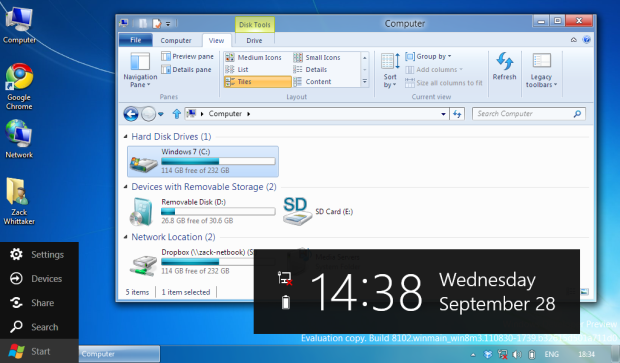
In short, what we have is a benchmark for what we will see in the final version of the next-generation Windows operating system.
"But they could take bits out!". No, I'm afraid Microsoft can't. If they did, they would be breaking a promise they haven't already given. Logically speaking, Windows 8 cannot contain any less than what it has in the public developer preview.
Gallery To see the screenshot gallery documenting how to install and get started with the Windows Developer Preview, along with some of the best features so far, head this way.
Jump ahead to find the new Blue Screen of Death, also roaming cloud profiles and the new 'Start menu'. You can search, see new notifications and see your new Control Panel. See what happens when you switch from Start to desktop, and see where Microsoft is pinching ideas from Apple.
Though I am fully aware the publicly available Windows Developer Preview is exactly that -- a preview merely for developers to test the basic elements of the platform and user interface -- there is already a great deal set in stone where by a vast number of users will hold back from upgrading.
1. Death of the Start menu
The Start menu is gone. I can't put it any simpler than that; it simply is not there any more.
For over fifteen years, the little pop-up menu in the bottom-left of the screen has been transformed into a screen filled with tiles, replacing the home of services and applications in favour of Microsoft's new Metro user interface.
As discussed only last week, users do not like change. Windows Developer Preview already takes time to get used to, even in light of a simpler, step-by-step installation to get users off the ground. But those users may be shocked to discover a new home for their applications, even if they are a swipe to the left instead of clicking on a solid point where the Start menu used to be
Office 2010 performs a similar function to the Start screen in the Windows Developer Preview. Just as you see the Start screen to take up your entire desktop estate, the 'Backstage' menu in all Office 2010 applications takes over what you were working on in favour of primary focus menu options.
Getting back to your work is only a click away, just as is the case in the Windows Developer Preview. But it does not feel natural, nor will it be obvious to Windows 8 newbies.
Whether or not this was an indication of what was next, it remains to be seen.
We were slightly misled when Windows 8 was first demonstrated in June at the D9 conference in Taipei, in that we expected an ordinary desktop, but a new layout for tablets. It would be two-in-one -- a tablet operating system fit for the desktop, and vice-versa.
2. Netbooks still struggle under 'new' hardware requirements
Installed on a fully-fledged desktop PC with 8GB RAM, along with a touch-screen laptop with 2GB RAM, the one device that stutters under the weight of the new operating system is the 1GB RAM netbook.
Netbooks are limited in what they can do, sure. But there has not been an operating system, bar that of Ubuntu, developed specifically for the netbook. It is a new device in the soon-to-be post-PC world, and Windows development has missed a beat between Windows 7 two years ago, and Windows 8 in a year's time.
There is no doubt that the Windows Developer Preview runs better on a netbook than a non-Starter edition of Windows 7. But Windows 8 still boasts the clunk and the heavy weight that Windows 7 does, with some bits stripped out and a new interface plonked on top.
Windows 8 will arrive at a time when netbooks are dead. Netbook development has been slow, along with smartphone innovation in the past few months. But netbooks for now are still widely used and need to be fully accommodated as part of Microsoft's ethos in creating a next-generation operating system for every device -- not just PCs, laptops and tablets.
3. Too much, too soon: A massive learning curve for new users
One could argue that the changes between leaving Windows XP and starting with Windows Vista was enough progression to make the operating system work. Had Vista acted and behaved like Windows 7, perhaps Microsoft would have taken a different path with the upcoming Windows 8 version.
But for users, I'm worried that too much has changed for the mere neophyte, who has a massive challenge ahead to get to grips with an entirely new operating system; visually out-of-this-world compared to past versions.
Users will want to see a familiar desktop, rather than tiles on a Start screen. Stuck between emulating a similar feel to Windows Media Center and that of Windows Phone 7, it is as though Microsoft presumes we have all used the mobile operating system first.
I knew that I would be facing a Start screen at some point -- but only on a tablet. Whether this boils down to my naivety or poor communication on Microsoft's part, I cannot say.
For tablets, however, users will reap the benefits from the new Start screen. But as the very vast majority of Windows 8 users will still be PC and laptop users -- never mind the netbooks for now -- one has to question whether Microsoft has its head screwed on the right way.
4. Cloud-based profiles: What data, and where will it be stored?
This is something that could restrict sales of the operating system in Europe if Microsoft is not forthcoming about its data protection and sharing practices.
For those who log in to Windows using a Windows Live ID, or 'native' cloud support without the aid of Windows Live additional software, it carries certain data like settings, desktop wallpaper and bookmarks into the cloud.
This is not limited to Windows 8, per se. Google Chrome also supports the synchronisation of settings and applications across browsers.
Content such as Windows settings, Metro style applications and sign-in credentials will be ported to the cloud, but there is still a giant question mark over "what data", for which Microsoft still has answers to give.
It is not clear yet exactly howmuch data is ported to the cloud, whether natively or otherwise. Though users are given the option to use a Windows Live ID to connect with the Windows 8, Microsoft is still not entirely forthcoming yet with full details of where data is stored, and whether personally identifiable data will be uploaded to the cloud with or without the user's permission.
But for now, questions loom over Windows 8's innate ability to connect to the cloud without third-party Windows Live Essentials support.
5. Windows 7 'pocketed' away: Windows 8 just adds tablet support
I am by far not the first person to notice this.
The keyboard and mouse combination is key and crucial to the traditional desktop experience. But because the Start screen is 'designed for' as opposed to simply 'optimised' for the tablet space, it seems that the keyboard and mouse have been left out to pasture.
In short, it is surprisingly tricky to navigate the Start screen without a series of keyboard shortcuts -- which, for the record, are not easy to find -- and the mouse is practically useless beyond pointing and clicking.
But the Windows Developer Preview is in effect Windows 7 on the face of it, with a few user interface changes. Users may not use the Start screen that often, only to open applications and to check updating tiled content. But for now, thankfully the desktop experience remains.
Related:
- Tech Broiler: Windows 8, Office 15: Get used to Metro, it'll be everywhere
- How does the Windows 8 'out of box' experience fair up?
- How will Windows 8 tablets fare against Amazon's Kindle Fire?
- Ed Bott: Windows 8 unveiled
- Windows 8: what you need to know to be productive now
- Microsoft: Don't blame us if Windows 8's secure boot requirement blocks Linux dual-boot
- Windows 8: Nice for tablets, but what about PCs?
- How Microsoft's Windows 8 will sync users' settings and apps