iPad 4 benchmark leaks into the wild, shows 1.4GHz processor

Apple's new iPad 4 won't start appearing in people's hands for a few days, but it seems that someone who has one already has benchmarked it using the Geekbench Browser benchmark tool.
The benchmark shows that the iPad 4 has a dual-core processor running at 1.4GHz, up from the 1.0GHz of the iPad 3. The new iPad also has 1GB of RAM, the same as the iPad 3 and iPhone 4, but twice as much as the iPad 2.
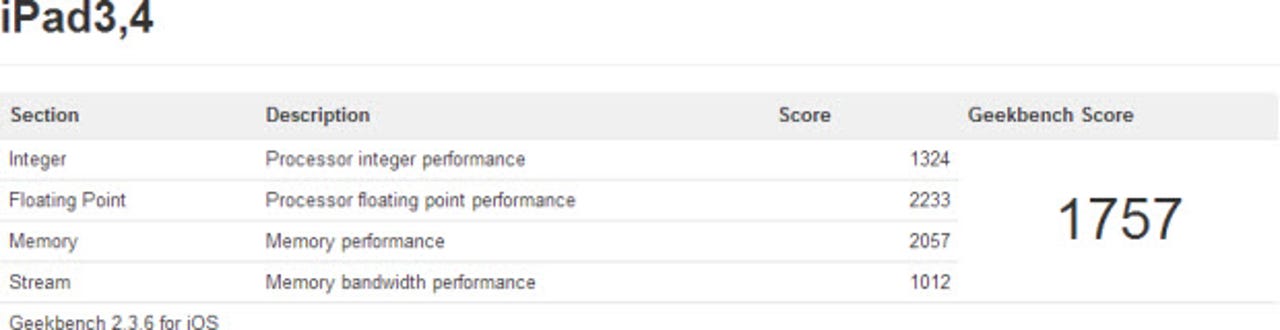
The iPad 4 achieved a Geekbench score of 1757, putting it ahead of the iPhone 5 with a score of 1571, and well ahead of the iPad 3 and iPad 2, which scored 791 and 780 respectively.
The iPad 4 is powered by the new A6X SoC (System-on-a-Chip) processor that features a dual-core CPU combined with quad-core graphics. According to Apple, it is up to twice as fast as the previous-generation A5X chip.
The performance boost indicated here should pave the way for next-gerneration apps -- from games to medical to business -- to leverage this extra horsepower.
Is this real? It seems so. Not only do the scores fall in line with what Apple told us about the A6X when the iPad 4 was unveiled, but John Poole, the founder of Primate Labs, the company that develops Geekbench, says that "there's nothing in the result that indicates it's a fake".
| The iPad mini and the new iPad 4 |
Image source: Primate Labs.