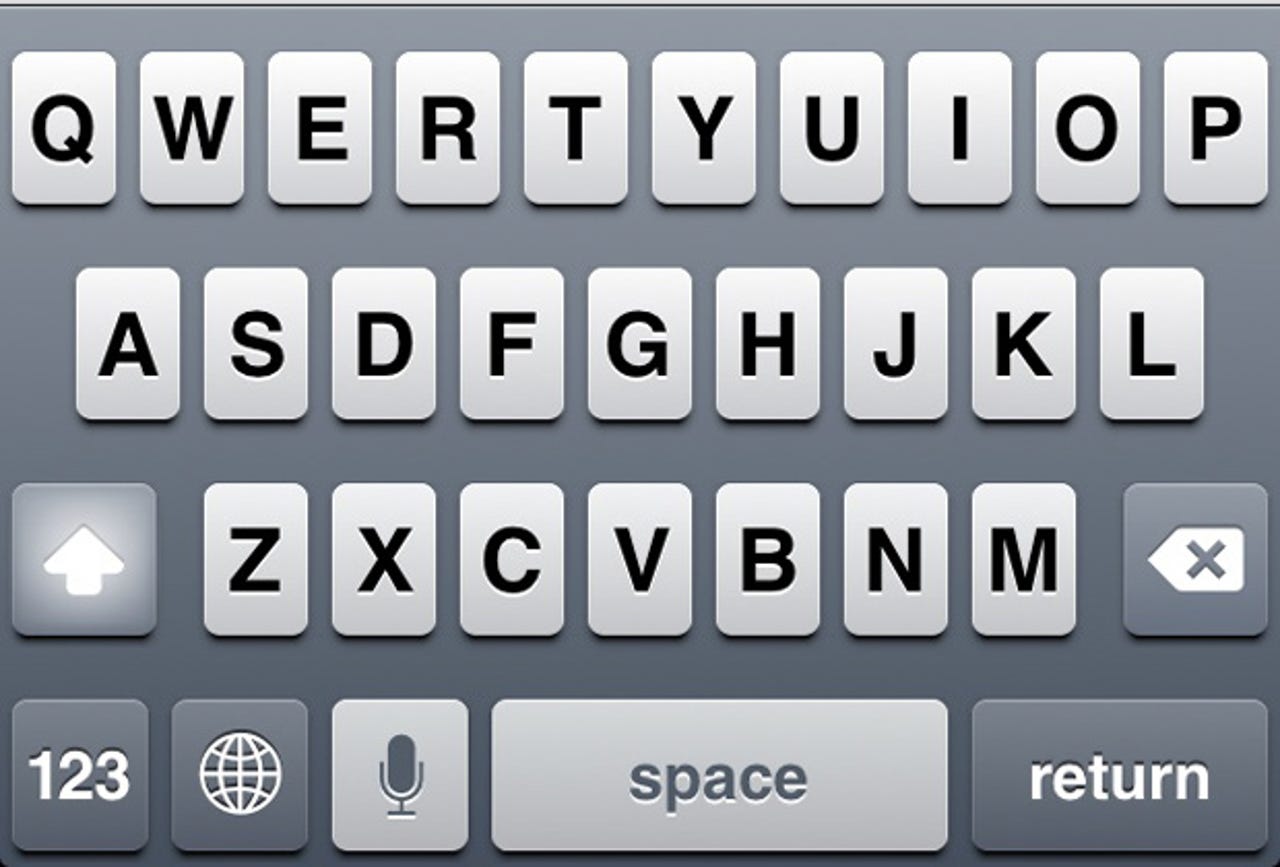
The iOS keyboard is overdue for an upgrade

Summary: Apple broke ground with the iPhone's virtual keyboard in 2007, but it appears to be stuck in time. It turns out iOS has lots of keyboard options but Apple and third-party developers have been slow to implement them.

When the iPhone was announced in 2007, people loathed the on-screen keyboard. Blackberry users panned it and even I hated it at first. Then a week went by and I loved it. Many people can type faster on a virtual keyboard then they can on a tiny chiclet keyboard, and most would agree that more screen real estate is better value proposition that a physical keyboard that takes up half the surface of a device.
The problem is that the iOS keyboard hasn't changed much since the original iPhone debuted in 2007 -- and it drives me nuts. One of the advantages of virtual keyboards is that you can change them on-the-fly in software. Or so the theory goes.
As of iOS 6.1.2 Apple only slightly modifies the keyboard in its first-party apps:
- In Mail, it replaces the spacebar with a smaller space bar and dedicated "@" and period keys when typing an email address.
- In Safari, it replaces the spacebar with period, slash and ".com" keys when you're typing into the address bar field. But at the expense of the microphone/Siri button (I guess that Apple doesn't want us dictating URLs).
Here are a couple of things that Apple needs to change in the iOS keyboard, stat:

Lower-case
iOS provides zero feedback over which case I'm typing in. The iOS keys display upper-case characters whether I'm typing in upper-case or lower-case letters. It would be trivial for iOS to display lower-case characters when typing them, yet the iOS keyboard always shows upper-case characters. The Android keyboard has displayed the proper case for as long as I can remember. (Pictured above is a lower-case iOS keyboard -- only available on jailbroken devices running the Showcase app from Cydia.)

Dedicated Number Row
Apple should add a dedicated number row across the top of the iOS keyboard. The lack of a dedicated numbers row makes it difficult to enter strong passwords in iOS because you have to switch back and forth between the text and number keyboards. This could easily be a preference in the iOS keyboard settings. (Pictured above is 5-Row Keyboard, a jailbreak tweak only available in Cydia.)
But it's not just Apple that's been lazy in implementing extra iOS keyboards, developers have been slow to offer additional keyboard choices too. Luckily, some iOS developers use the UITextField, UITextView, and UIView objects in the iOS SDK to customize their keyboards. Good examples of apps that have purpose-built keyboards include:

Google Chrome adds four dedicated punctuation keys and a ".com" button.

Byword is a writing app that includes a keyboard accessory which shows word and character counts. You can even swipe it to show quick cursor arrows and common syntax used when writing in Markdown.

IAWriter is another writing app that includes a customizable fifth keyboard row.

Wolfram Alpha for iOS turns keyboards into an art form. The $2.99 app includes a default keyboard, a math keyboard, a Greek keyboard, and a symbol keyboard, to name a few.
It's time for Apple to show its plain-jane iOS keyboard some love.
How would you change the iOS keyboard?
Kick off your day with ZDNet's daily email newsletter. It's the freshest tech news and opinion, served hot. Get it.
Talkback
You Mean Each App Must Implement Its Own Custom Keyboard?
Nope!
The input field type is specified by the app developer in the graphical layout part of xCode, or proceduraly in the code.
It takes one parameter to set the input, be it keyboard or other input control.
If the developer wants to create a custom keyboard they can. If the developer wants to add to a keyboard they can.
Wolfram Alpha adds considerably to the standard keyboard, as do other apps. I havent seen an app that creates a whole keyboard as that would rarely be necessary.
As for custom keyboards system wide - no the basic security approach makes that a bad idea. If Android does this by allowing code execution then good luck!
Re: the basic security approach makes that a bad idea.
Except...
Except of course for the shift keys, which are highlighted to provide feedback over which case you're typing in.
Exactly!
Windows keyboard
On iOS, the characters that you need all the time (ä, ö, ü, ß etc.) aren't even displayed. You have to hold the a, e, u or s key down for a second, then a list appears with the accents. This is fine if you are typing in English and only need the characters rarely, but in a foreign language, where those accents are used a lot, that is a pain. Okay, Android isn't any better at this.
But under Windows 8 and RT, those extra characters are there all the time. I can also switch layouts mid sentence and apps, like Internet Explorer, automatically change the spelling checker to match the keyboard language!
That is a huge benefit.
International Keyboards
On my iPhone, it's simply a matter of Settings -> General -> Keyboard -> Keyboards -> Add New Keyboard -> select which ever language(s) you need.
Then when you're using a keyboard, simply tapping the International icon (looks like a globe) beside the "123" key toggles you through your choices.
I have a German iPhone
On Windows, the onscreen keyboards have those extra keys, making the experience a lot better.
The keyboard isn't the only part of iOS that's not changed in the past 5
It's due an overhaul.
Apple worship
This gives Apple too much credit. There is a sort of mass-hysteria among certain commentators who seem obsessed with ignoring true history and replacing it with a fictional one in order to credit Apple with more than they deserve.
"When the iPhone was announced in 2007, people loathed the on-screen keyboard. Blackberry users panned it and even I hated it at first. Then a week went by and I loved it."
The headline says it all, however.
How does this Apple "too much credit"?
Then came Apple and rearranged the smartphone market paradigm and made it a viable and exciting market as evidenced by the success of iOS and Android, the complete revamp of Microsoft's mobile OS, and now even Blackerry's BB OS 10.
Sorry you are too blinded by your love of Microsoft to see what really happened and are attempting to rewrite history yourself.
Correction
"yet the iOS keyboard always shows upper-case characters."
Re: Maybe,because there are many middle age people, whose vision isn't as g
Are you sure?
Re: you're mistaken.
Try reading a line of text with only the top halves of the letters visible (e.g. cover the bottom half of the line with a sheet of paper). Now try reading a line with only the bottom halves of the letters visible.
You'll find you can read the text almost perfectly looking at only the top halves of the letters, not so easily from just the bottom halves. What this means is that alphabets have evolved to convey more information in the upper parts of letter shapes than their lower parts.
Now compare uppercase and lowercase letters, and you'll see that lowercase letters have more variation in their upper parts than uppercase letters do.
In other words, lowercase letters are more distinctive in the parts that are more important for distinguishing them.
In other words, lowercase letters are easier to read.
QED.
Just because YOU
Unfortunately, not QED
Secondly, "b" and "d" under your test method are indistinguishable with your test method, since the only distinguishing characteristic (which side the vertical line belongs to) is *not* distinguishable when only looking at the lower half of the letters. In contrast, the shape of the curves on the upper-case versions makes it extremely easy to distinguish between them.
As for variations between upper & lower parts of letters, the majority of lower-case letters don't *have* an upper portion. In fact, only 7 letters (b, d, f, h, k, l & t) have an upper portion -- 9 if you count the dot for 'i' and 'j', except that dot doesn't allow you to distinguish between either letter.
Not to mention, of course, that a) people don't use electronic devices with half of each letter obscured (so the test becomes rather pointless) and b) since capital letters are (by their nature) larger than lower-case letters, they are automatically easier to read (just as large-print books are easier to read than standard-print books).
Nothing to add
What does the upper/lower half of letters have to do with it?